
Last Updated: June 28, 2024
 InfiPlex Inventory & Order Management System (OMS) connects to your Amazon Today account via our Amazon SP-API App connection. This document outlines how to log into your OMS account and temporarily close a store.
Set-up Steps
Follow the steps outlined below to temporarily close one of your Amazon Today stores.
- Log into your OMS:
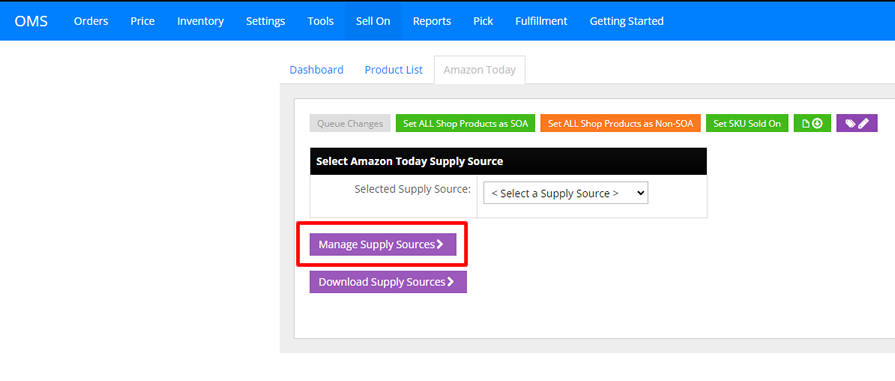
Log into your InfiPlex OMS site and navigate to the Settings > Sell On page. Click on the Amazon Today tab at the top of the page. - Select Manage Supply Sources
Click the purple "Manage Supply Sources" button to access the Amazon Today Supply Source list.
- Set Zero Inventory Active to YES:
Find the store address that you need to temporarily close, then select "Yes" in the Zero Inventory Active drop-down in the right column.
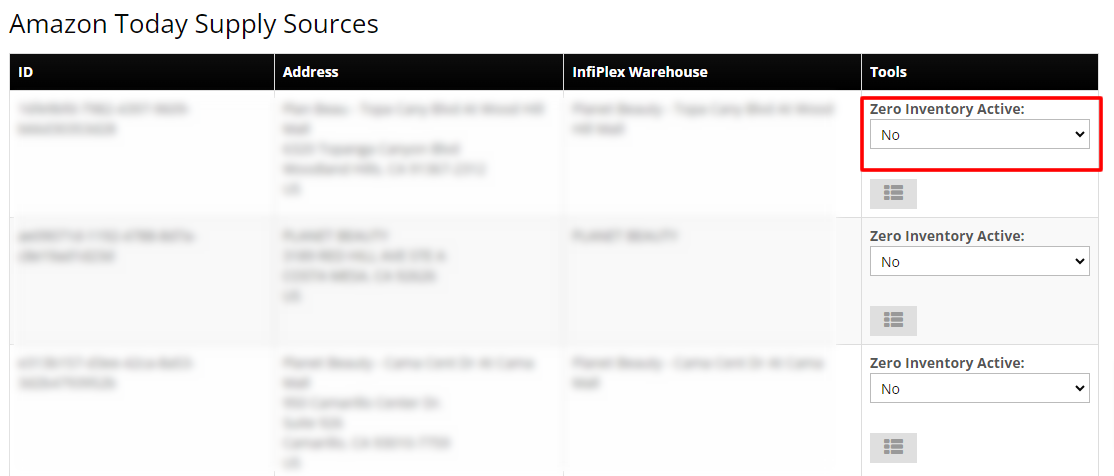
This will send a 0 inventory level for every Amazon Today SKU flagged on your account and will stop any future inventory sends until this setting is turned back to "No".
- Re-opening a Store
To re-open a store, set the Zero Inventory Active setting back to "No". This will cause all current inventory levels to be resent to Amazon Today and re-activate normal inventory updates.
- If you have any questions, please contact us.
Amazon Today and all related logos are trademarks of Amazon.com, Inc. or its affiliates.
