
Last Updated: June 28, 2023
InfiPlex Inventory & Order Management System (OMS) connects to your Amazon Today account via our Amazon SP-API App connection. This document outlines how to log into your OMS account and connect your Amazon Today account with InfiPlex to start managing orders, shipping, and inventory for your Amazon Today account.
Set-up Steps
Follow the steps outlined below to connect your Amazon Today account with InfiPlex OMS.
- Log into your OMS:
Log into your InfiPlex OMS site and navigate to the Settings > Integrations page. Click on the EDI/Retail tab at the top of the Integrations page and then click on the Amazon Today logo. - Select the Type of Amazon Seller Account
This is the type of Amazon Seller account your Amazon Today account is tied to. An Amazon Today account can be tied to a Seller Central account or a Vendor Central account. If you have both types of accounts and are not sure which one should be used, please contact your Amazon Today Team to find out.

- Click the link to connect your Amazon account:
In the amazon_pull_orders_enabled setting area, click the link to connect to Amazon.
Important:
The new window sometimes gets placed behind your existing window, so be sure look for it if you don't see it.

- Authorize the InfiPlex Selling Partner App
The authorization page will open in a new window or tab. You will need to log into your Amazon Seller account with the main administrative account to make the authorization. Check the box shown below and then click the Confirm button.
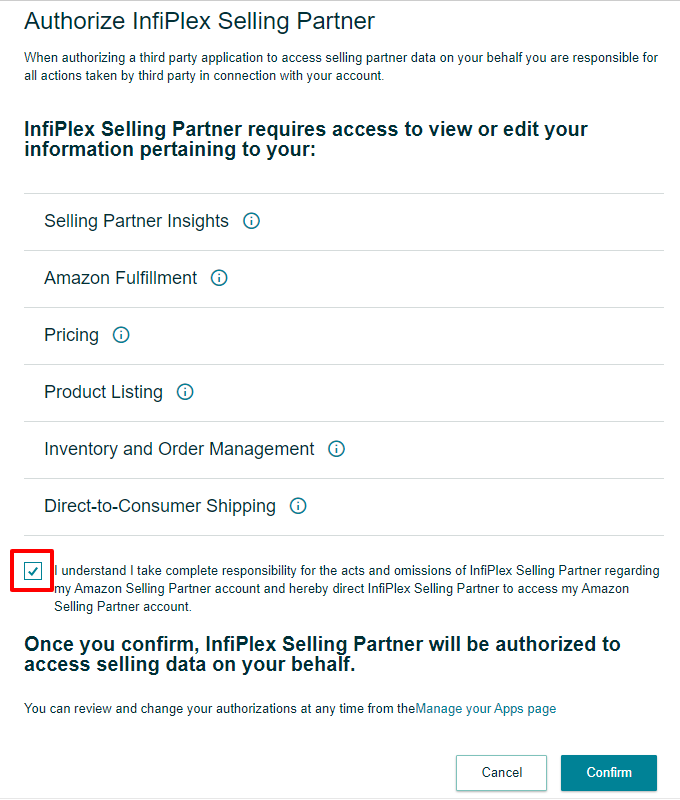
After you confirm the InfiPlex App, you can return to the settings page on your OMS that will confirm that the connection was successfully made.
- Set to Pull Orders:
Set the amazon_today_pull_orders setting to YES in order to start checking for Amazon Today orders.
- Save Your Settings:
Click the green "Save" button to save the settings.
NOTE:
InfiPlex will help finalize your Amazon Today set-up, so you do not need to fill out or set any other settings.
- If you have any questions, please contact us.
