
Last Updated: March 02, 2022
InfiPlex Inventory & Order Management System (OMS) connects to your Amazon Seller's account via the Amazon SP-API connection. This document outlines how to log into your OMS account and connect your Amazon Seller account with InfiPlex to start managing orders, shipping, and inventory.
Set-up Steps
Follow the steps outlined below to connect your Amazon Seller account with InfiPlex OMS.
- Log into your OMS:
Log into your InfiPlex OMS site and navigate to the Settings > Integrations > Amazon settings page. - Enable the SP-API
Set the amazon_sp_api_enabled setting to YES. - Click the link to connect your Amazon account:
In the amazon_pull_orders_enabled setting area, click the link to connect to Amazon.
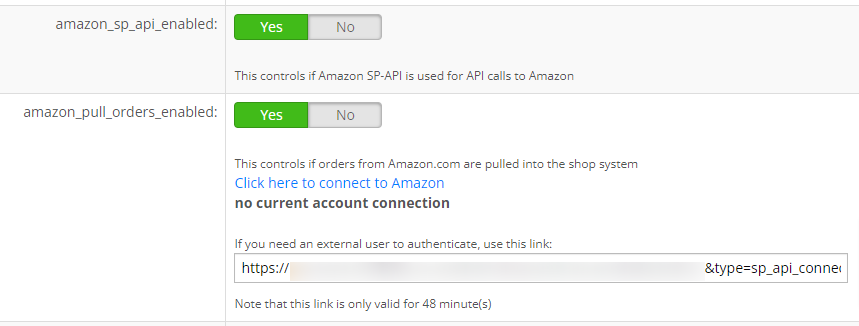
- Authorize the InfiPlex Selling Partner App
The authorization page will open in a new window or tab. You will need to log into your Amazon Seller account with the main administrative account to make the authorization. Check the box shown below and then click the Confirm button.
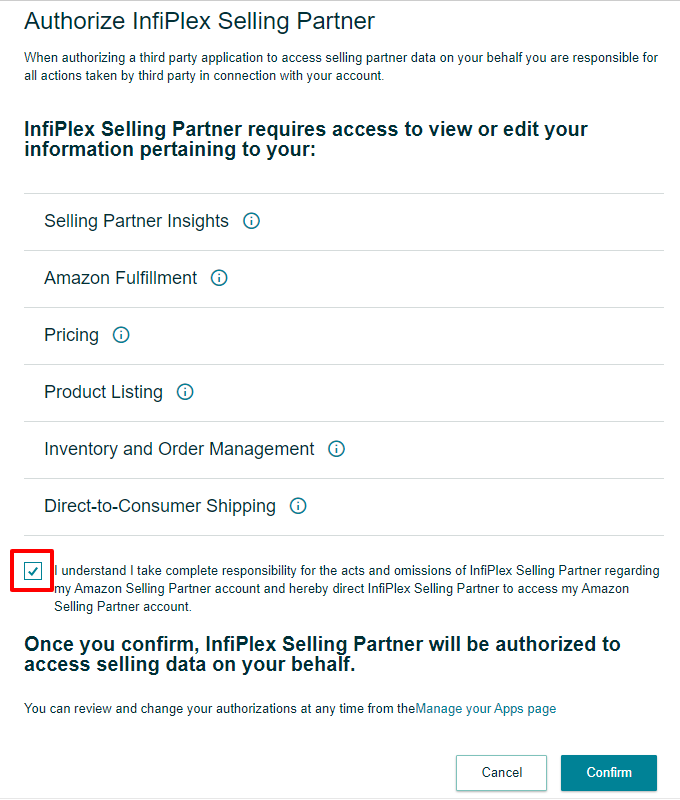
After you confirm the InfiPlex App, you will be sent to a page on your OMS that will confirm that the connection has successfully made.
- If you have any questions, please contact us.
