
Last Updated: Aug 23, 2022
Learn how to use the RePricer Tool to secure the Back Market Buy Box.
The Back Market Buy Box RePricer
InfiPlex offers Back Market sellers the ability to automate the capture of the Back Market Buy Box. Easily add SKUs to the Back Market RePricer and set your regular price and your Buy Box Floor price. If you can get the Buy Box, you will get it automatically.
Access to the RePricer Tool is available for clients with the Pro Package. If you would like to have the RePricer Tool added to your InfiPlex OMS, please contact us to have it turned on.
How It Works
SKU entries entered into the RePricer will be checked every hour. The Back Market Buy Box API currently is limited to one call per hour. SKUs that are currently Online will be available for repricing. Offline SKUs are not available for repricing. SKUs are set as Offline for any of the following reasons.
Reasons SKUs are set as Offline:
- The stock level = 0
- The Price is above price_new for the item
- Your sales limit has been reached
If we do find the SKU in the hourly pull, then we will compare the API's buy box price to the Buy Box Floor price you have set. If the floor price is equal to or less than the API's buy box price, then we will set your SKU to that price. The API's price is the price that will guarantee you have the buy box. If you cannot get the buy box price, then we set the price to your regular price.
Adding a Back Market SKU to the RePricer
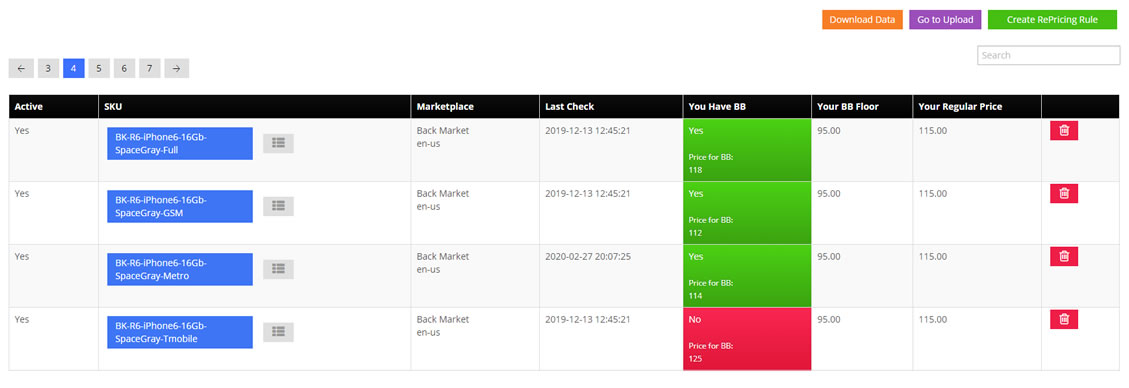
- You can access the RePricer tool from the Price menu. You must be at the Pro Package or higher to use the RePricer tool.
- Click the green Create Repricing Rule button
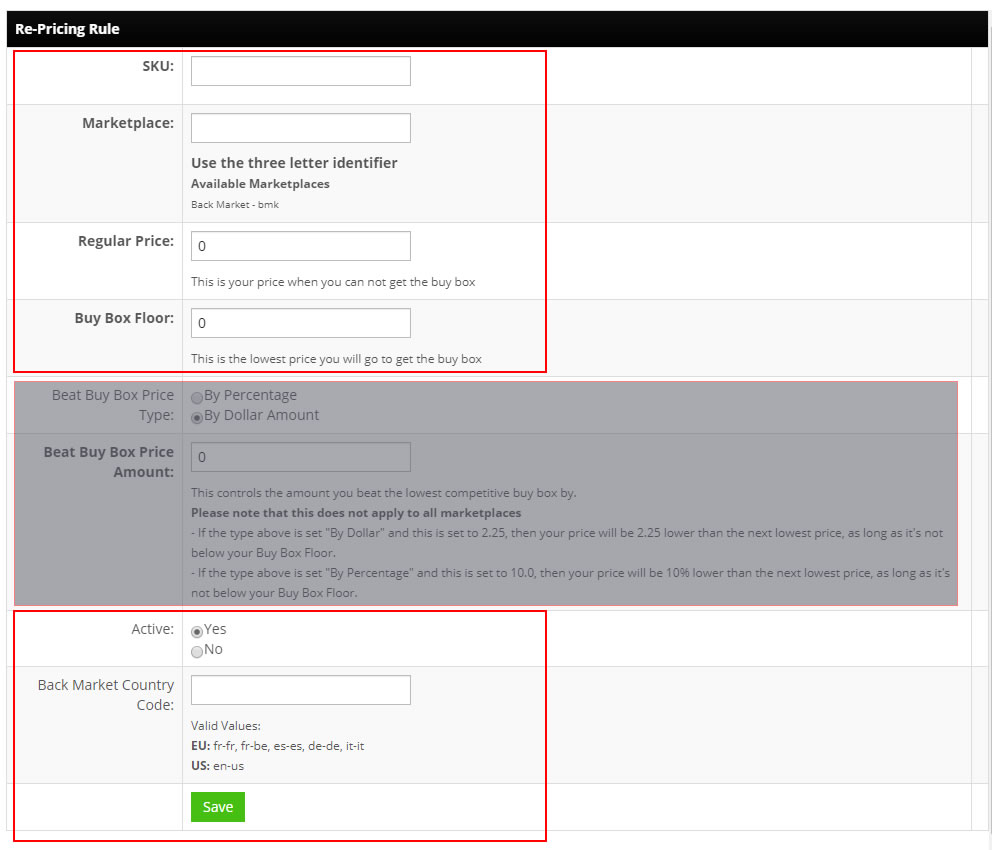
- Fill out the following fields for the Back Market Repricing rules:
- SKU: SKU must match SKU at Back Market - SKU number is tied to the product grade you have set in Back Market.
- Marketplace: enter bmk
- Regular Price: This is your price when you can not get the buy box
- Buy Box Floor: This is the lowest price you want to set to get the buy box
- Skip the Beat Buy Box Price Type and Beat Buy Box Price Amount, they do not apply to the Back Market Repricing rules
- Active: Set as Yes to start the repricer rules
- Back Market Country Code: Used to set different pricing in the EU region. If left blank, the value will default to the API Region your InfiPlex OMS Site Area is connected to. Default for EU is fr-fr. Default for US is en-us.
- Valid Values:
- US: en-us (default)
- EU: fr-fr (France - default)
fr-be (Belgium)
es-es (Spain)
de-de (Germany)
it-it (Italy)
en-gb (Great Britain / UK)
de-at (Austria)
en-ie (Ireland)
fi-fi (Finland)
nl-nl (Netherlands)
gr-gr (Greece )
- Valid Values:
- Back Market Buy Box Override: Yes / No. If this is set to yes AND you have the buy box, but your regular price is lower than the buy box price, your regular price will be used instead of the recommended buy box price
- Save: Click the green Save button to save the repricing rule
- The Back Market Rules run every hour to see if you can get the Buy Box
Back Market RePricer Upload File
The Back Market RePricer also includes the ability to use a .csv file to manage your RePricer SKUs. Start with the available example file download link available in the Upload Repricer Rules form that is available at the bottom of the RePricer page.
Fill out the file with the defaults listed below:
- sku - SKU must match SKU at Back Market - SKU number is tied to the product grade you have set in Back Market
- marketplace_ident - enter bmk to associate the entry to Back Market
- regular_price - This is your price when you can not get the buy box
- buy_box_floor This is the lowest price you want to set to get the buy box
- beat_buy_box_by_type set to 0 - this does not apply to the Back Market Repricing rules
- beat_buy_box_by set to 0 - this does not apply to the Back Market Repricing rules
- is_active set to 1 - 1 is active, 0 is not active
- back_market_country_code - Used to set different pricing in the EU region. If left blank, the value will default to the API Region your InfiPlex OMS Site Area is connected to. Default for EU is fr-fr. Default for US is en-us.
- Valid Values:
- US: en-us (default)
- EU: fr-fr (France - default)
fr-be (Belgium)
es-es (Spain)
de-de (Germany)
it-it (Italy)
en-gb (Great Britain / UK)
de-at (Austria)
en-ie (Ireland)
fi-fi (Finland)
nl-nl (Netherlands)
gr-gr (Greece )
- Valid Values:
- back_market_buy_box_override: 0 = No, 1 = Yes. If this is set to yes AND you have the buy box, but your regular price is lower than the buy box price, your regular price will be used instead of the recommended buy box price
