
Last Updated: Jan 2, 2018
This document outlines the set-up for integrating the InfiPlex OMS with your Bonanza.com Store.
InfiPlex Bonanza Quick Set-up
- Connecting to Bonanza.com requires that you have an existing seller's account. You can sign-up for one here if you are not already a Bonanza seller.
- It is highly recommended that you use the InfiPlex Bonanza App to quickly set-up your Bonanza store connection. You simply need to follow the instructions below to log into your Bonanza account and give InfiPlex OMS permissions to access your accounts Bonanza API connection.
- Connect your Bonanza Seller's Account:
- bonanza_dev_id - This is your Bonanza dev id. Leave blank to use the default Infiplex OMS Bonanza application settings.
- bonanza_cert_id - This is your Bonanza cert id. Leave blank to use the default Infiplex OMS Bonanza application settings.
- bonanza_auth_token - For the default set-up, leave blank and click the connect to Bonanza link. You will see a pop-up window that will ask you to log into your Bonanza account and confirm to give InfiPlex OMS access to your account.
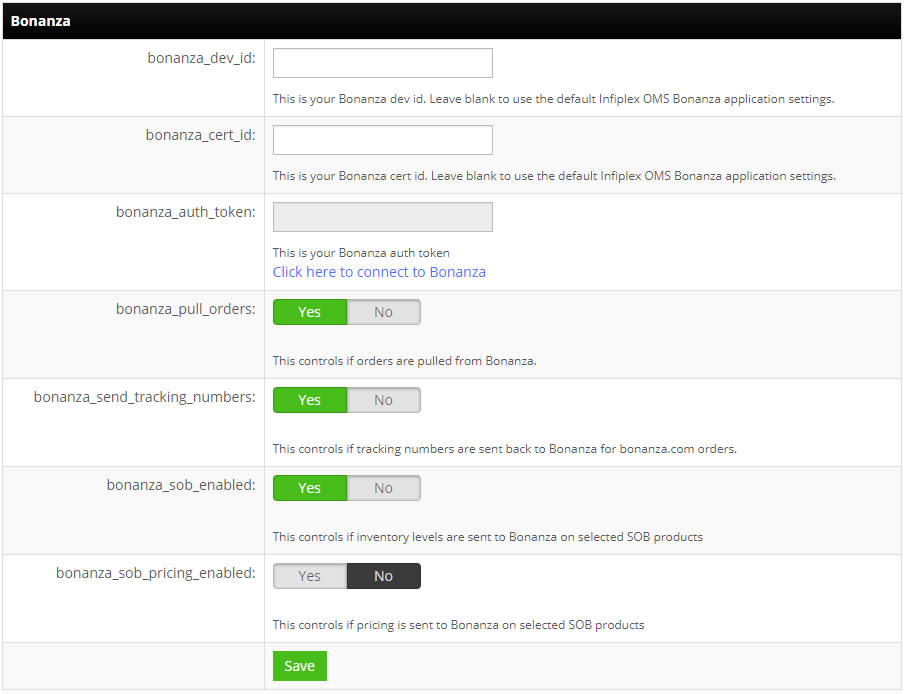
- bonanza_pull_orders - Set to YES. This controls if orders are pulled from Bonanza.
- bonanza_send_tracking_numbers - Set to YES. This controls if tracking numbers are sent back to Bonanza for bonanza.com orders.
- bonanza_sob_enabled - Set to YES. This controls if inventory levels are sent to Bonanza on selected SOB products (Sell On Bonanza).
- bonanza_sob_pricing_enabled - This controls if pricing is sent to Bonanza on selected SOB products. Default is set to NO.
- Save - Click the Save button to save the settings.
