
Last Updated: July 30, 2025
This document outlines the set up for a SKU Map. SKU Maps are typically used with Fulfillment integrations with 3PL Warehouses and Drop Shipper integrations.
SKU Map Set-up
 Part of the Drop-shipping setup requires all distributor or fulfillment integrations to have an associated SKU map. This SKU map is used to map your marketplace SKU numbers to the item numbers the distributor or warehouse requires to place drop-ship orders. This is a one-to-one map.
SKU Map Set Up Details
- Add Standard SKU Map for Distribution/Fulfillment Integrations:
Go to the Tools > SKU Map page to add a map.
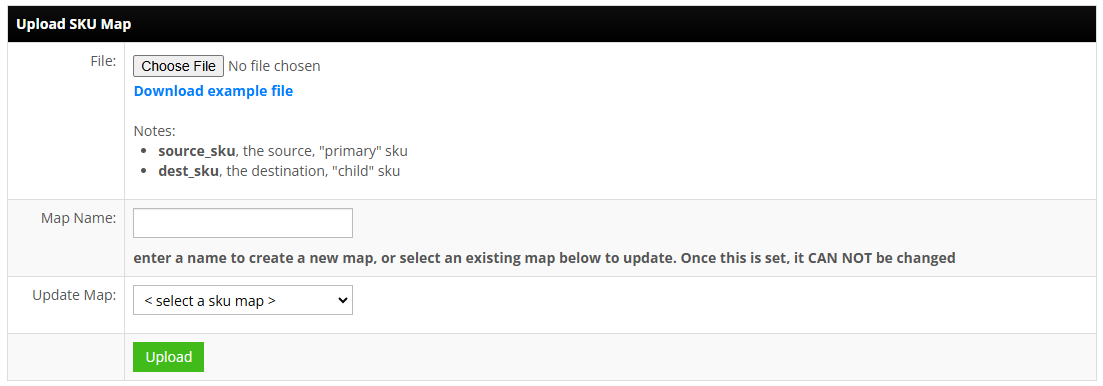
File Columns (.csv)- source_sku: the source, "primary" sku
- dest_sku: the destination, "child" sku or drop-shipper/warehouse SKU number
Map Name:
Enter a new map name, or select an existing one from the Update Map drop-down. Once you name a new map, the name cannot be changed. - Associate Fulfillment integration with SKU Map:
Go to the Fulfillment area to associate the SKU map with your distributor or fulfillment integration.For most Fulfillment integrations, a SKU coming from a marketplace order must exist in the associated SKU Map for the order to be pushed to the associated Fulfillment integration. Orders must also be associated to a warehouse that is also associated to the Fulfillment integration. The order must also be associated to a warehouse that has an associated warehouse ID for the Fulfillment integration as part of the warehouse details. Edit a warehouse to find the associated fulfillment integration warehouse ID input field.
