
The Load New Layout button on the PC-Content tab will load the PC Content window with place holder text that you may then replace with your own content. If there is already original content on the page, choosing Load New Layout will cause that content to be lost unless a version of the page was saved using the save version feature at the bottom of the page.
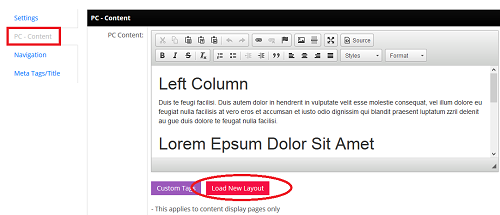
The layouts available to you are dependent on your template.
Adding New Page Layouts
Advanced users that have HTML5 skills may create new page layouts for the page layout library by using the Page Layout option of the Design tool found in the Admin Tools (wrench in upper right corner).

Give the new layout a descriptive name, paste the HTM5 code in the HTML Layout window and apply the appropriate security groups. The icon is optional. If you save the layout, apply it to a new page, then go to the user side and take a screenshot and save it to your computer, you can use that screenshot as the icon for the page and then when editing a page, the admin will have a visual representation of the layout.
