
Last Updated: Jan 19, 2022
This document outlines the process for Invoicing Rooms To Go orders received through the InfiPlex Inventory & Order Management System (OMS).
InfiPlex Rooms To Go Invoicing
 The Rooms To Go integration requires that you send EDI 810 invoice files back to Rooms To Go to finalize the order process. An Admin will be required to review the Invoicing section and create an invoice for each order.
There are 4 tabs to the Invoice form for each order. You can click through each tab to update all fields before you click the Save button.
- Base Data tab
There are 3 fields that are required on the Base Data tab:- Invoice Number:
Enter your Invoice Number from your ERP or Accounting System. - Invoice Date:
Enter the date the order shipped. - Invoice Total:
Enter the total from the order. Orders coming from Rooms To Go use Wholesale pricing, so you can copy the invoice total from the order. - Terms Net Days Due:
Enter the terms Net Days Due like 30.

- Invoice Number:
- Items tab
Confirm Quantity and Unit Cost:- Invoice Quantity:
Enter the total that was shipped on the order. - Unit Cost:
Enter the unit price from the order. The Rooms To Go orders will use the negotiated unit wholesale price.

- Invoice Quantity:
- Remit To Address tab
Select the Address:- System Address:
Select the pre-defined invoice address for you Rooms To Go. This uses our Systems Address tool that is available to the main admin via the wrench icon in the top right of the InfiPlex admin area. You need to define the address so it can be quickly chosen, or you will need to enter it manually.

- System Address:
- Rooms To Go tab
Set required fields:- TSCA Code:
The only required Rooms To Go field is the TSCA code for the order. Enter one of the codes below that best fits the item on the order. ONLY enter the 3 letter code.- CCW:
The products listed on this invoice contain composite wood subject to TSCA Title VI, 40 CFR Part 770, and all such products are TSCA Title VI-compliant - NWP:
The products listed on this invoice do not contain any wood and are not subject to TSCA Title VI, 40 CFR Part 770 - ECW:
The products listed on this invoice contain [TYPE OF MATERIAL(S)] specifically excluded from TSCA Title VI, Part 770—Formaldehyde Standards for Composite Wood Products pursuant to 40 CFR § 770.1 - CSW:
The products listed on this invoice contain only solid wood not subject to TSCA Title VI, 40 CFR Part 770 - PCW:
Some products listed on this invoice contain composite wood subject to TSCA Title VI, 40 CFR Part 770. All products containing composite wood are compliant with TSCA Title VI, 40 CFR Part 770 and are properly labelled as such
- CCW:
- RTG Carrier Identity:
Enter the shipping carrier name associated to the shipment, like UPS or FedEx. - RTG Tracking #:
Enter the tracking number associated to the shipment.
- RTG Allowance/Charge Indicator:
If you set this field, you MUST enter values for the following 2 fields below.
Code which indicates an allowance or charge for the service specified. - RTG Allowance/Charge Code:
Code identifying the service, promotion, allowance, or charge.- C310 - Discount
- D240 - Freight
- D270 - Fuel Charge
- RTG Allowance/Charge Amount:
Amount of charge.
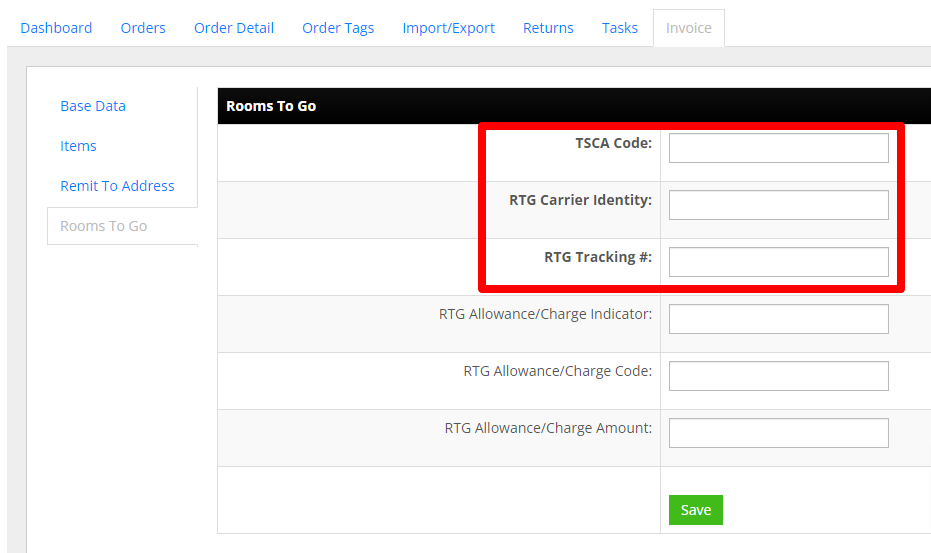
- TSCA Code:
- Save invoice
Save the invoice options on the Base Data tab:- Save As Draft:
This will allow you to come back and make edits to the invoice before it is closed and sent to Rooms To Go. Once the file is closed, you cannot make any further updates to the invoice. - Closed, ready for Sending:
This will save the invoice, Close it, and send the EDI 810 invoice file to Rooms To Go. Be sure you have entered all of the required information before you close the invoice.

- Save As Draft:
