
Last Updated: Oct 16, 2020
This article outlines the steps to connect your Sears Marketplace seller account with your InfiPlex Inventory & Order management System (OMS).
Sears.com Marketplace Set-up
Follow the steps outlined below to connect InfiPlex with your Sears Marketplace account.
- Log into your Sears Marketplace account or sign-up to be a new seller. From your account, you will need to provide the following:
- Sears email: this is the email address used to log into your Sears Marketplace account
- Seller ID: You can access this from the Account info area at the top right side of the portal. The Seller ID is displayed under the Business Name in the account drop-down menu shown below:
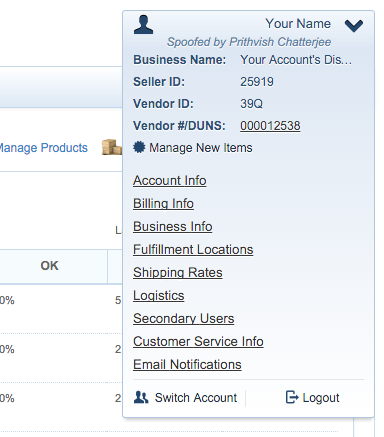
- Sears API Key: Go to your Account Info page and use the API Authorization Key to generate a new key. Please note that generating a new key will cause old keys to be in-valid.
- Log into the InfiPlex admin area
- Go to the Settings > Integrations > Sears page to add the settings
- Enter the following values in the Sears Settings form:
- sears_email: your Sears login email
- sears_seller_id: your Sears Seller ID
- sears_api_key: your API key
- sears_pull_orders: Set to Yes to start pulling new orders
- sears_send_tracking_numbers: Set to Yes to send tracking data back to Sears to finalize orders
- sears_sos_enabled: Set to Yes to send inventory updates for SKUs associated to the Sears marketplace
- sears_sos_pricing_enabled: Recommended to set to No - this turns on the pricing system to start sending pricing updates to Sears. Only turn this on if you have the pricing system set-up. Please contact support for more information.
- sears_inventory_set_to_zero: default is 0. This is the threshold value for setting inventory to zero. Example: If this is set to 5, then any item with inventory less than or equal to 5 will have its inventory set to 0.
- Click the green SAVE button
