
Last Updated: Dec 18, 2018
Shopify Store Automated Product Information Manager (PIM)
The InfiPlex Product Information Manager (PIM) makes it simple to send a new product to a connected marketplace like Amazon, Walmart, Jet and more. Manage product data from your Shopify store and publish it to all your marketplaces.
How It Works
InfiPlex makes it easy to push products to your selected marketplaces. We will work with you to set-up your Product Information Manager (PIM). Once set-up is completed with a marketplace, you will be able to push new products and product updates by simply adding a tag to your Shopify product. It's that simple.
- What You Do: Tag products you want uploaded to a marketplace. This is done by adding a tag to the product. We will define the tags for you based on your connected marketplaces, like InfiPlex-Walmart, InfiPlex-Jet, or InfiPlex-Etsy. Once a product is tagged, it will get pulled an uploaded based on the PIM Rules that InfiPlex creates for your set-up.
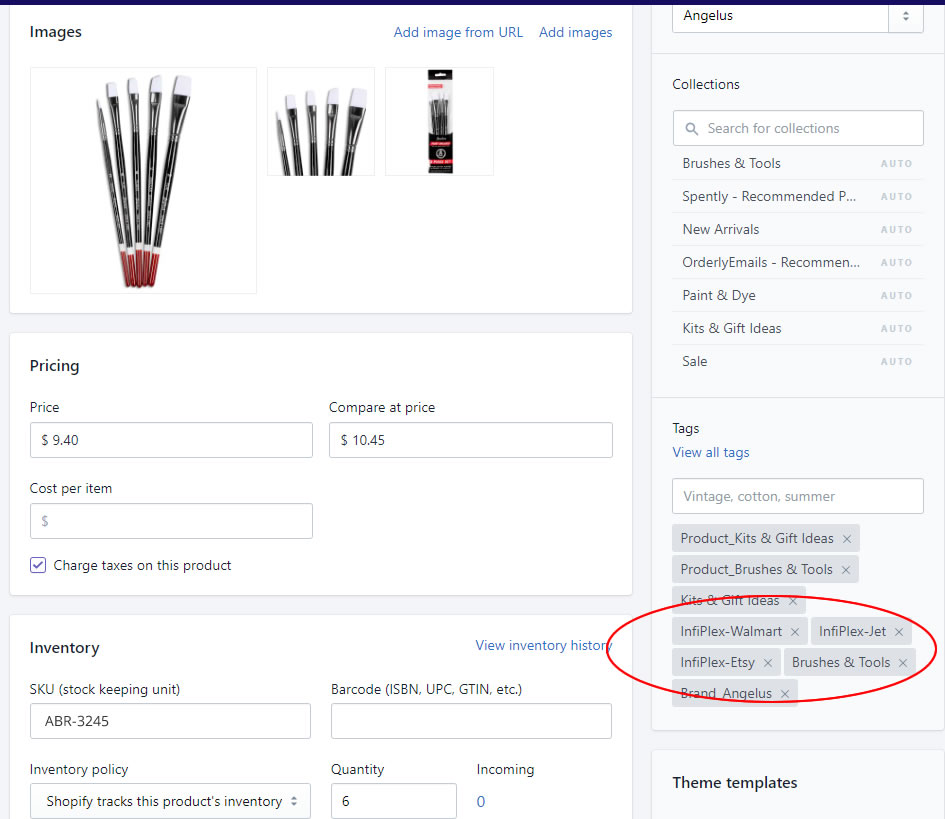
- What We Do: As part of your set-up, InfiPlex will work with you to connect to your Shopify store and set-up the necessary rules in the PIM to fully automate the upload of new products to your selected marketplaces. The set-up allows you to simply add the tag in your Shopify store as described above. The basic process is as follows:
- Connect your Shopify store: InfiPlex will work with you set-up the connection to your Shopify store. All of your product data will be pulled from your listings in your Shopify store.
- Connect your selected marketplaces: InfiPlex will work with you to connect the PIM to the marketplaces you want to push product.
- Identify your product categories: Each marketplace will require settings to map the Product Type from your Shopify Store to the correct category on the marketplace. InfiPlex will work with you to get these mappings in place.
- Set pricing rules: Pricing rules can be added to control the actual pricing sent to the marketplace.
- Set shipping rules: Shipping rules can be modified on some marketplaces based on product shipping requirements.
- Define Products for Export from Your Shopify Store: Once everything is completed, you can start adding the defined Product Tag to push your products to your connected marketplaces.
Contact us today to get started!
