
Last Updated: Jan 06, 2016
This document outlines the set-up for integrating the Stamps.com Shipping module with the InfiPlex Webstore & Order Management Systems. You will need to create an account with Stamps.com to get started.
Connect Your InfiPlex OMS with Stamps.com
- Create an account with Stamps.com
- You will need your User name and Password for the site to set-up your Live Labels settings below
- Go to Settings > Shipping > Live Labels
- Required fields for OMS & webstore integration for Live Labels:
The Live Labels settings will allow you to get actual shipping labels from Stamps.com to ship your orders. This makes it quick and easy to fully manage your orders from one administrative interface.- Fill out the top Ship information fields so the Stamps.com API has your shipping location information. This is the location you will be shipping from.
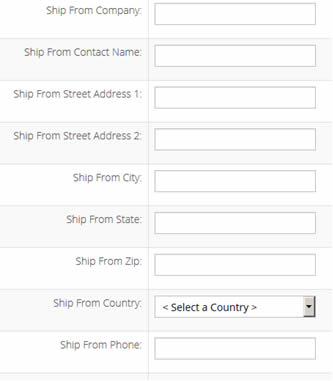
- On the same page, fill out the Stamps.com fields and make sure you have Enabled set to YES.

- Stamps.com Login: your user name
- Stamps.com Password: your password
- Click the Green Save button at the bottom of the page to save your new settings.
- Fill out the top Ship information fields so the Stamps.com API has your shipping location information. This is the location you will be shipping from.
