
Last Updated: Mar 02, 2022
Use the NEW Amazon SP-API connection:
The Amazon MWS Order API's will be discontinued by Amazon on July 31, 2022.
Please go here to learn how to connect using the new Amazon SP-API connection.
The Amazon MWS Order API's will be discontinued by Amazon on July 31, 2022.
Please go here to learn how to connect using the new Amazon SP-API connection.
The InfiPlex OMS connects to your Amazon Seller's account by using access key's generated by Amazon MWS. This document outlines how to sign-up and retreive your Amazon MWS access keys to connect the OMS.
Set-up Steps
Follow the steps outlined below to generate the appropriate keys required to connect your website to your Amazon Seller account.
- Sign Up for MWS Access:
- Go to http://developer.amazonservices.com.
- Click the Sign up for MWS button and login with your PRIMARY Amazon Seller Central account.
- On the MWS registration page, click the button for I want to give a developer access to my Amazon seller account with MWS.
- In the Developer's Name text box, type "InfiPlex". This doesn't need to be the exact name; it is merely for your reference in the future.
- In the Developer Account Number text box, enter the MWS developer account identifier - 7368-6696-6489.
- Click the Next button.
- Accept the Amazon MWS License Agreements and click the Next button.
- Copy your account identifiers (Seller ID, MWS Authorization Token, and Marketplace ID). These are required to programmatically access your Amazon seller account.

- Save your account identifiers by pasting them to a text file and saving it in a secure location.
- Install Your Developer Keys:
- To install your developer keys, map the following settings in your InfiPlex App:
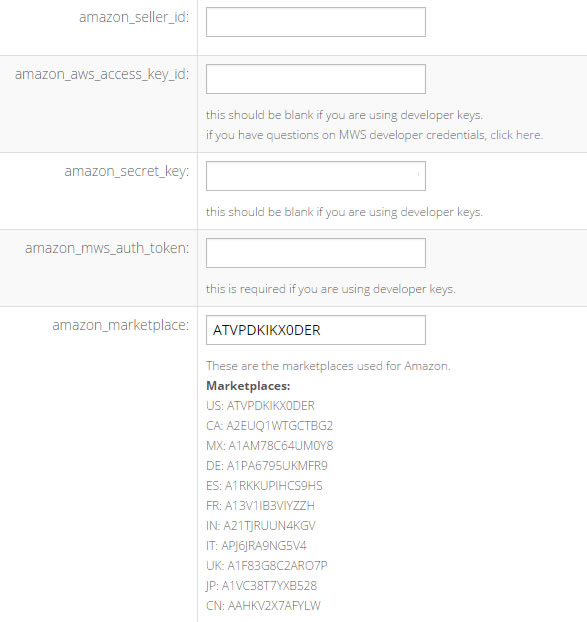
Leave the amazon_aws_access_key_id and amazon_secret_key settings blank.- amazon_seller_id > Seller ID
- amazon_mws_auth_token > MWS Auth Token
- amazon_marketplace > ATVPDKIKX0DER (Amazon.com US)
- To install your developer keys, map the following settings in your InfiPlex App:
- Connecting to Other Amazon Regions
Amazon Marketplace Web Services (Amazon MWS) has muplitple access points for getting your keys for different world regions. Be sure to get your keys from the correct location in order for your connection to work.
- Amazon Services for US, CA, MX Regions
http://developer.amazonservices.com - Amazon Services for Europe - UK, IT, FR, ES, DE Regions
https://developer.amazonservices.co.uk/ - Amazon Services for Japan - JP
https://developer.amazonservices.jp/ - Amazon Services for India - IN
https://developer.amazonservices.in/
- Amazon Services for US, CA, MX Regions
