
Last Updated: Feb 04, 2025
This document outlines the set up for drop shipping bundles.
Drop Shipping Bundle Set-up
 The InfiPlex OMS drop shipping integrations include setting up drop shipping bundles. Drop shipping bundles allow a seller to create their own set of bundled SKUs to sell on marketplaces under a single SKU number, which InfiPlex OMS then splits into the individual SKUs required for the distributor to ship.
Drop Ship Bundle Set Up Quick Overview
- Set-up / upload your marketplace SKU numbers and Bundle SKU numbers in InfiPlex. Add new SKUs to InfiPlex with an initial inventory level of 0 at all warehouses. Let a distributor or fulfillment integration then update inventory.
- Set-up Bundle SKUs to automatically calculate inventory levels based associated SKUs. This is done at a warehouse level. Reference the associated link for full set-up instructions.
- Set-up the associated SKU Map for your distributor or fulfillment integration. Go to the Tools > SKU Map page to add a map and then to to the Fulfillment area to associate the SKU map with your distributor or fulfillment integration.
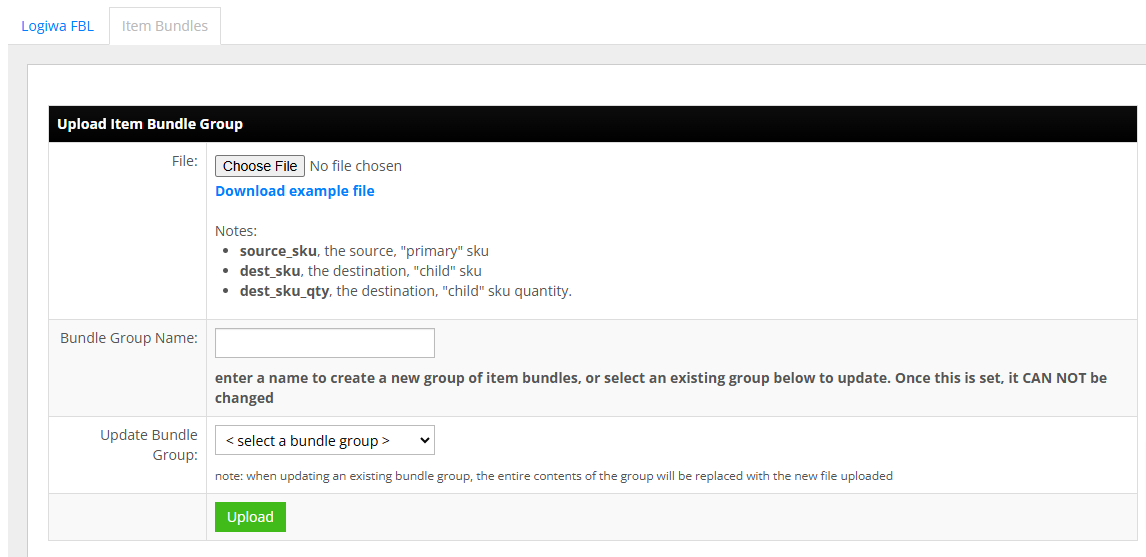
- Set-up the Bundle SKU Map for each distributor or fulfillment integration. The Bundle SKU Map tool is located on the Fulfillment > Item Bundles page. Bundles can contain multiple entries to create a bundle with multipe different SKUs.
Drop Ship Bundle Set Up Details
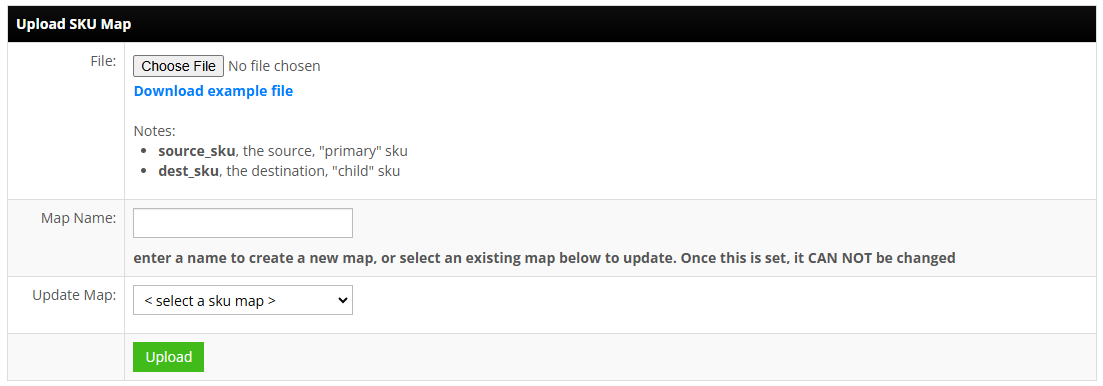
- Add Standard SKU Map for Distribution/Fulfillment Integrations:
Part of the Dropshipping setup requires all distributor or fulfillment integrations to have an associated SKU map. This SKU map is used to map your marketplace SKU numbers to the item numbers the distributor requires to place drop-ship orders. This is a one-to-one map. Go to the Tools > SKU Map page to add a map and then to to the Fulfillment area to associate the SKU map with your distributor or fulfillment integration.
- Add Bundle SKUs:
Bundle SKUs need to be added to the Bundle SKU Map. The Bundle SKU Map tool is located on the Fulfillment > Item Bundles page. Bundles can contain multiple entries to create a bundle with multipe different SKUs.
Important: Bundle SKUs should NOT be added to the Standard SKU Map, just the Bundle SKU map.
Bundle SKU Map:- source_sku: the source, "primary" sku used at the marketplace/retailer. This would be the "Bundle SKU" number.
- dest_sku: the destination, "child" sku. This is the item number used by the distributor or fulfillment integration.
- dest_sku_qty: the destination, "child" sku quantity.
- Bundle SKU Inventory Set-up:
The SKU Bundle Tool is used to dynamically update inventory levels for Bundle SKUs.- The Bundle SKU Tool will automatically update inventory levels for a Bundle SKU in InfiPlex based on the available SKU levels of the associated SKUs
- Use the settings to set your Miminum inventory level and the auto create amount
- This needs to be done at a warehouse level for each bundle SKU number
- Bundle SKU numbers and all associated SKU numbers must exist in InfiPlex before the Bundle tool will work
- Reference the link above for the full instructions on setting up a bundled SKU for automatic inventory updates
