

Amazon Vendor Central Direct Fulfillment and ShipStation Overview
InfiPlex makes it easy to manage inventory and orders for your Amazon Vendor Central Direct Fulfillment account. With our ShipStation integration, all orders are sent to ShipStation for shipping and InfiPlex is used to manage inventory levels for all your SKUs. Tracking numbers flow from ShipStation to InfiPlex and then back to Amazon Vendor Central, completing your order shipment in the Vendor Central portal.
 The process to connect your Amazon Vendor Central Direct Fulfillment account with your ShipStation account can be completed in 1 - 2 business days. Read More here for details on the set-up process.
Manage Inventory for Amazon Vendor Central Direct Fulfillment
InfiPlex makes it easy to manage inventory for your Amazon Vendor Central Direct Fulfillment account or any other marketplace you want to connect with. InfiPlex can also work with a multi-warehouse set-up if needed. InfiPlex automatically decrements SKU levels as orders are received and sends out real-time updates to all connected marketplaces. There are also several ways to manage inventory levels within InfiPlex.
- Manual Updates:
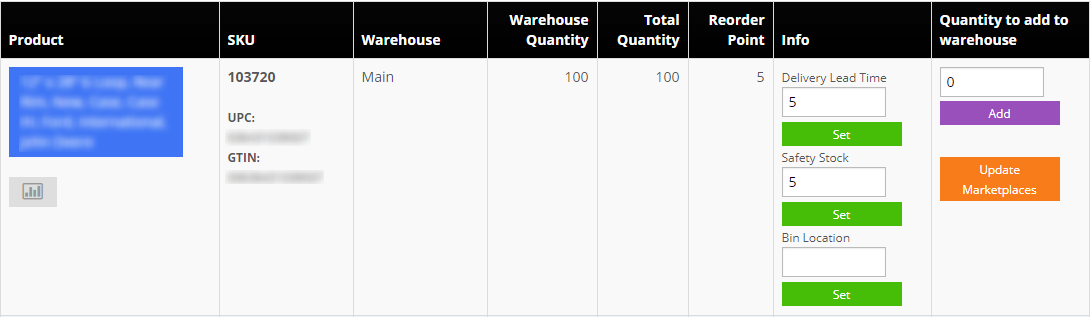
The Inventory Tool makes it easy to quickly update the inventory of any SKU. The lead time setting that is part of the inventory page is used by the Restock settings to send you restock alerts on your SKUs. The restock alerts are based on actual sales over time.
You can use the Inventory page to quickly add or subtract inventory for any SKU.
- Mass Inventory .csv File Update
InfiPlex OMS also allows you to update inventory levels using a .csv file upload on the Tools > Price & Inventory Tools page. The Price & Inventory file has the following headings to the .csv file:- sku
- price
- can_purchase
- inventory
- cost
- retail_price
- lead_time
- safety_stock
- bin_location
- product_name

- FTP Inventory Updates
The FTP Pull Inventory settings allow you to establish an automated connection to pull inventory from a file on the internet. You can schedule inventory pulls every 6 - 48 hours to fit your business process. Inventory updates are automatically queued to update all connected marketplaces.

- InfiPlex API Updates The InfiPlex REST API makes it easy to connect your custom ERP to update inventory levels. Inventory updates are automatically queued to update all connected marketplaces.
- Get Started
Visit our Amazon Vendor Central Direct Fulfillment page to review pricing and to sign-up. Set-up Support is included and you can be connected in 1 - 2 business days after sign-up.
 Go here to view information on the InfiPlex OMS - SP-API App page on the Amazon Appstore. Our SP-API application is an approved 3rd Party SP-API application.
