
Last Updated: Sep 21, 2026
 InfiPlex Inventory & Order Management System (OMS) connects directly to your WooCommerce store through the WooCommerce REST API. Once connected, InfiPlex pulls WooCommerce orders alongside every marketplace you sell on, sends tracking back when you ship, and keeps WooCommerce inventory in step with your other channels.
Step 1: Generate WooCommerce API Keys
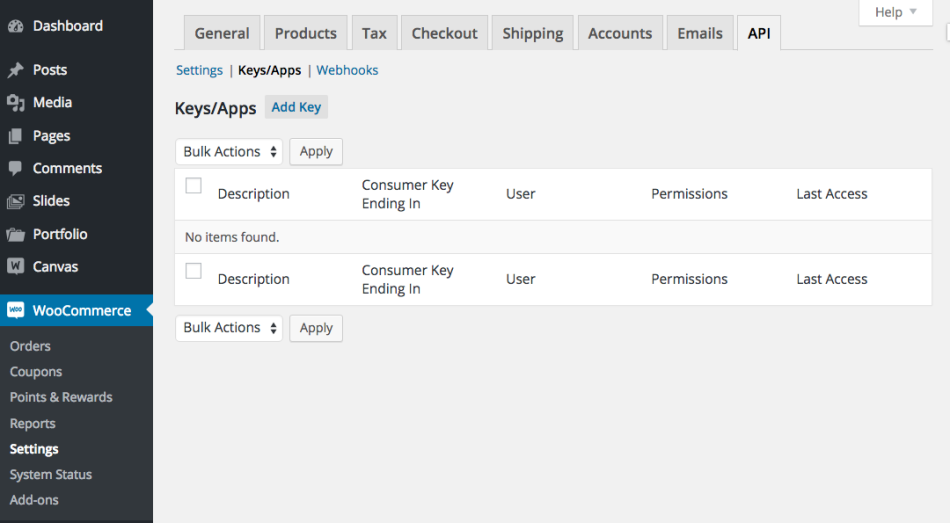
In WooCommerce, generate a Consumer Key and Consumer Secret with Read/Write access. WooCommerce's REST API documentation covers the screen.
Step 2: WooCommerce Settings in InfiPlex
- Log into your InfiPlex OMS site and go to Settings > Base Settings > WooCommerce.
- woocommerce_store_url: the full URL of your store including https, for example https://mywoostore.com/
- woocommerce_consumer_key: the Consumer Key
- woocommerce_consumer_secret: the Consumer Secret
- woocommerce_pull_orders: set to Yes to pull WooCommerce orders into the OMS
- woocommerce_pull_orders_from_date: leave blank to start from the moment the keys are active, or enter a date such as 03/01/2026 to pull older orders
- woocommerce_send_tracking_numbers: set to Yes to send tracking back to WooCommerce when an order ships
- woocommerce_sow_enabled: set to Yes to enable the Sell On WooCommerce tools and inventory updates
- woocommerce_sow_pricing_enabled: set to Yes only if you want InfiPlex to send pricing to WooCommerce for those SKUs
- Save. InfiPlex starts checking WooCommerce for new orders on the next cycle.
Tracking Numbers in WooCommerce
WooCommerce needs the Shipment Tracking extension to store tracking on the order automatically. Without it, InfiPlex adds the tracking number as an order note so you can pass it to the buyer yourself.
Which WooCommerce Orders Are Pulled
InfiPlex pulls WooCommerce orders in Processing status; other statuses are left alone. If you move an order to Processing by hand, also set its order date to the current time, because InfiPlex checks for new orders on the current day, looking back a couple of hours. An order placed yesterday that failed payment and is set to Processing today will be missed unless its date is updated too.
Inventory on WooCommerce
Inventory updates go only to SKUs flagged as sold on WooCommerce. Add your WooCommerce SKUs to InfiPlex and set them as Sold On WooCommerce, and InfiPlex keeps the WooCommerce quantity in step with every marketplace from then on.
Set-up Support
Contact InfiPlex with any WooCommerce set-up questions. Support is included with every InfiPlex package, and our team can review your first WooCommerce orders with you.
