
Last Updated: Sep 21, 2026
 InfiPlex Inventory & Order Management System (OMS) reaches QuickBooks Desktop (Pro or Enterprise) through Method:CRM. InfiPlex pushes every sales order to Method, and Method writes it into QuickBooks. This guide covers the API key and the two mappings QuickBooks requires: customer per order source and item name per SKU.
Before You Start
Your Method:CRM to QuickBooks connection must be working before InfiPlex is connected. Create a 30-day Method trial if you do not have an account; Method's QuickBooks page explains how the two sync.
Step 1: Create the Method API Key
- In Method, open Integrations under your profile icon (top right), then click API.
- Click New, name it "InfiPlex API Key", and click Generate API key.
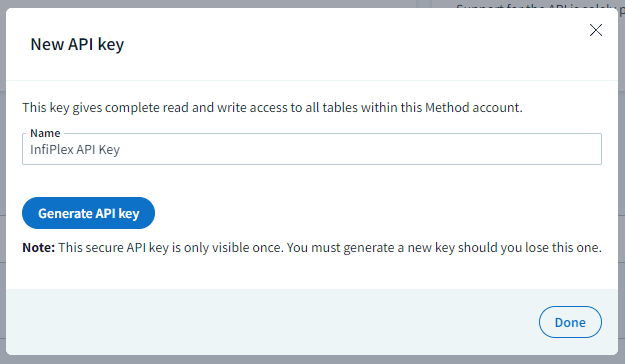
- Method shows the key once. Copy it, then send it to InfiPlex; onboarding completes the configuration below with you.
Step 2: QuickBooks Customer per Order Source
QuickBooks needs a customer name on every order. InfiPlex assigns one per order source, so all Amazon orders post to one QuickBooks customer, all Wayfair orders to another. Create a customer in QuickBooks for each marketplace you sell on and send the list to InfiPlex. Behind the scenes, an Order Automation rule uses an order filter per source to stamp the method_qb_customer value on each incoming order.
Step 3: QuickBooks Item Name per SKU
Method saves orders using the QuickBooks Item Name. If your QuickBooks item names are your SKU numbers, nothing to do. If not, each SKU needs a method_qb_item_name SKU Data value holding the QuickBooks item name, loaded with the SKU Utilities tool. Send InfiPlex a spreadsheet of SKU to item name and we load it. New QuickBooks items need the same mapping before their orders will post.
Set-up Support
Contact InfiPlex with any Method:CRM questions. Support is included with every InfiPlex package.
