
Last Updated: Sep 21, 2026
 The FedEx shipping module in InfiPlex Inventory & Order Management System (OMS) pulls live FedEx rates for your webstore checkout and lets you offer specific FedEx services. It uses your own FedEx.com account and Web Services credentials. Many sellers instead route FedEx labels through EasyPost or ShipStation; this guide covers the direct FedEx module.
Step 1: Request FedEx Web Services Access
- Log into your account at FedEx.com and request a new production set of Web Services access keys.
- The final sign-up page displays your Authentication Key and Meter Number. Copy and save both.
- FedEx emails the production Password separately; keep that email.
InfiPlex needs four values: Account Number, FedEx Key, Password, and Meter Number.
Step 2: Live Rates for FedEx
Go to Shop > Settings > Shipping > Live Rates, enter the four values, enable the FedEx services you use, then apply them to your catalog with Update All Products with Enabled Services at the end of the form.
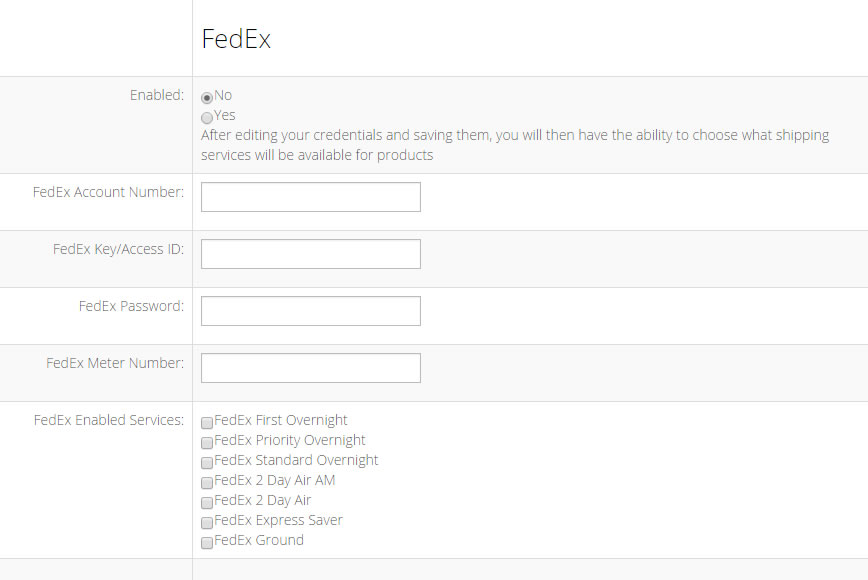
Available FedEx services: First Overnight, Priority Overnight, Standard Overnight, 2Day A.M., 2Day, Express Saver, and Ground.
Set-up Support
Contact InfiPlex with any FedEx questions. Support is included with every InfiPlex package.
