
Last Updated: Sep 21, 2026
 InfiPlex Inventory & Order Management System (OMS) connects directly to your Maisonette seller account. Once connected, InfiPlex pulls Maisonette orders, sends tracking back when you ship, and keeps Maisonette inventory in step with your other channels.
Before You Start
You need an active Maisonette seller account. If you do not sell on Maisonette yet, apply to become a Maisonette partner first.
Step 1: Generate Your Maisonette API Key
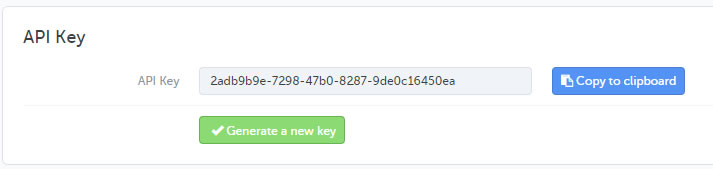
- In the Maisonette Back Office, click your user name in the top right.
- Open the API Key tab.
- Click Generate a new key, then Validate.
- Copy the API key.
Step 2: Maisonette Settings in InfiPlex
- Log into your InfiPlex OMS site, go to Settings > Integrations, and click the Maisonette logo.
- maisonette_api_token: paste the API key from the Back Office
- maisonette_pull_orders: set to Yes to pull Maisonette orders into the OMS
- maisonette_send_tracking_numbers: set to Yes to send tracking back to Maisonette when an order ships
- maisonette_som_enabled: set to Yes to send inventory levels to Maisonette for SKUs flagged as Sell On Maisonette
- maisonette_som_pricing_enabled: default No. Set to Yes only if you want InfiPlex to send pricing to Maisonette for those SKUs
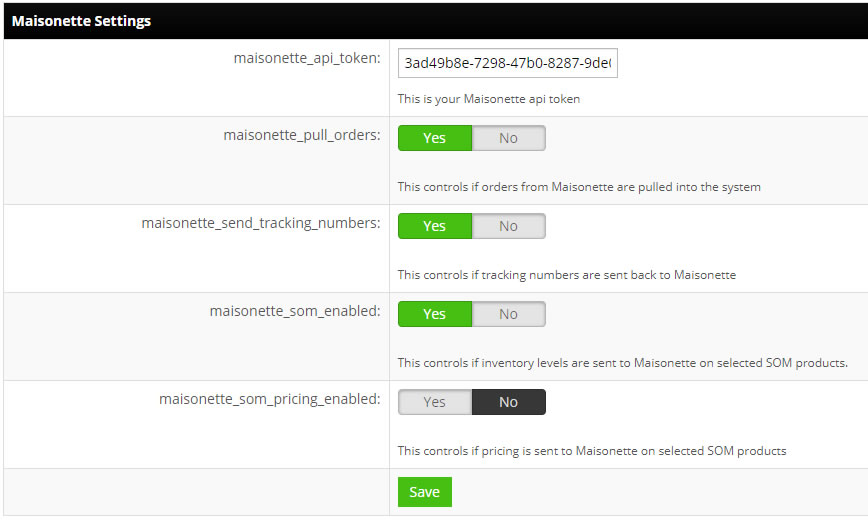
- Save. InfiPlex starts checking Maisonette for new orders on the next cycle.
Inventory on Maisonette
Inventory updates go only to SKUs flagged as sold on Maisonette. Add your Maisonette SKUs to InfiPlex and set them as Sold On Maisonette, and InfiPlex keeps the Maisonette quantity in step with every other channel from then on.
Set-up Support
Contact InfiPlex with any Maisonette set-up questions. Support is included with every InfiPlex package, and our team can review your first Maisonette orders with you.
