
Last Updated: Oct 30, 2026
 You set a SKU to 3 days of handling time in Seller Central, and a day later it is back to 1 day and orders are showing late. Amazon applies your account default handling time to any inventory update that carries no lead time, so a value set only in Seller Central does not survive the next update. InfiPlex Inventory & Order Management System (OMS) solves this with a per-SKU Amazon Lead Time that rides along on every inventory update it sends. This guide covers why the reset happens, the three ways to fix it, and how to set the lead time for one SKU or your whole catalog.
Jump to What You Need
| If You Want To… | Go To |
|---|---|
| Understand why the value resets | Why Handling Time Reverts |
| See what InfiPlex sends to Amazon | How InfiPlex Sends Lead Time |
| Pick the right fix for your catalog | Three Ways to Fix It |
| Set one SKU in the OMS | Set the Lead Time for One SKU |
| Set many SKUs from a file | Set Many SKUs by File |
| Set lead time by API or MCP | Set Lead Time by API |
Why Handling Time Reverts
Amazon calls it handling time in Seller Central and lead time to ship in its listings data: the days between the order and the hand-off to the carrier. Amazon keeps two levels of it:
- Default handling time, one value for the whole account, set in Seller Central under Settings, Shipping settings, General shipping settings.
- SKU-specific handling time, which overrides the default for that SKU.
Amazon's own help page on handling time notes that leaving the lead time empty in an update reverts the offer to the account default. So when a 3-day SKU value lives only in Seller Central and an inventory update for that SKU arrives with quantity and no lead time, Amazon falls back to the account default, often 1 day, and orders start carrying a ship-by date your warehouse cannot meet.
How InfiPlex Sends Lead Time
By default InfiPlex sends quantity only, and Amazon uses the default handling time from your Seller Central shipping settings. That keeps every SKU on one account-level number you control in Amazon.
For SKUs that need a different number, InfiPlex stores an Amazon Lead Time per SKU in SKU Data. Once a SKU has one, every inventory update InfiPlex sends for that SKU includes it, so the value can no longer be reset by the update itself. The field is per warehouse and labeled with the warehouse name, which matters when you sell from several locations through Amazon multi-location inventory. Behind the label is the reserved SKU Data name ipx_skd_amazon_lead_time_{warehouse_id}, one entry per warehouse.
Three Ways to Fix It
| Your Catalog | Fix | Where |
|---|---|---|
| Most SKUs need the same handling time | Change the account default handling time. No InfiPlex change needed. | Seller Central: Settings, Shipping settings, General shipping settings, Handling time, Edit |
| Some SKUs differ from the default | Set the Amazon Lead Time in InfiPlex for those SKUs only. | One SKU, by file, or by API |
| You want Seller Central to own a SKU completely | Turn off the SKU's Amazon Sold On flag so InfiPlex stops sending its inventory, and manage its quantity in Seller Central. | Sold On page |
The first two combine well: put the account default on the number most of your catalog ships in, then give the exceptions their own lead time in InfiPlex.
Set the Lead Time for One SKU
- Go to Tools > SKU Data in your OMS.
- Enter the SKU and click the purple Get SKU Data button.
- Select the Amazon tab on the left.
- Enter the number of days in the Amazon Lead Time For field of the warehouse, Main in the example below.
- Click the green Save button.
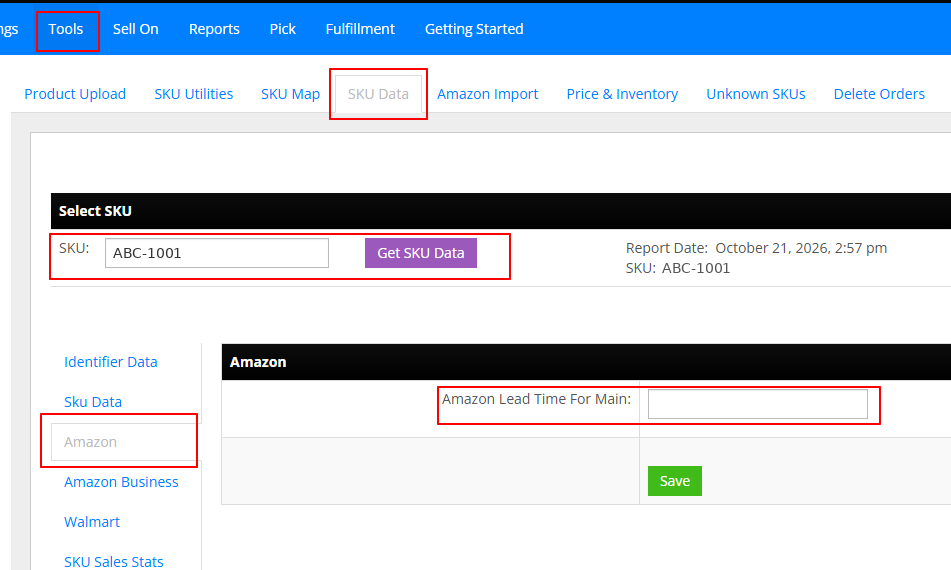
Every inventory update InfiPlex sends for that SKU now includes this lead time, and Amazon applies it when it processes the update.
Set Many SKUs by File
The SKU Utilities tool loads SKU Data from a .csv: a sku column plus one column per data name. Choose Set Identifying Data and upload a file with the lead time column named for your warehouse id:
sku,ipx_skd_amazon_lead_time_3
ABC-1001,3
ABC-1002,3
ABC-2050,5
To get the exact column name, set one SKU in the OMS first, then read it back with SKU Data Get: the entry shows the full name with the warehouse id. Warehouse Search lists every warehouse id too. Sell from more than one warehouse? Add one column per warehouse. Values are whole days, and columns you leave out are untouched.
Set Lead Time by API
SKU Data Bulk Update takes the same rows as JSON, across any number of SKUs, which suits an ERP or PIM that already knows each item's lead time. SKU Data Set writes the entries on one SKU.
[
  { "sku": "ABC-1001", "data_name": "ipx_skd_amazon_lead_time_3", "data_value": "3" },
  { "sku": "ABC-1002", "data_name": "ipx_skd_amazon_lead_time_3", "data_value": "3" },
  { "sku": "ABC-2050", "data_name": "ipx_skd_amazon_lead_time_3", "data_value": "5" }
]
To audit what is set, SKU Data Search returns every SKU with its lead time for a warehouse in one call:
{{api_url}}/shop/products/sku_data/search?sku_search_type=all&data_name_search_type=single&data_name=ipx_skd_amazon_lead_time_3
On the InfiPlex MCP server the same writes and reads are the sku_data_set_bulk, sku_data_get, and sku_data_search tools, so an assistant can set "3 days on every SKU in this list" from a pasted spreadsheet.
Automated Handling Time in Seller Central
Amazon also offers Automated handling time, set in the same General shipping settings area. Amazon documents that it overrides both the account default and SKU-specific handling time once a SKU has enough shipping history. If a SKU shows a different number than the one InfiPlex sends, check this setting first.
Amazon Handling Time Questions
Why does my Amazon handling time keep going back to 1 day?
Amazon applies your account default handling time to any inventory update that carries no lead time. A 3-day value set only on the SKU in Seller Central is replaced by the default the next time an update for that SKU arrives without one. Set the lead time in InfiPlex and every update sends it.
Does InfiPlex send a handling time to Amazon?
Only for SKUs where you set one. By default InfiPlex sends quantity only, so Amazon uses the default handling time from your Seller Central shipping settings. Once a SKU has an Amazon Lead Time in InfiPlex, every inventory update for that SKU includes it.
Can InfiPlex leave the handling time I set in Seller Central alone?
Not while InfiPlex is sending inventory for that SKU, because Amazon resets an update with no lead time to the account default. Either set the lead time in InfiPlex, change the account default in Seller Central, or turn off the SKU's Amazon Sold On flag and manage its quantity in Seller Central.
What if most of my SKUs need the same handling time?
Change the default handling time in Seller Central under Settings, Shipping settings, General shipping settings. Every SKU without its own lead time uses it, and nothing changes in InfiPlex. Set a lead time in InfiPlex only for the SKUs that differ.
How do I set the lead time on hundreds of SKUs at once?
Upload a .csv through the SKU Utilities tool with a sku column and an ipx_skd_amazon_lead_time_ column named with your warehouse id, or send the same rows through SKU Data Bulk Update in the API or the MCP server.
Where do I find the warehouse id for the SKU Data name?
Set the lead time on one SKU in the OMS, then read it back with SKU Data Get: the entry shows the full name, such as ipx_skd_amazon_lead_time_3. Warehouse Search in the API also returns every warehouse id.
I set the lead time in InfiPlex and Amazon still shows a different value. Why?
Check whether Automated handling time is on in Seller Central. Amazon documents that it overrides both the account default and SKU-specific handling time once a SKU has enough shipping history.
Handling time that stays where you set it, SKU by SKU.
InfiPlex sends your Amazon lead time with every inventory update, per SKU and per warehouse, alongside orders, tracking, and inventory across 130+ marketplaces, carts, 3PLs, and ERPs.
Related Amazon guides
- Amazon SP-API Integration and OMS
- Amazon Integration FAQs
- Amazon SP-API Connection Set-up
- Amazon Seller Multi-Location Inventory Setup
- Seller Fulfilled Prime Requirements
- Walmart Fulfillment Lag Time
