Is connecting an AI assistant to InfiPlex secure? Yes. Here is what that means, in plain terms.
When you connect an AI assistant such as Claude or ChatGPT to your InfiPlex account, nothing about your account becomes public, nothing is shared with other companies, and the assistant can only do what you allow. This page explains how, without the technical vocabulary. If you already know what MCP is and want the detail, the full write-safety guide and the set-up guide have it.
A private phone line between your assistant and your InfiPlex account
Think of it as a phone line with a lock on it. InfiPlex gives your account a private address that an AI assistant can call. The line only picks up if the caller presents a key you created in your InfiPlex admin. With the key, the assistant can ask InfiPlex questions ("how many orders came in today?") and, if you allowed it, ask InfiPlex to do things ("record this tracking number"). Without the key, the line does not answer. That is the whole mechanism. The technical name for the standard is MCP, and the MCP server is the part of InfiPlex that answers the line.
It is not public.
Your account's address is on your own InfiPlex subdomain, and it answers only to a valid key. Anyone who reaches it without one gets an error and no data. Nothing is listed, searchable, or open.
It is not shared.
Your assistant talks directly to your InfiPlex account. There is no InfiPlex AI in the middle reading everyone's data. Your key opens your account and nobody else's.
You decide what it can do.
The key carries checkboxes: read orders, read inventory, change inventory, change prices, and so on. Unchecked means the assistant cannot even see that ability. Most companies start with read-only.
The key
The key is the whole security model, and you hold it
A key is a long code you create in your InfiPlex admin at Tools > Admin API. You name it, you tick the boxes for what it may do, and you give it to the assistant. That is the same kind of key InfiPlex has always used for connecting other software, and it has the same rules:
One key, one purpose.
Make a separate key for each person or assistant. The activity log shows what each key did, so you always know who asked for what.
Read-only is a real option.
A key with only the "read" boxes ticked can answer every question and change nothing. There is no way for the assistant to change data through a read-only key, because the ability is not there to use.
Changes are previewed.
On a key that can change things, anything that affects stock, prices, shipments, products, warehouses, or settings is shown to you first as a preview. It happens only after a go-ahead. You saw this in the demo: a price change is proposed, the person says "leave it," nothing changes.
Passwords and marketplace logins are off limits.
The assistant is never shown your Amazon, Walmart, or other marketplace credentials and cannot change them, no matter how the key is set. Connecting a new marketplace is done through a link the account owner clicks, so no login ever passes through the assistant.
Off means off.
Disable or delete the key and the assistant is disconnected on its next request. Nothing else in your account is affected.
The assistant side
What the AI company sees
When your assistant asks InfiPlex a question, the answer goes to the assistant so it can reply to you, the same way it would if you pasted a report into the chat. What happens to that text afterwards is governed by your agreement with the AI company (Anthropic for Claude, OpenAI for ChatGPT), not by InfiPlex. Business and enterprise plans from those companies typically do not train on your data; check the plan you are on. InfiPlex itself does not send your data to any AI company and does not run an AI service in between.
Set-up
Three steps, about five minutes
Create a key
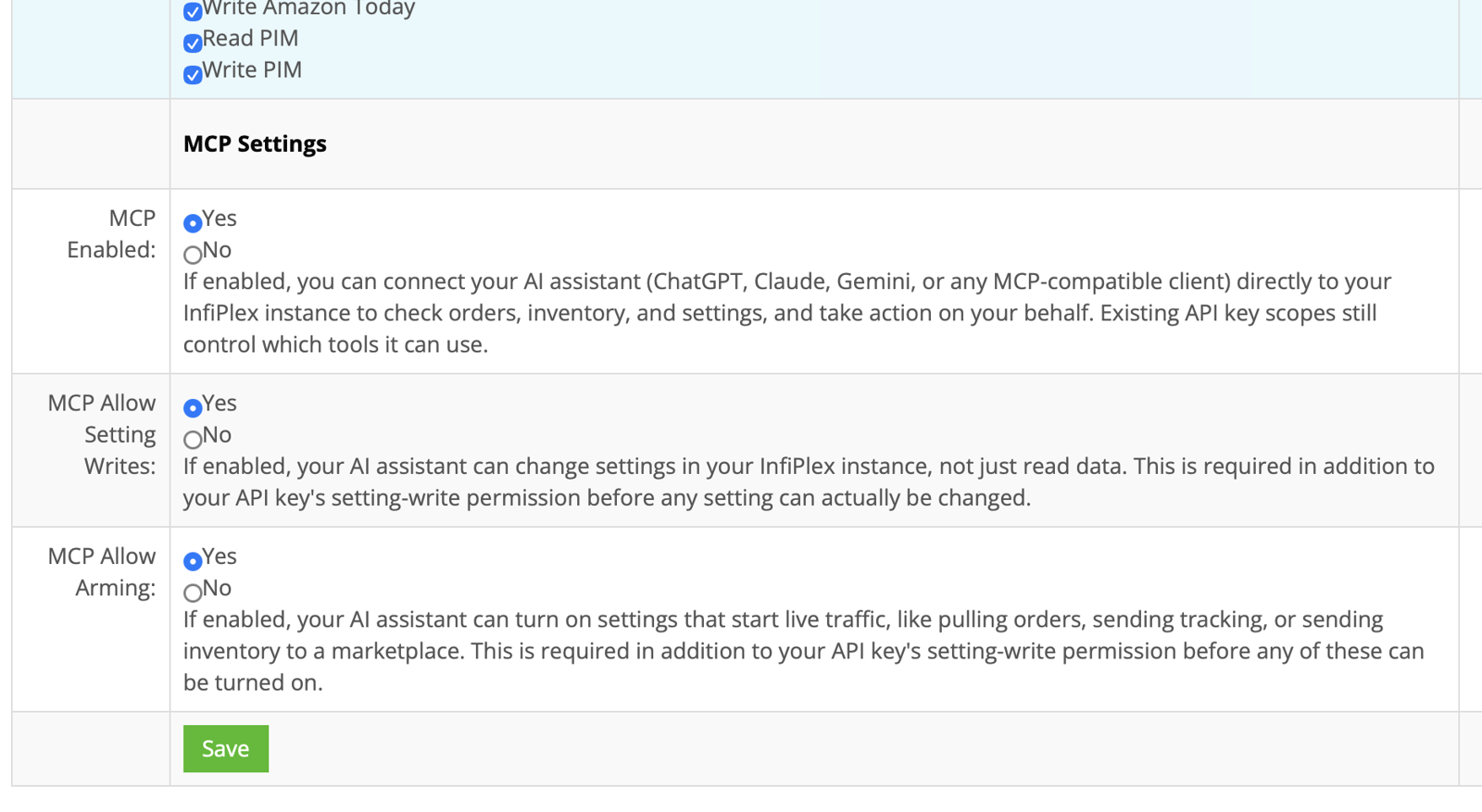
In InfiPlex go to Tools > Admin API and click Create New API Key. Tick the "read" boxes only. Under MCP Settings set MCP Enabled to Yes. Save.
Give it to your assistant
The key page shows two things to copy: an address and the key. In Claude: Settings > Connectors > Add custom connector, paste them in. ChatGPT via Codex, Cursor, and others have an equivalent settings screen.
Ask a question
"How many orders came in today?" If it answers, you are connected. When you want it to do more than answer, tick more boxes on the key.
Nothing is installed on your computer or on InfiPlex. The step-by-step version with screenshots for each assistant is in the set-up guide, and the questions worth asking first are in the prompts guide.
No. Turning on MCP for a key creates nothing public. Your account's address answers only to a valid key; anyone without one receives an error. Nothing is listed anywhere, and no data is returned without the key.
A key is a long random code, not a password a person chooses, and the connection is encrypted in transit. Treat it like any credential: give it only to the assistant, and if it is ever exposed, disable it in the admin and make a new one. That takes under a minute.
Only within what the key allows. On a read-only key it cannot change anything. On a key that can make changes, InfiPlex shows a preview before anything that affects stock, prices, shipments, products, warehouses, or settings and waits for a go-ahead. Those limits are enforced by InfiPlex, not by the assistant's good behavior.
No. Your assistant talks to your InfiPlex account directly. InfiPlex sees the requests the assistant makes (the same way it sees any API request, logged by key) and nothing about the conversation around them.
It uses the same keys and the same permissions as any other integration, such as an ERP or a shipping tool. The two differences are in your favor: the assistant gets previews before changes, and you can start it read-only and widen it later.
Claude is a trademark of Anthropic, PBC. ChatGPT and Codex are trademarks of OpenAI. Model Context Protocol (MCP) is an open standard. AI company data policies are theirs; consult the plan you are on.
Our website uses cookies to help provide the best user experience. By continuing to use this site, you consent to the use of cookies as described in our Privacy Policy. OK