
Last Updated: Sep 21, 2026
 The InfiPlex Product Information Manager (PIM) publishes new Shopify products to your connected marketplaces from a single product tag, once InfiPlex has set up the mappings and rules for your account.
What You Do
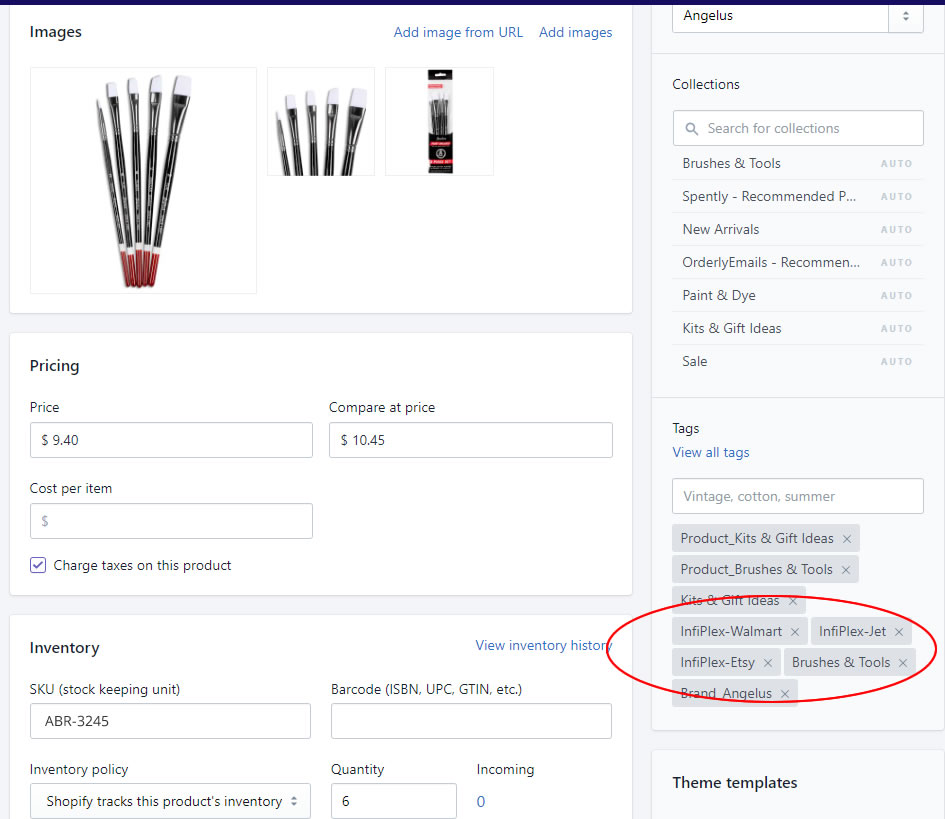
Add the tag InfiPlex defines for each marketplace to a product in Shopify, for example InfiPlex-Walmart or InfiPlex-Etsy. The PIM rules pick up the tag and push the product on the schedule InfiPlex configured with you.
What InfiPlex Sets Up
- Connect your Shopify store: product data is pulled from your live listings.
- Connect your marketplaces: the PIM is wired to push to each one you choose.
- Category mapping: your Shopify Product Type is mapped to the correct category on each marketplace.
- Pricing rules: control what price is actually sent.
- Shipping rules: adjusted per marketplace where a channel requires it.
Once set-up is complete, tagging a product in Shopify is the only step needed to publish it.
Set-up Support
Contact InfiPlex with any the PIM questions. Support is included with every InfiPlex package.
