
Last Updated: Sep 21, 2026
 The Unknown SKU settings in InfiPlex Inventory & Order Management System (OMS) create a product automatically when an order arrives with a SKU InfiPlex has never seen. You get an email, the order processes, and you fix inventory and marketplace flags afterward instead of the order stalling.
Settings
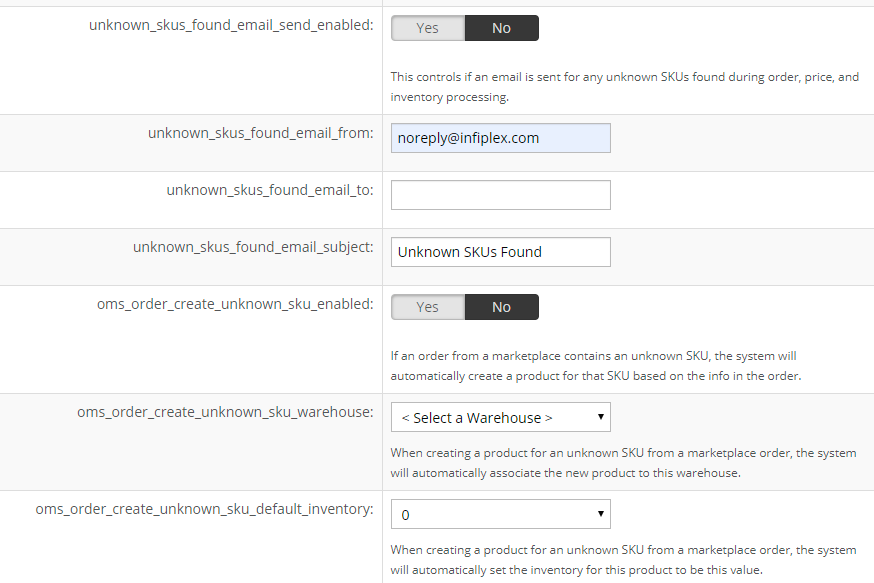
Settings > Base Settings > Miscellaneous:
- unknown_skus_found_email_send_enabled: send an email when unknown SKUs appear during order, price, or inventory processing.
- unknown_skus_found_email_from: noreply@infiplex.com.
- unknown_skus_found_email_to: recipients, separated by semicolons.
- unknown_skus_found_email_subject: the subject line.
- oms_order_create_unknown_sku_enabled: Yes. Creates a product for any unknown SKU on a marketplace order, from the order's data.
- oms_order_create_unknown_sku_warehouse: the warehouse new products are associated to.
- oms_order_create_unknown_sku_default_inventory: the starting inventory for new products.
After a SKU Is Auto-Created
Auto-created SKUs are flagged as sold on every connected marketplace, so inventory would push everywhere. Use the SKU Utilities tool (For Selected Sell On) or the Sold On page to limit each one to the marketplaces it is actually listed on, and set its real inventory level.
Set-up Support
Contact InfiPlex with any unknown SKUs questions. Support is included with every InfiPlex package.
