
Last Updated: Sep 21, 2026
 The SKU Bundle tool in InfiPlex Inventory & Order Management System (OMS) marks an existing SKU as a bundle made of other SKUs and keeps the component counts right when bundles are built or sold. It can also build more bundles automatically when the bundle's stock drops to a threshold.
Rules
- The bundle SKU and every component SKU must already exist in your product list; the tool does not create SKUs.
- Change bundle quantity only in the Bundle tool. Adjusting a bundle SKU on the regular Inventory page does not move component inventory.
- A bundle SKU cannot be a component of another bundle.
- If a component belongs to a SKU Inventory Group, include every SKU in that group as components so they all move correctly.
Bundle Fields
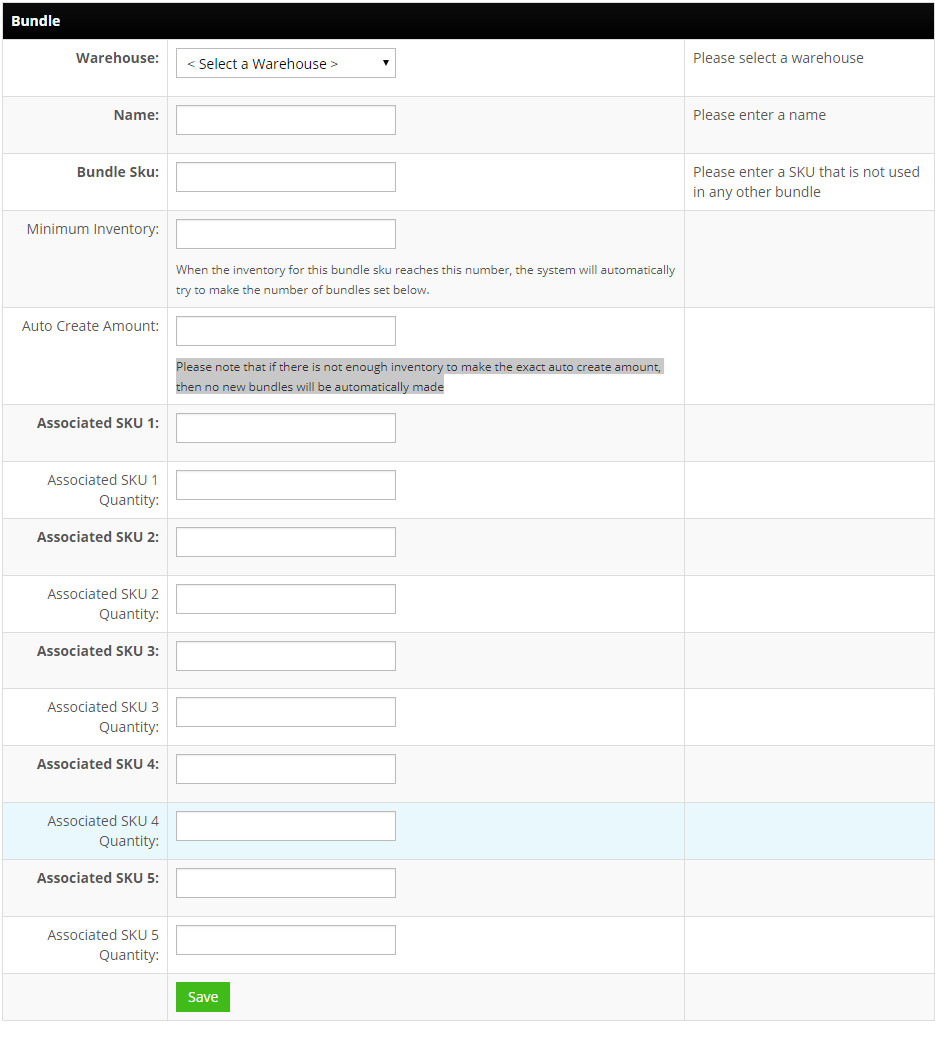
- Warehouse (required): the warehouse the components are drawn from when bundles are built.
- Name (required): a descriptive title.
- Bundle SKU (required): the existing SKU number for the bundle.
- Minimum Inventory: when the bundle's stock reaches this number, InfiPlex tries to build more.
- Auto Create Amount: how many to build. If component stock cannot cover the full amount, none are built.
- Associated SKU 1 to 5 and Quantity: each component SKU and how many the bundle uses.
Click the green Save button.
More Than 5 Components
Settings > Base Settings > Miscellaneous, bundle_max_skus, sets how many component slots the form shows, up to 100.
Bundles sold through drop-ship distributors need the Bundle SKU Map as well; see Drop Shipping Bundle Set-up. To have the components added as order lines for a 3PL pick, see Add Order Lines by Rule.
Set-up Support
Contact InfiPlex with any bundles questions. Support is included with every InfiPlex package.
