
Sell the same unit on two marketplaces in the same minute, and one of those orders gets canceled. Do it often enough and the marketplace does the math for you: cancellation rate ceilings sit around 2 to 2.5% on Amazon and Walmart, and crossing them puts selling privileges at risk. Multichannel inventory sync is the difference between that being a daily gamble and a non-issue. InfiPlex holds every warehouse and source you have as its own location, totals or splits them per channel, and pushes the right number to every channel, as fast as each channel allows.
Jump to What You Want to Set Up
| If You Want To… | Jump To |
|---|---|
| Pull inventory counts from a 3PL, WMS, FBA, WFS, or FBT | Fulfillment-Service Sources |
| Keep my ERP or store as the single source of truth | External System as Master |
| Set inventory in InfiPlex directly | InfiPlex as the Source |
| Combine several of those on one account | Mixing Sources |
| Control what each marketplace actually sees | Per-Channel Sync |
| Flag which SKUs each marketplace can sell | Sold On Flags |
| Know how fast updates actually move | Sync Speed |
| Stop overselling the last few units | Set-to-Zero and Inventory Buffers |
How Much Flexibility Does InfiPlex Inventory Sync Actually Give You?
- Pull inventory from 51 named sources and counting: 3PLs, WMS platforms, Amazon FBA, Walmart WFS, TikTok Shop FBT, ERPs, storefronts, marketplaces, files, or the InfiPlex API directly.
- Choose the source per warehouse, not per account. An ERP can control five warehouses while a fulfillment provider feeds two more, on the same account, at the same time.
- Control what each channel sees. The combined total by default, one specific warehouse's count if you prefer, or true warehouse-level mapping on channels that support it, and only ever for the SKUs you've flagged as sold on that marketplace.
- Sync as fast as each connection allows. Webhooks where they exist, 15-minute pulls on most API connections, and honest handling of the connections that only update daily.
- Decide which marketplace sells your last units. Per-SKU inventory buffers let you pick a sell-out channel based on fees, sell-through speed, and oversell penalties.
Where Do I Set Up Inventory Sync in InfiPlex?
Almost everything lives in one place: Settings > Integrations. Every connection, marketplaces, stores, ERPs, EDI retail, and fulfillment services, has its own section on that page with its own inventory settings.
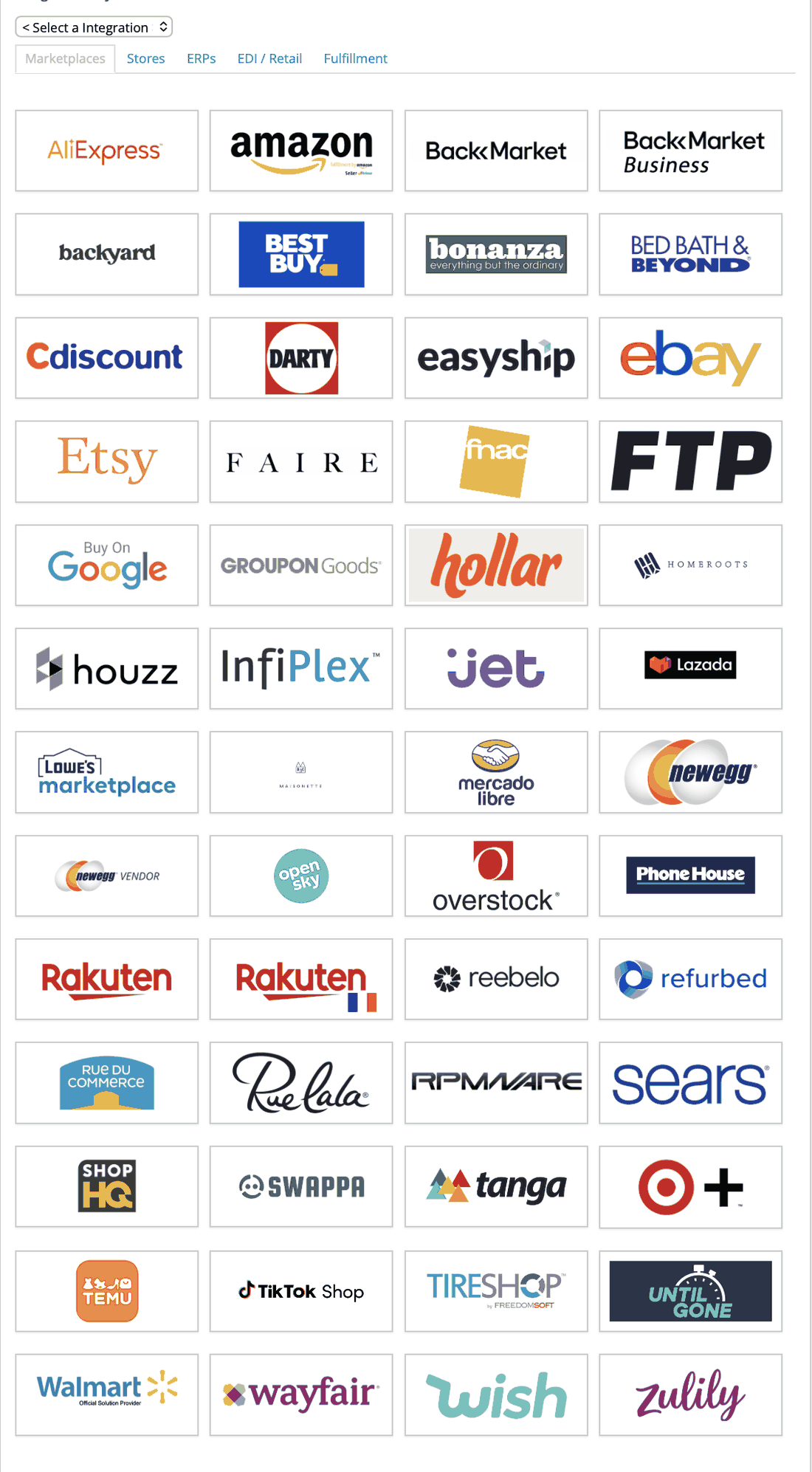
The one exception is the Inventory Buffer tool, which lives at Inventory > Inventory Buffer and is covered in its own section below.
Where Can a Warehouse's Inventory Come From?
Every InfiPlex warehouse gets its inventory from a source, and there are three kinds. The choice is made per warehouse, so one account can use all three at once.
Two sources can even feed the same warehouse. The only thing to keep straight in that setup is SKU overlap: if both sources report the same SKU, whichever wrote last wins, there's no summing and no error. In practice this almost never comes up, since clients keep each source's SKUs unique, or the sources already are.
Which Fulfillment Services Can Feed InfiPlex Inventory?
When a 3PL, WMS, or fulfillment network holds your physical stock, InfiPlex pulls its counts into a matching warehouse and keeps them current. These are the fulfillment-side sources connected today, and the list keeps growing, so if yours isn't here, ask:
The three marketplace fulfillment networks, Amazon FBA, Walmart WFS, and TikTok Shop FBT, are read the same way: by SKU, into their own InfiPlex warehouse each. FBA stock lands in whichever InfiPlex warehouse you choose for it in the Amazon settings, defaulting to the first warehouse in the system if none is selected; WFS and FBT stock land in the warehouse you choose for each in the Walmart and TikTok Shop settings. The network count is visible per SKU on the Inventory page next to your own warehouses and any 3PL, never blended, and whether it is included in what each sales channel receives is a per-channel warehouse selection. Inventory sends to Amazon, Walmart, and TikTok Shop are enabled separately from the reads, so you can read FBA and push nothing to Amazon, or the reverse.
Can My ERP or Store Stay the Master for Inventory?
Yes, and this is the most common advanced setup. An external system, an ERP like NetSuite, a storefront like Shopify, or in rare cases even a marketplace, stays the single source of truth. InfiPlex pulls its numbers, stores them against your warehouses, and pushes them out to every other connected channel. These are the external systems connected today:
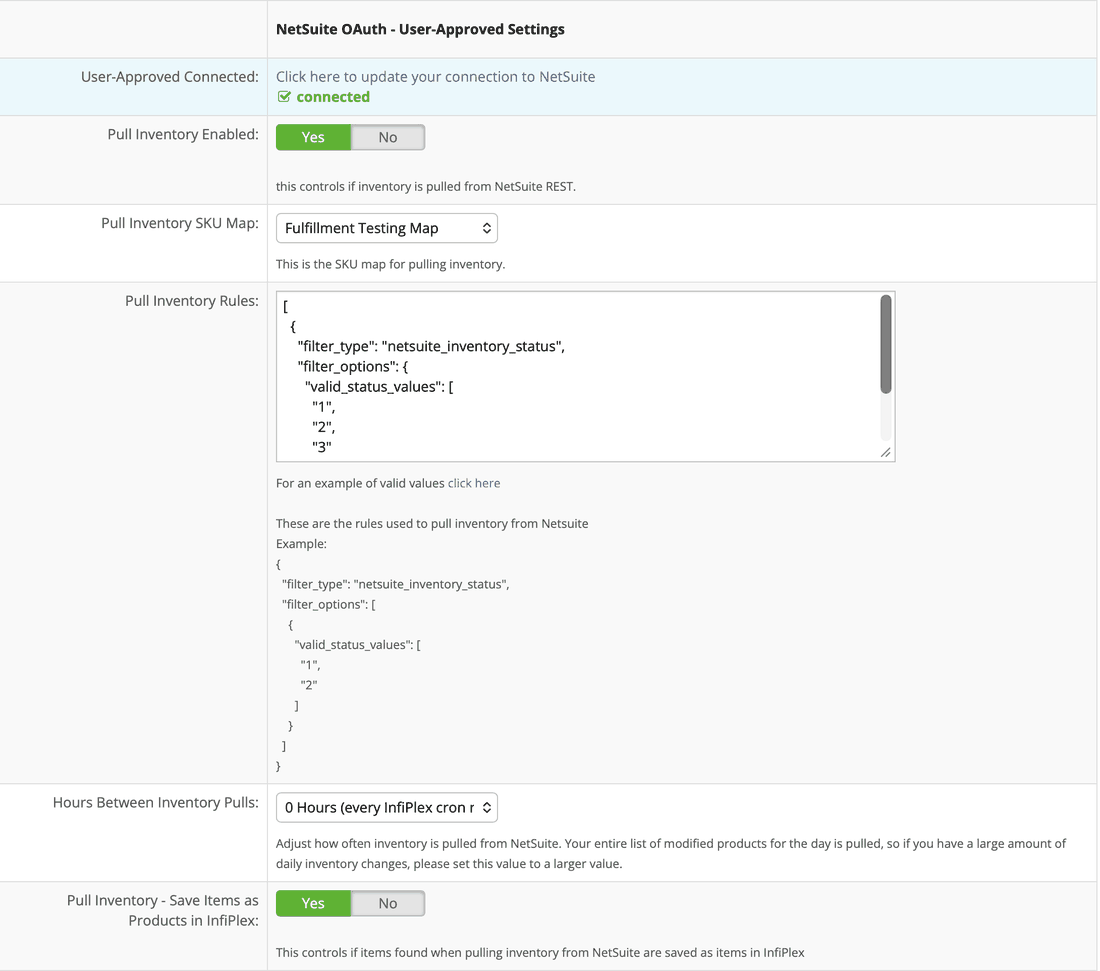
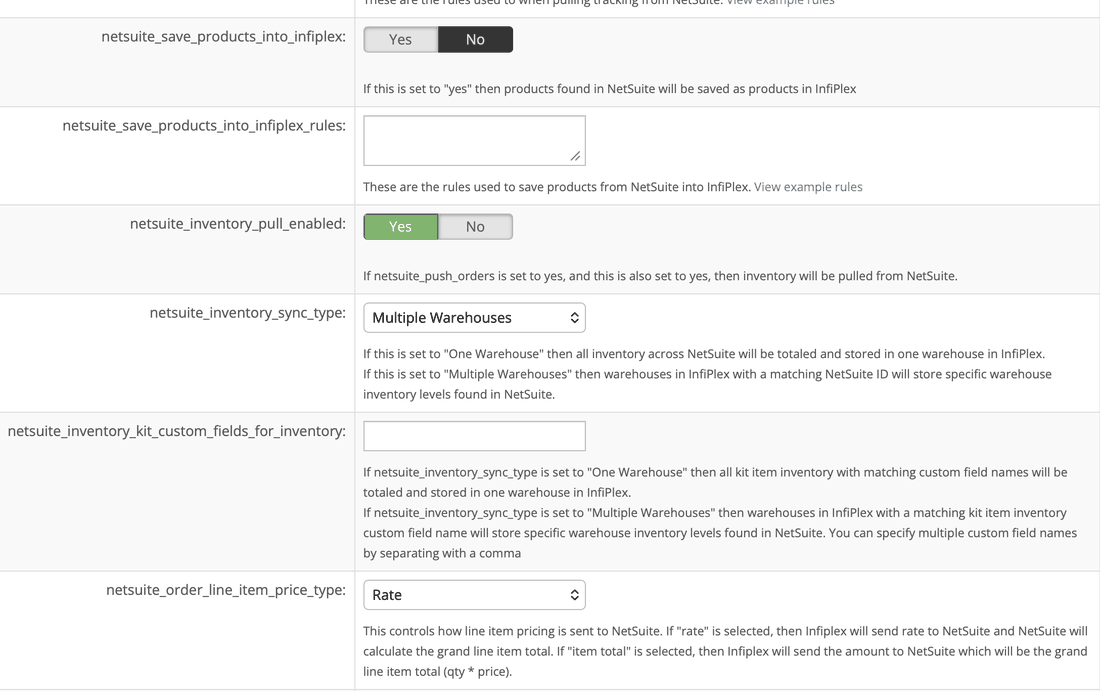
NetSuite is a good example of how much control these connections carry. Its settings include pull rules that filter which inventory statuses count, a SKU map for translating between the two systems, and a sync type choice: One Warehouse totals all NetSuite inventory into a single InfiPlex warehouse, while Multiple Warehouses matches each NetSuite location to the InfiPlex warehouse carrying its ID.
The rare-but-real variant: a couple of clients run older systems that already write inventory to Amazon, and treat Amazon as their master. InfiPlex pulls those numbers from Amazon into warehouses and syncs them everywhere else. Unusual, but it works the same way as any other external master.
Can I Just Set Inventory in InfiPlex Directly?
Yes. With no external system involved, inventory is set straight into InfiPlex by whichever method fits:
- InfiPlex API: single or bulk inventory updates, for technical teams.
- Manual CSV upload: file-based bulk updates through your InfiPlex site.
- InfiPlex Tools: setting levels by hand in the web interface.
Can I Mix Different Inventory Sources on One Account?
Freely. The source is a per-warehouse choice, so real setups get creative: an ERP as master for five warehouses while a fulfillment provider feeds two more, a Shopify store feeding one warehouse and Wayfair Castlegate another, or any other combination the operation actually needs. Years of client requests have pushed the flexibility a long way.
What Does Each Sales Channel Actually Receive?
Inbound is only half the story. Outbound, what number each channel is actually told, is its own per-channel choice, set on that channel's integration page:
- The combined total, the default. Every warehouse's count for a SKU, added up.
- One warehouse only. A channel can be scoped to a single warehouse's count, ignoring the rest.
- Warehouse-level mapping. Amazon, TikTok, Walmart, and Wayfair support multiple warehouses on their own side, so InfiPlex can map warehouses to warehouses: many to many, one to many, or many to one.
The controls behind these live in two places. The warehouse side is the Integration Warehouse IDs section on each warehouse's edit page, the same place fulfillment-service IDs go. Give a warehouse an Amazon.com ID, for example, and it becomes mappable on Amazon's side:
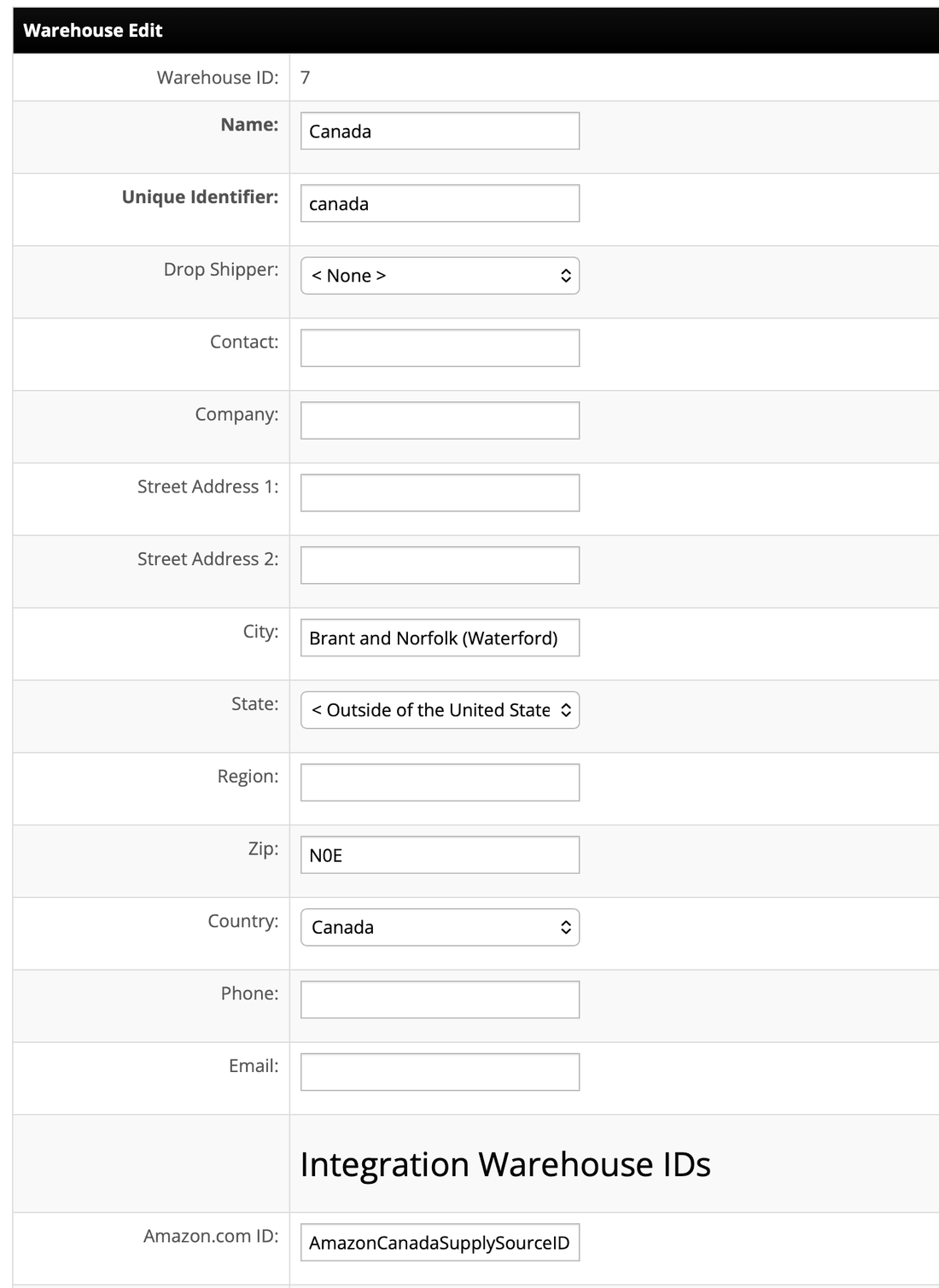
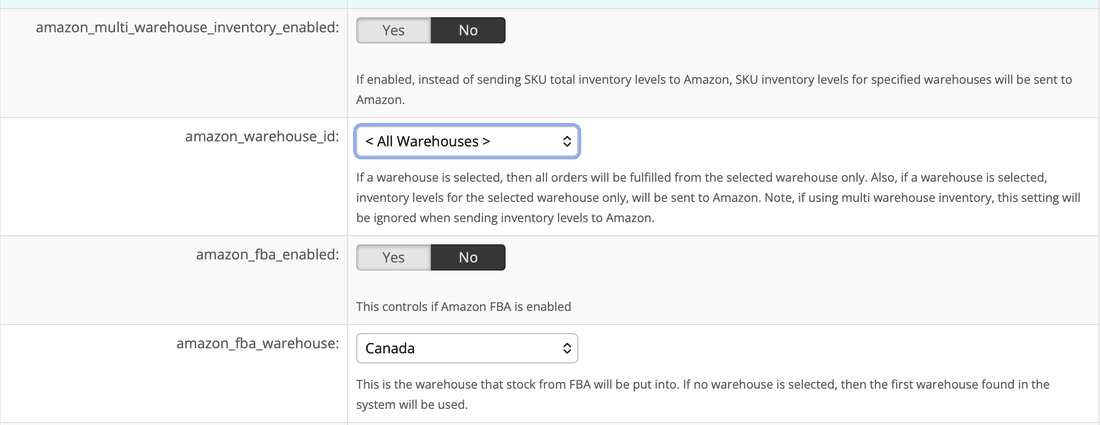
The channel side is that marketplace's integration page. On Amazon, amazon_multi_warehouse_inventory_enabled switches from sending one SKU total to sending per-warehouse levels for every warehouse carrying an Amazon ID. The amazon_warehouse_id setting is the single-warehouse scope, and readers of our order routing guide will recognize it: it's the same setting that forces order fulfillment to one warehouse, and it scopes outbound inventory to that warehouse too. When multi-warehouse inventory is on, Amazon ignores it for inventory sending.
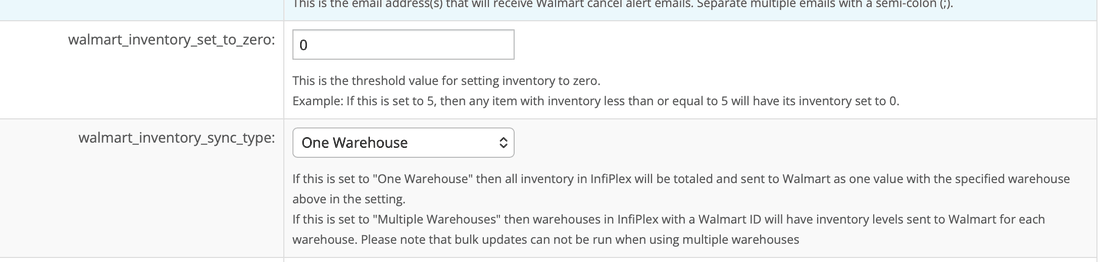
Walmart follows the same pattern with walmart_inventory_sync_type: One Warehouse totals everything into a single value, Multiple Warehouses sends per-warehouse levels for every warehouse carrying a Walmart ID. One honest caveat straight from the setting itself: bulk updates can't run while multiple-warehouse mode is on.
Which SKUs Send Inventory to Each Marketplace?
One more per-SKU gate sits on top of everything above: the Sold On flag. Every marketplace has one, SOT for Sold On TikTok, SOA for Sold On Amazon, and so on down the list. Enabling inventory for a marketplace is step one. Step two is flagging which SKUs are actually sold there, and InfiPlex only sends inventory for a SKU to a marketplace when that SKU carries its flag.
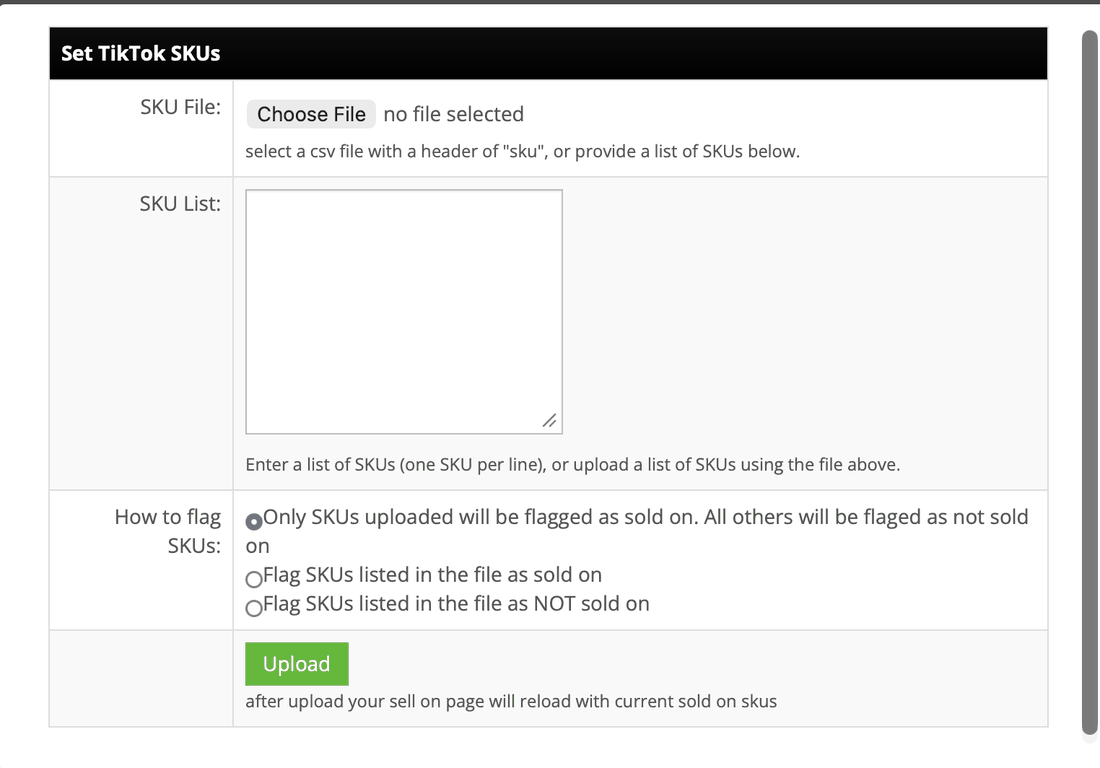
Once a marketplace's Sold On setting is enabled, that marketplace appears under the Sell On menu, so flags are managed at Sell On > TikTok, Sell On > Walmart, and so on. From there, flags are set in bulk: upload a CSV with a single sku header column, or paste a list of SKUs, then pick one of three modes. The list can become the complete sold-on set with everything else unflagged, add the listed SKUs to whatever is already flagged, or remove the listed SKUs from the flagged set.
Occasionally a SKU is deliberately left unflagged even though it's listed and selling on that marketplace, so InfiPlex leaves its inventory there completely alone. It's rare, but it's a real case on marketplaces like AliExpress, where some SKUs get promotional allocation and the marketplace doesn't allow inventory to be set at all.
How Fast Does InfiPlex Inventory Sync Actually Happen?
As fast as each connection allows, which is the honest answer no one likes to give. The mechanics:
- Webhooks where they exist. Shopify supports webhooks, so those updates are essentially instantaneous.
- 15-minute pulls on most API connections. The large majority of connections allow filtering by date and time modified, so InfiPlex pulls just the changes, as often as the client wants, normally every 15 minutes. Sending inventory out works the same way, most channels get updates every 15 minutes.
- Daily connections handled honestly. Some connections only provide changes, or only accept updates, once a day. Nothing can make those faster, so InfiPlex works them on their own schedule.
- Full-catalog connections scaled sensibly. A few connections can't filter by modification time at all, only by day, so every pull downloads everything. On those, frequency scales with catalog size: a huge catalog with few changes might pull every couple of hours, a small one can pull constantly.
The operating principle across all of them: as aggressive as possible without causing problems for the connection.
How Do I Stop Overselling the Last Few Units?
The riskiest inventory is the last handful of units, where two channels can sell the same piece inside one sync window. InfiPlex has two levers for exactly that window.
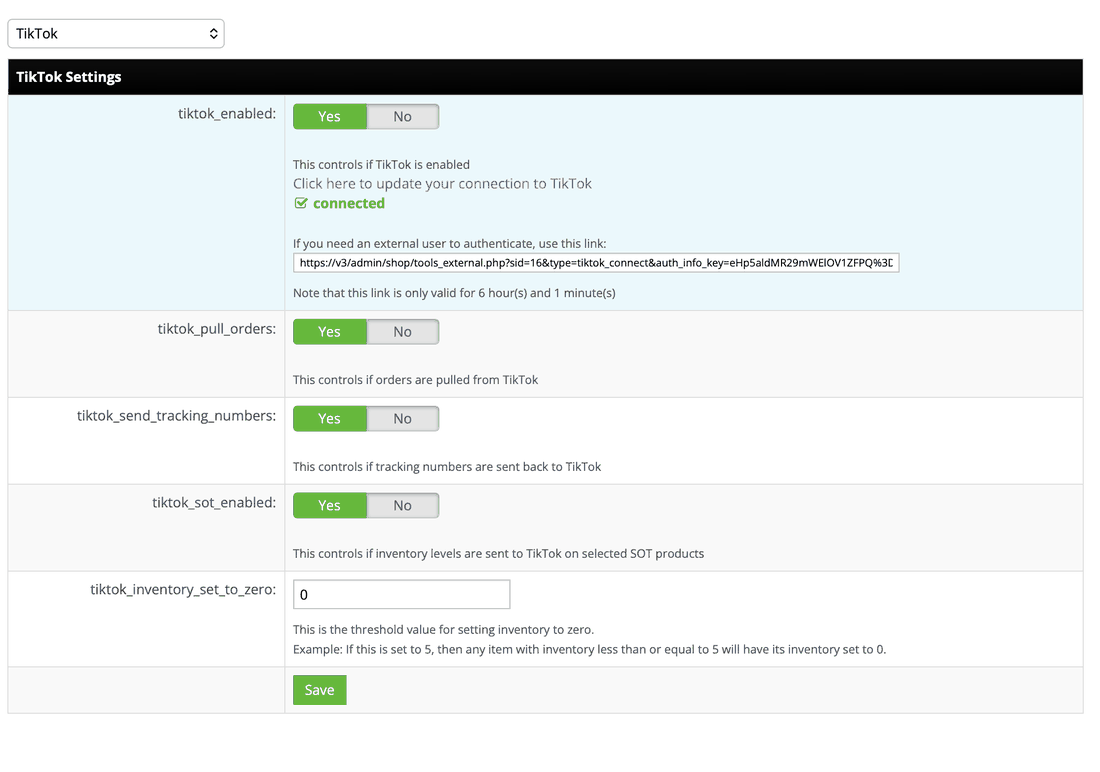
Lever 1: the set-to-zero threshold. Every integration has its own threshold setting. If it's set to 5, any SKU whose available count is 5 or less gets sent to that channel as 0. Simple, per-channel, and it kills the risky tail entirely for that channel.
Lever 2: the Inventory Buffer, with a chosen sell-out channel. The buffer works per SKU: it subtracts a reserve from the count sent to every channel, except the channels you exclude. The excluded channels see the true number and sell it to zero. In other words, you're choosing which marketplace gets your last units, per SKU, based on whatever matters most: lowest fees, fastest sell-through for that SKU on that marketplace, or the gentlest oversell penalties.
The buffer subtracts from whatever number would otherwise be sent, so it stacks cleanly with per-channel scoping: a channel scoped to one warehouse's 25 units with a buffer of 2 sees 23. When a set-to-zero threshold is configured on the same channel, which almost no one does in practice, the threshold fires first: at or below it, the channel is simply told 0 and the buffer is skipped entirely. Above it, the number passes through untouched and the buffer runs normally. The threshold never subtracts anything, it only zeroes.
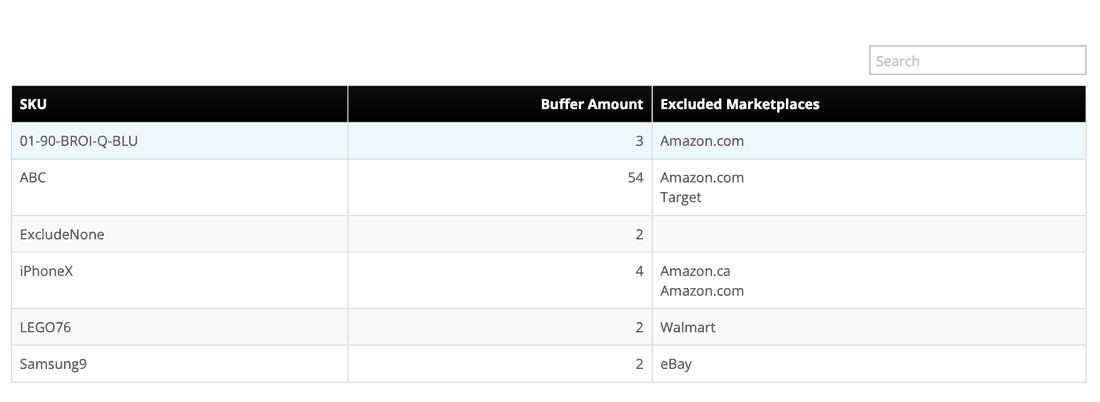
The tool lives at Inventory > Inventory Buffer. The page shows your current buffers, and changes are made by CSV upload, one row per SKU:
| Column | What It Does |
|---|---|
| sku | The SKU the rule applies to. |
| exclusions | Marketplace identifiers, separated by semicolons, that skip the buffer and see the true count. For example azu;azc makes Amazon.com and Amazon.ca the sell-out channels. |
| buffer | Units held back from every non-excluded channel. |
| enabled | 1 to apply the rule, 0 to remove it. |
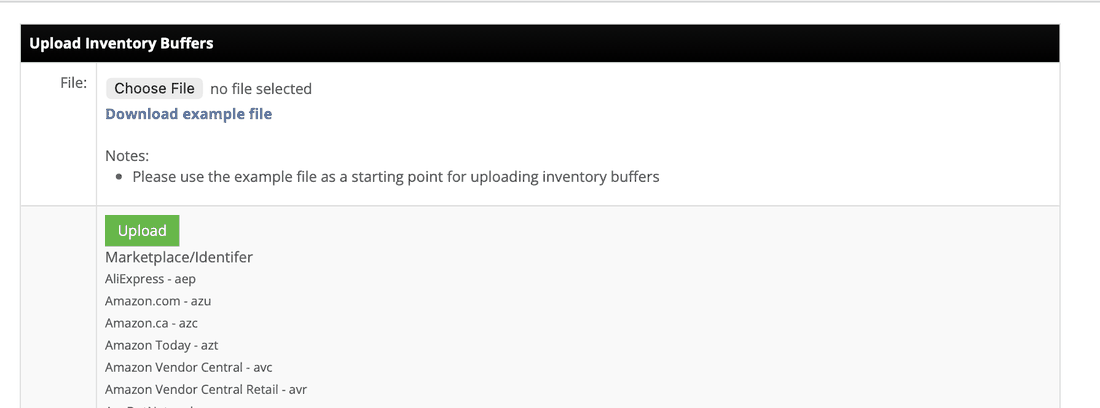
The exclusions column uses short marketplace identifiers, also shown on the upload page itself.
Marketplace identifier reference (tap to expand)
| Marketplace | Identifier | Marketplace | Identifier |
|---|---|---|---|
| AliExpress | aep | Amazon.com | azu |
| Amazon.ca | azc | Amazon Today | azt |
| Amazon Vendor Central | avc | Amazon Vendor Central Retail | avr |
| AspDotNet | adn | AutoZone | auz |
| Back Market | bmk | Back Market Business | bmb |
| Backyard.com | byd | Badcock | bck |
| Bed Bath & Beyond | bbb | Best Buy | beb |
| BigCommerce | bgc | Bluestem | bst |
| Blue Yonder | byn | Bonanza | bza |
| Bright Sites | brs | Brown Trout | brt |
| Build.com | bcm | Cdiscount | cdi |
| Channel Advisor | cad | Channel Gate | cgt |
| Cin7 | cin | Costco | cos |
| Darty | drt | Deposco | dep |
| Dsco | dsc | EasyShip | esh |
| eBay | eby | Ecwid | ecw |
| Epicor | epi | Etsy | ets |
| Faire | fai | FarApp | far |
| Feedonomics | fee | Fnac | fnc |
| Finale Inventory | fii | Google Shopping | gos |
| Groupon | grp | Groupon EDI | gpe |
| HD Supply | hds | Hollar | hol |
| Home Depot | hod | HomeRoots | hro |
| Hot Topic | htp | Houzz | hoz |
| HSN | hsn | InfiPlex | inf |
| Jet | jet | Lazada | laz |
| Lowes | low | Lowes Marketplace | lmp |
| Magento | mag | Maisonette | mai |
| Marketo | mko | Mercado Libre | mlb |
| Method QB | mtq | Michaels | mic |
| MS Dynamics | msd | NetSuite | nst |
| Newegg | neu | Newegg VF | nvf |
| Office Depot | odp | Open Sky | osk |
| Overstock | ovs | PageDNA | pdn |
| Phone House Spain | phs | Quickbase | qbs |
| QVC | qvc | Rakuten | rak |
| Rakuten.fr | rkf | Reebelo | reb |
| Refurbed.de | rde | Rooms To Go | rtg |
| Rue du | rdu | Rue La La | rll |
| RPMWare | rpm | Sage World | sgw |
| Sams Club | sam | Sears | srs |
| Sellercloud | scd | ShipStation | shs |
| Shopify | shp | ShopHQ | shq |
| Sku Vault | skv | Squarespace | sqs |
| Square Up | squ | Swappa | swp |
| Tanga | tga | Target | tgt |
| Target+ | tgp | Target Stores | tgs |
| Teamwork Commerce | twc | Temu | tem |
| TikTok | ttk | Tire Shop | trs |
| Tractor Supply | tsu | Until Gone | ung |
| Walmart | wal | Walmart 1P Supplier | w1s |
| Wayfair | way | Website | web |
| Wish | wsh | Wix | wix |
| Woo Commerce | woo | World Market | wmk |
| Zoho | zoh | Zoro Tools | zor |
| Zulily | zly |
Put together, every control in this article funnels into one question per SKU, per channel: what number does the marketplace actually get told?
What Do Real InfiPlex Inventory Setups Look Like?
ERP as the single source of truth. The most common serious setup: NetSuite or another ERP holds master inventory, InfiPlex pulls it, warehouse-matched or totaled, and pushes it to Amazon, Walmart, Shopify, TikTok Shop, eBay, and every other connected channel. The ERP team never touches a marketplace; the marketplaces never disagree with the ERP.
Mixed masters across one account. The setup from the diagram above, drawn from a real client: an ERP controls five warehouses' inventory while a fulfillment provider's counts feed two more. One combined pool, two systems of record, each authoritative for its own warehouses, all synced to every channel together.
InfiPlex Inventory Sync Questions
How do I prevent overselling when selling on multiple marketplaces?
Keep every warehouse in one system and let it update every channel automatically, which is what InfiPlex does. For the riskiest last few units, add a set-to-zero threshold per channel, or an Inventory Buffer per SKU that reserves the final units for one chosen sell-out marketplace.
Can different warehouses have different inventory sources?
Yes. The inventory source is a per-warehouse choice in InfiPlex. An ERP can be master for some warehouses while fulfillment services feed others, on the same account.
What happens if two sources feed the same warehouse?
Both are allowed. If they ever report the same SKU, the last write wins, there's no summing. In practice clients keep each source's SKUs unique, so this rarely matters.
Can I send a marketplace only one warehouse's inventory?
Yes. Outbound sync is set per channel: the combined total by default, or a specific warehouse's count only, configured on that channel's integration page.
Which channels support warehouse-level inventory mapping?
Amazon, TikTok, Walmart, and Wayfair support multiple warehouses on their side, so InfiPlex can map warehouses to warehouses many to many, one to many, or many to one.
How fast does InfiPlex sync inventory?
As fast as each connection allows: essentially instant where webhooks exist (like Shopify), every 15 minutes on most API connections in both directions, and on each connection's own schedule where the connection itself only updates daily.
What's the difference between the set-to-zero threshold and the Inventory Buffer?
The set-to-zero threshold is per channel: at or below the threshold, that channel is told 0. The Inventory Buffer is per SKU: it holds units back from every channel except the ones you exclude, making the excluded marketplaces the designated sell-out channels for that SKU. If both are set on one channel, the threshold fires first: if it zeroes the count, the buffer is skipped, otherwise the buffer runs.
Can NetSuite stay the master while a 3PL feeds some warehouses?
Yes. That's a normal mixed setup: NetSuite as master for its warehouses, the 3PL's counts pulled into others, each warehouse kept separate and totaled or split per channel.
Why isn't inventory being sent for some SKUs on a marketplace?
The SKU probably isn't flagged as sold on that marketplace. Every marketplace has a Sold On flag (SOT for TikTok, SOA for Amazon, and so on), and InfiPlex only sends inventory for flagged SKUs. Occasionally that's deliberate, like AliExpress promotional allocation, where the marketplace doesn't allow inventory to be set.
Where do I flag SKUs as sold on a marketplace?
Sell On > that marketplace, for example Sell On > TikTok. The menu entry appears once that marketplace's Sold On setting is enabled. Flags are set by CSV upload with a single sku header column, or a pasted list, in one of three modes: replace the whole flagged set, add to it, or remove from it.
What file format does the Inventory Buffer upload use?
A CSV with four columns: sku, exclusions (marketplace identifiers separated by semicolons), buffer (units to hold back), and enabled (1 to apply, 0 to remove). For example, a row of iPhoneX, azu;azc, 4, 1 reserves the last 4 units of that SKU for Amazon.com and Amazon.ca.
Does the Inventory Buffer work with per-channel warehouse scoping?
Yes. The buffer subtracts from whatever number would otherwise be sent, so a channel scoped to one warehouse's 25 units with a buffer of 2 sees 23.
Can InfiPlex pull inventory from Amazon instead of sending it?
Yes. A few clients run older systems that already write inventory to Amazon and treat Amazon as their master. InfiPlex pulls those numbers from Amazon into warehouses and syncs them to every other channel. Unusual, but fully supported.
Where does Amazon FBA stock go in InfiPlex?
Into whichever warehouse you select for it in the Amazon integration settings. If none is selected, the first warehouse in the system is used.
Does InfiPlex read FBA, WFS, and FBT stock by SKU as separate locations, or only push inventory to those channels?
It reads them. Amazon FBA, Walmart WFS, and TikTok Shop FBT stock are each pulled by SKU into their own InfiPlex warehouse, separate from your own warehouses and any 3PL, and kept current. Pushing inventory to Amazon, Walmart, and TikTok Shop is a separate per-channel setting, so reads and sends are independent.
Ask an AI Agent Instead
You can ask an AI agent what a SKU has in each warehouse, why it is at that number, and what is below its reorder point, and have it apply a cycle count with one preview. Every InfiPlex instance runs a native MCP server, so Claude, ChatGPT through Codex, or any MCP client connected to your instance can do it from a chat window, with a preview before anything channel-visible changes. See the five-minute set-up and the prompts by role.
Need Something This Doesn't Cover?
Contact Us and we'll take a look. Support is included with every InfiPlex plan.
Stop the oversell before it happens
See the full mechanics behind InfiPlex's multichannel inventory sync, buffers, thresholds, and per-channel rules included.
Related NetSuite guides
Related Inventory guides
- SKU groups vs bundles vs SKU maps
- InfiPlex Restock Alerts: How the Reorder Point Is Calculated
- Inventory Buffer tool
- Nightly restock agent
- Daily inventory by warehouse report agent
- Receive a container from a spreadsheet with the MCP server
- Selling on a marketplace InfiPlex does not connect to yet
- AI agent for Temu
