
Last Updated: Sep 21, 2026
 The Batch Pick List in InfiPlex Inventory & Order Management System (OMS) groups a set of open orders so the warehouse picks them in one pass. Any Order List search can become a batch, and the list gives total quantities per SKU across the batch.
Creating a Batch
The Batch Pick List form sits at the bottom of the Order List. Search your open orders first, then create the batch from the results.
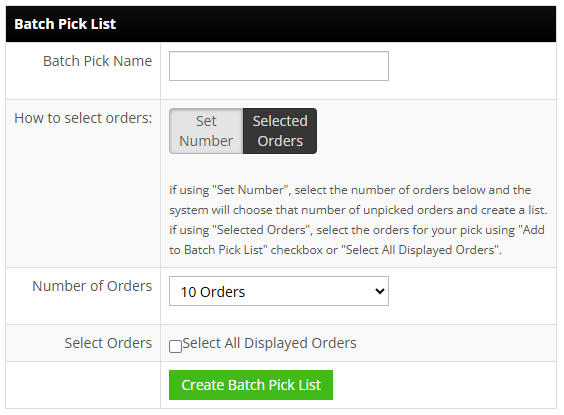
Common ways to group:
- Ship-by date: marketplaces that supply one (Walmart, Wayfair, Target and others) let you pick the orders due first.
- Marketplace: filter by order source to pick one channel at a time.
The batch shows every SKU in the group with the total quantity to pull. At the shipping station, use the list to find each order, print its label, and pack it; see Shipping from the Order List for the label steps. Orders are flagged Fully Shipped automatically once every item is in a package with a label, and you can set the Processed flag as each one is packed.
Finding a Batch Later
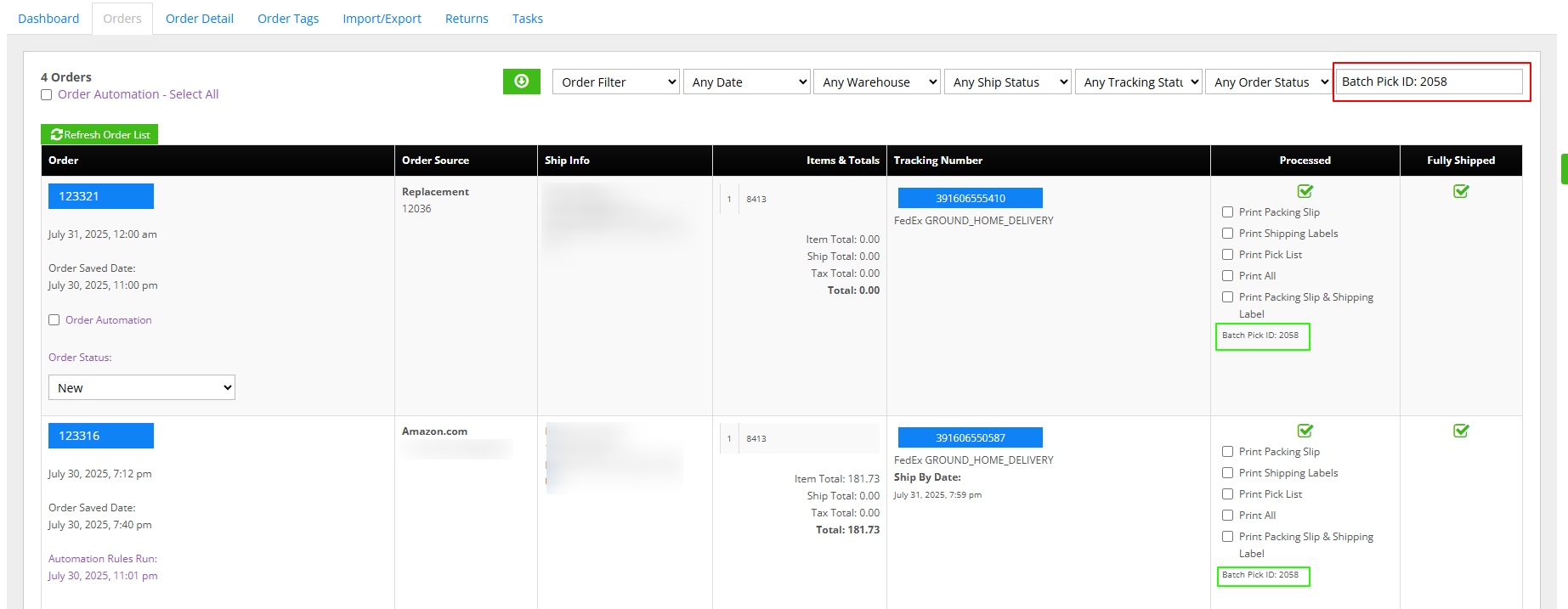
An order in a batch shows its ID at the bottom of the Processed column, for example "Batch Pick ID: 2356". Paste that text into the Order List search box to bring back every order in the batch.
Set-up Support
Contact InfiPlex with any batch picking questions. Support is included with every InfiPlex package.
