
Last Updated: Sep 21, 2026
 InfiPlex Inventory & Order Management System (OMS) connects directly to your Sears Marketplace seller account. Once connected, InfiPlex pulls Sears orders, sends tracking back when you ship, and keeps Sears inventory in step with your other channels.
Before You Start
Log into your Sears Marketplace account, or sign up if you are not yet a seller, and gather:
- Sears email: the login email for your Sears Marketplace account.
- Seller ID: shown under your Business Name in the account drop-down, top right of the portal.
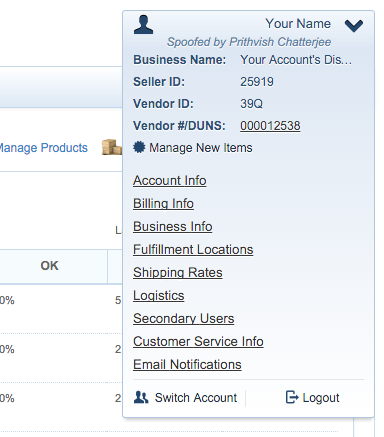
- Sears API Key: generate one on the Account Info page using the API Authorization Key. Generating a new key invalidates any old one.
Sears Settings in InfiPlex
- Log into your InfiPlex OMS site and go to Settings > Integrations > Sears.
- sears_email: your Sears login email
- sears_seller_id: your Seller ID
- sears_api_key: your API key
- sears_pull_orders: set to Yes to pull Sears orders into the OMS
- sears_send_tracking_numbers: set to Yes to send tracking back to Sears when an order ships
- sears_sos_enabled: set to Yes to send inventory levels to Sears for SKUs associated to Sears
- sears_sos_pricing_enabled: No by default. Turn on only if you have the pricing system configured; contact support first.
- sears_inventory_set_to_zero: default 0. The threshold below which InfiPlex reports zero. Set to 5, for example, and any SKU with 5 or fewer units shows as 0 at Sears.
- Save. InfiPlex starts checking Sears for new orders on the next cycle.
Set-up Support
Contact InfiPlex with any Sears questions. Support is included with every InfiPlex package.
