
“Do you handle bundles?” is three questions wearing one word. In InfiPlex there are three separate tools that people mean when they say it, and they do different jobs: SKU Groups keep several SKUs at one shared count, Bundles are true builds that turn component stock into bundle stock, and SKU Maps (Item Bundle Groups) translate SKUs and quantities for a specific 3PL, WMS, or ERP connection. Pick the wrong one and you either oversell or you do inventory math by hand. This guide says exactly what each does, where it lives, and when to reach for it, including how each behaves when NetSuite is the system of record.
Jump to the Tool You Need
| If Your Situation Is… | Use |
|---|---|
| Several SKUs are the same physical unit and must always show the same count | SKU Groups |
| You sell a bundle SKU and also sell its components separately | Bundles |
| A 3PL, WMS, or ERP knows an item by a different SKU or quantity than your channels do | SKU Maps (Item Bundle Groups) |
| A marketplace bundle SKU has to reach a 3PL as its component SKUs | SKU Maps (Item Bundle Groups) |
| You want a quick way to tell the three apart | Side-by-Side |
| NetSuite is your inventory source of truth | How This Works With NetSuite |
SKU Groups: One Count Shared Across Several SKUs
A SKU Group is a set of SKUs whose inventory moves together. Any inventory change made to any SKU in the group is made to every other SKU in the group. Use it when several SKUs are, physically, the same unit: the same item listed under a legacy SKU and a new one, a master SKU and its channel-specific variants, or a product that had to be relisted under a different identifier on one marketplace.
The two kinds of inventory change behave differently, and this is the part worth getting right:
- Hard set. Setting one SKU to a specific number sets every SKU in the group to that number. Set one to 17 and all of them read 17.
- Add or subtract. Adding or subtracting a quantity applies that same delta to each SKU's own count. Starting counts of 4, 5, 7, and 14 with a subtract of 2 become 2, 3, 5, and 12.
A sale of one unit through any SKU in the group is a subtract of 1 across the group, which is exactly what you want when the SKUs are one physical item. It is also why a SKU Group is the wrong tool for bundles: there is no quantity ratio, no component, and no build. It is a shared count, nothing more.
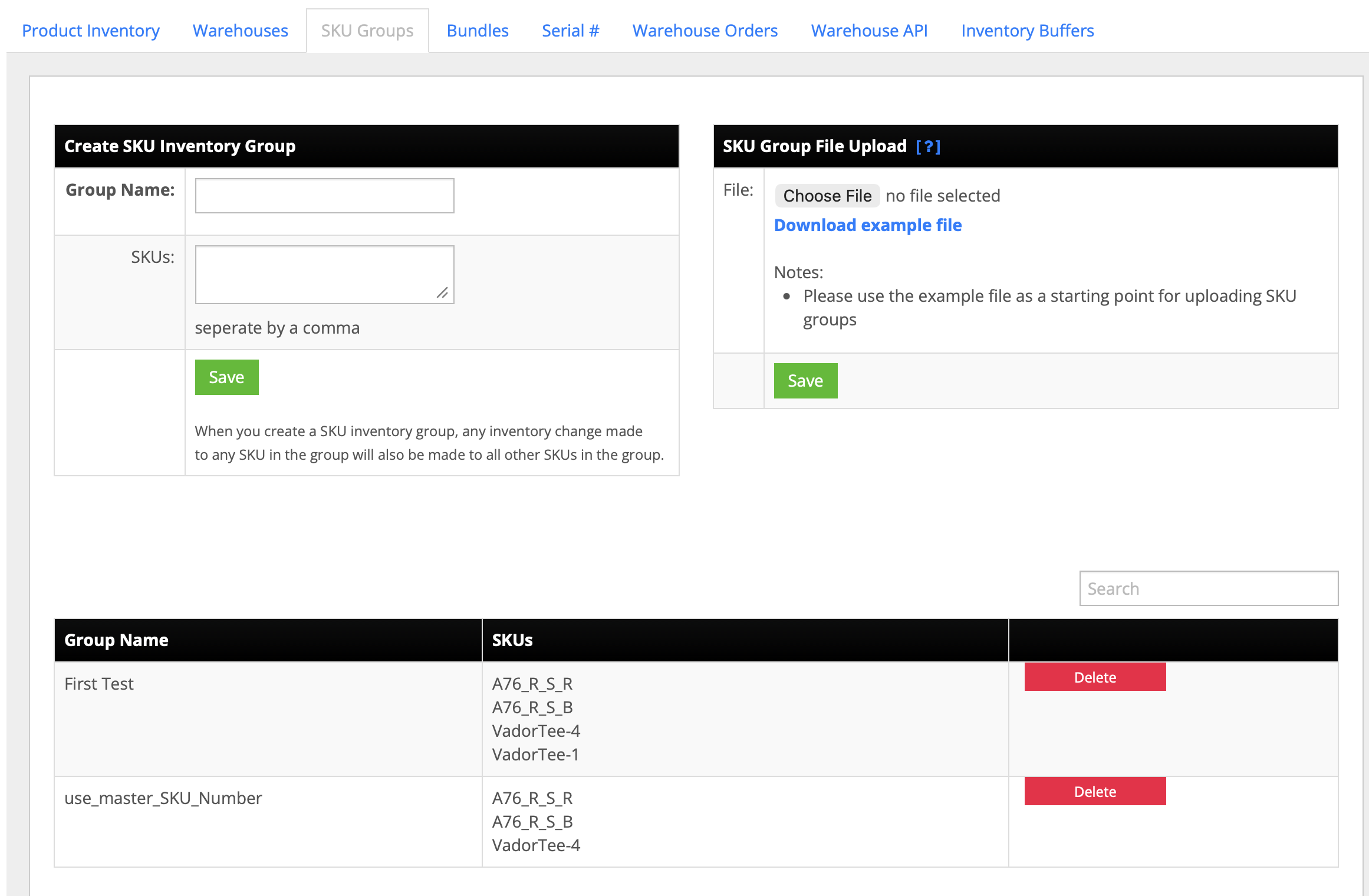
Where it lives: Inventory > SKU Groups. Create a group by entering a Group Name and a comma-separated list of SKUs, or upload a CSV using the example file as the starting point. Existing groups are listed with their SKUs and can be deleted from the same screen.
Bundles: True Builds From Component Stock
A Bundle in InfiPlex is a real build. The bundle SKU has its own inventory, and that inventory is created by consuming the components. If Bundle A has stock of 2 and the system makes 3 more, it subtracts the required quantity of each component SKU from the warehouse and adds 3 to Bundle A. The counts you then send to every marketplace already reflect that trade.
That is the whole point, and it is an oversell problem before it is anything else. Say you hold 2 units of an item and you also list a bundle that contains 1 of it. Without a build, the marketplace shows 1 of the bundle and 2 of the item. Sell 1 of the item and 1 of the bundle in the same afternoon and you have oversold, because the same 2 units were promised twice. With the bundle tool, building the bundle moves the stock: the marketplace shows 1 of the bundle and 0 of the item, or whichever split you configured, and the two listings can no longer promise the same unit. Zero oversells, because the numbers were reconciled before they were sent, not after an order came in.
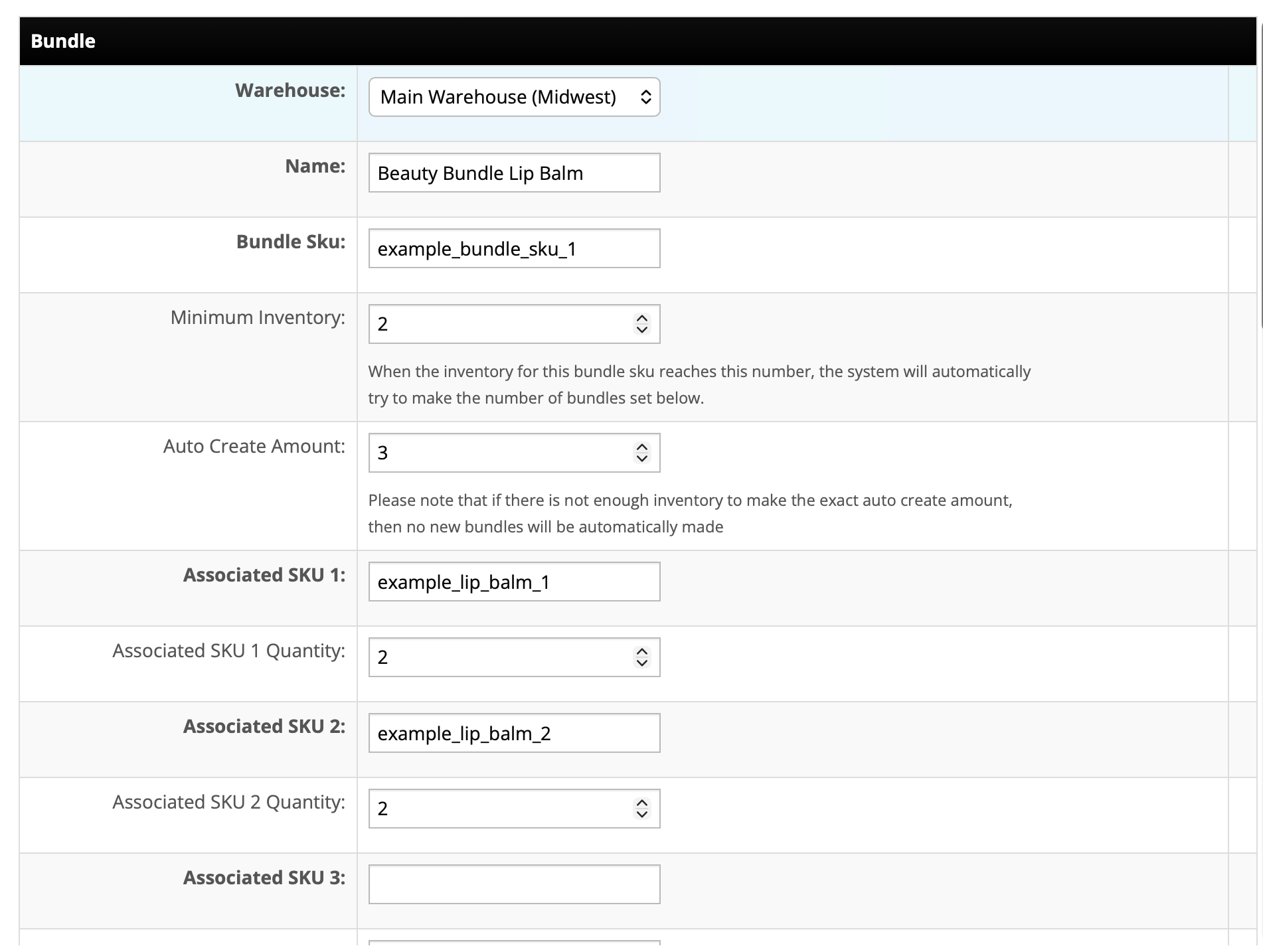
Each bundle is defined with these fields:
| Field | What It Does |
|---|---|
| Warehouse | The warehouse whose component stock the bundle is built from, and where the built bundle stock lands. A bundle is defined per warehouse. |
| Name and Bundle SKU | The bundle's display name and the SKU your channels sell it under. |
| Minimum Inventory | When the bundle SKU's stock reaches this number, the system automatically tries to build more. |
| Auto Create Amount | How many bundles to build when the minimum is reached. If component stock cannot cover the exact amount, no bundles are made; there is no partial build. |
| Associated SKU 1, 2, 3… and quantities | The component SKUs and how many of each go into one bundle. |
Bundles can be created one at a time or uploaded in bulk from the Bundles tab. The no partial build rule is deliberate: a partial batch would leave both the bundle count and the component counts somewhere you did not choose, so the system waits until the full Auto Create Amount can be made.
What happens on the order: the bundle SKU is pushed to your ERP as one line, the SKU the customer bought. It is not exploded into components at the ERP. The bundle tool manages inventory so the marketplaces are right; it does not restructure the sales order. The bundle SKU therefore needs to exist as an item in the ERP, because the push needs its item ID.
SKU Maps (Item Bundle Groups): Translate SKUs Per Fulfillment Connection
A SKU Map does not change inventory at all. It translates. When an order is sent to a fulfillment connection, a 3PL, a WMS, or an ERP, each source SKU on the order is replaced by the destination SKU (and destination quantity) that connection knows. When tracking comes back from that connection, the map is reversed so the marketplace order shows the SKU it started with. When inventory is pulled from that connection, the map is reversed the same way.
The upload is a CSV with three columns:
- source_sku: the source, “primary” SKU, the one your channels use
- dest_sku: the destination, “child” SKU the fulfillment connection knows
- dest_sku_qty: how many of the destination SKU one source SKU becomes
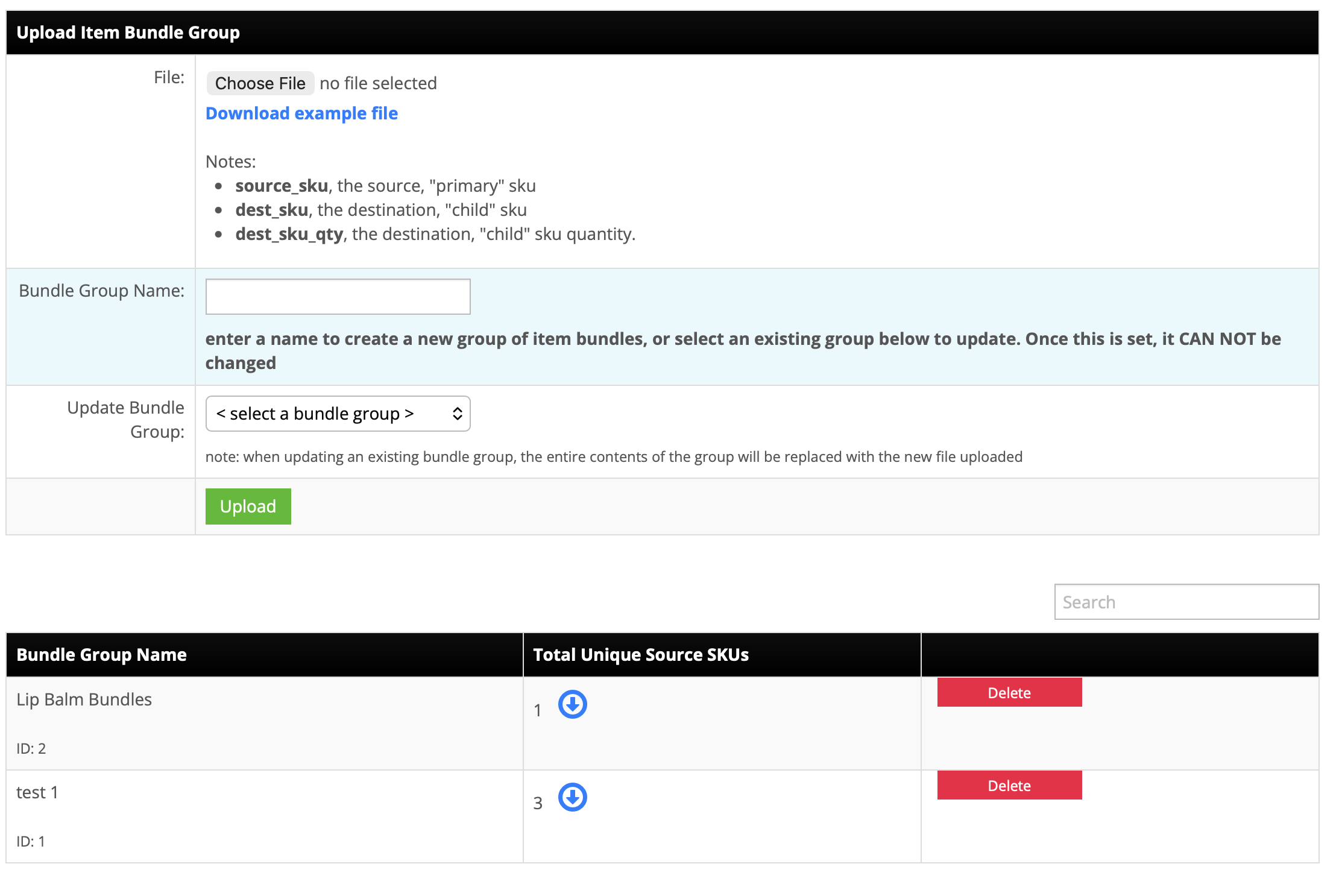
Rows are grouped under a Bundle Group Name, and the group is what gets associated to a specific fulfillment connection. That is what makes the tool work across a real operation: if one 3PL knows your item as one SKU and a second 3PL knows it as another, you upload two groups and associate each to its own fulfillment. Orders routed to either warehouse are mapped with that warehouse's group, and shipments and inventory pulled from each are reverse-mapped with the same group, so nothing about your channel SKUs has to change.
Two things to know about maintaining a group:
- Once a Bundle Group Name is set, it cannot be changed.
- Uploading a file against an existing group replaces the entire contents of that group with the new file. Keep the CSV as the source of record and re-upload the whole thing rather than trying to patch individual rows.
One-to-many maps. A single source_sku can have several rows, each pointing to a different dest_sku with its own quantity. That is how a marketplace bundle SKU reaches a 3PL that picks components: the order goes out as the component SKUs at the right quantities, the 3PL picks and ships them, and the tracking that comes back is reverse-mapped onto the single bundle line the marketplace is expecting. This is a live pattern, for example on a TikTok Shop connection fulfilled through a VeraCore WMS, and it is a map, not a build: the channel is selling a bundle SKU, and the 3PL is picking pieces.
Side-by-Side: Which Tool Does What
| SKU Groups | Bundles | SKU Maps (Item Bundle Groups) | |
|---|---|---|---|
| Changes inventory? | Yes: one change cascades to every SKU in the group | Yes: building consumes component stock and creates bundle stock | No: translation only |
| Quantity ratio | None: 1 to 1, always | Per component, per bundle | Per row, dest_sku_qty |
| Scope | Account-wide set of SKUs | Per warehouse | Per fulfillment connection |
| Direction | n/a | Component stock to bundle stock | Source to destination on push; reversed on tracking and inventory pull |
| What the ERP receives on an order | The SKU that sold | The bundle SKU, as one line | The destination SKU(s), if the ERP is the mapped connection |
| Set up in | Inventory > SKU Groups (form or CSV) | Inventory > Bundles (form or upload) | Upload Item Bundle Group (CSV, named group) |
| Typical reason | Same physical unit under several SKUs | Selling a bundle and its components at the same time | A 3PL or ERP that knows the item by a different SKU or as pieces |
They also combine. A bundle can be built in InfiPlex for inventory accuracy, sold on a marketplace under the bundle SKU, and, if the 3PL that ships it picks components, mapped to those components with an Item Bundle Group on that 3PL's connection. Each tool is doing its own job in that chain.
How This Works When NetSuite Is the Source of Truth
The question that comes up on every NetSuite integration: if NetSuite owns inventory, who builds the bundle? The answer is that the bundle tool and NetSuite-as-master are not in conflict, because the bundle tool is about what the marketplaces are told, not about overriding NetSuite. Setups are client-dependent, but one that works looks like this:
- A specific NetSuite location is synced into an InfiPlex warehouse, and that warehouse holds only the component SKUs. InfiPlex pulls NetSuite inventory by modified date, so those component counts stay current.
- The bundle is defined against that warehouse in InfiPlex. When its Minimum Inventory is reached, InfiPlex builds the Auto Create Amount from the component stock in that warehouse and sends the resulting bundle and component quantities to the marketplaces, with each channel's buffers and set-to-zero threshold applied on the way out.
- When a bundle sells, the order pushes to NetSuite with the bundle SKU as one line. NetSuite handles whatever it needs to on its side; InfiPlex does not explode the line. The bundle SKU has to exist as a NetSuite item in some form, because the push needs its NetSuite item ID.
SKU Maps apply to the NetSuite connection the same way they apply to a 3PL: if a channel SKU differs from the NetSuite item, an Item Bundle Group associated to the NetSuite connection translates it on push and reverses it on tracking and inventory pull. NetSuite locations map to InfiPlex warehouses, and if your account has Advanced Item Location Configuration enabled, location-level inventory is read through SuiteQL, the one path that still returns it, which the NetSuite failure and recovery guide covers in detail. Moving to InfiPlex from another connector does not change any of this; the connector switching guide covers how channels move over one at a time.
SKU Groups, Bundles, and SKU Maps: Questions
Does InfiPlex handle kits and bundles?
Yes, and the useful answer is which tool. If you sell a bundle SKU and also sell its components separately, the Bundles tool builds bundle stock out of component stock so both counts stay accurate. If a 3PL or ERP knows your item by a different SKU or breaks it into pieces, an Item Bundle Group (SKU map) translates it on the way out and back. If several SKUs are literally the same physical unit, a SKU Group keeps their counts identical.
What is the difference between a bundle and a SKU map in InfiPlex?
A bundle changes inventory: building 3 bundles subtracts component stock and adds 3 to the bundle SKU, so the numbers you send to marketplaces are already reconciled. A SKU map does not change inventory; it translates SKUs and quantities for one fulfillment connection when orders go out, and reverses the translation when tracking and inventory come back.
How does a SKU Group treat a hard-set count versus an add or subtract?
A hard set applies the same value to every SKU in the group: set one to 17 and all of them read 17. An add or subtract applies the same delta to each SKU's own count: SKUs at 4, 5, 7, and 14 with a subtract of 2 become 2, 3, 5, and 12.
What happens when a bundle's Minimum Inventory is reached but there aren't enough components?
No bundles are made. Auto-build only fires when component stock can cover the exact Auto Create Amount; it does not build a partial batch. That is deliberate, because a partial build would leave both the bundle count and the component counts in a state you did not choose.
Is a bundle built per warehouse or across all warehouses?
Per warehouse. Every bundle definition names the warehouse whose component stock it draws from, and the built bundle stock lands in that same warehouse. If the same bundle is built in two warehouses, it is defined twice, once per warehouse.
Does the bundle SKU get exploded into components when the order goes to NetSuite or another ERP?
No. The bundle SKU is pushed to the ERP as one line. The bundle tool exists to keep marketplace inventory correct when you sell both the bundle and its components; the ERP receives the bundle SKU the customer bought. The bundle SKU therefore has to exist as an item in the ERP, because the push needs its item ID.
Can a channel bundle SKU be sent to a 3PL as its component SKUs?
Yes, with an Item Bundle Group associated to that 3PL's fulfillment connection: one source_sku row per component, each with its own dest_sku and dest_sku_qty. The 3PL picks components, and when tracking comes back InfiPlex reverses the map so the marketplace order shows the bundle SKU it started with.
Can I use a different SKU map for each 3PL?
Yes. Each Item Bundle Group is associated to a specific fulfillment connection, so a 3PL that knows an item as one SKU and a second 3PL that knows it as another each get their own group. Orders routed to either warehouse are mapped with that warehouse's group, and inventory pulled from each is reverse-mapped with the same group.
Can I edit a SKU map after it's uploaded?
You re-upload it. Selecting an existing Bundle Group Name and uploading a new file replaces the entire contents of that group with the new file, and the group's name cannot be changed once it is set, so keep the group's CSV as the source of record and re-upload the whole thing rather than trying to patch rows.
Can the bundle tool run while NetSuite stays the inventory source of truth?
Yes. One working setup syncs a specific NetSuite location into an InfiPlex warehouse that holds only the component SKUs. InfiPlex builds the bundles in that warehouse and sends bundle and component quantities to the marketplaces, and when a bundle sells the order pushes the bundle SKU to NetSuite as one line. Setups vary by client; that is one of them.
Sell the bundle and the components, with zero oversells
SKU groups, true bundle builds, and per-connection SKU maps are included on every InfiPlex plan, alongside buffers, set-to-zero thresholds, and per-channel inventory rules.
Related guides
- Multichannel Inventory Sync: Stop Overselling
- InfiPlex Inventory Sync
- CastleGate 1:1 vs Pooled Inventory Sync
- Multi-Warehouse Order Routing
- 3PL Connector
- TikTok Shop Integration
- NetSuite Integration
- NetSuite Integration Failures and Recovery
- Switching NetSuite Marketplace Connectors
- NetSuite Custom Field Mapping and Order Rules
- InfiPlex vs FarApp (NetSuite Connector)
