
One warehouse, and shipping is simple: everything comes from the same place. Add a second warehouse, a 3PL, or a drop-ship partner, and every order becomes a routing decision: which location has the stock, which location should ship it, and what happens when no single location has enough on its own. InfiPlex answers all three automatically, splitting a single order across as many warehouses and fulfillment services as it needs to, then pulling tracking from every one of them and syncing it back to the marketplace as one order. If you're evaluating software rather than the mechanics, see Order Management for 3PL.
Jump to the Way You Want to Slice and Dice Orders
| If You Want To… | Jump To |
|---|---|
| Let orders find the right warehouse on their own | How Warehouse Selection Works |
| Ship one order's items from wherever each one actually is | How a Multi-Item Order Splits |
| Split an order between my own warehouse and a 3PL | Owned Warehouse + 3PL |
| Split an order across more than one 3PL, no warehouse of mine involved | Splitting Across Multiple 3PLs |
| Use a fulfillment service or drop-shipper as if it were a warehouse | Virtual Warehouses |
| Force an entire sales channel to one location, no exceptions | Forced Warehouse Routing |
| Keep it simple: clean regions, no overlap | Clean Zip-Code Splits |
| Know what happens if a warehouse runs out of stock mid-order | Rare Edge Cases |
How Much Flexibility Does InfiPlex Order Routing Actually Give You?
- Route by whatever matters most to you. Zip code proximity, a manual priority list, a channel-level force, or a SKU-specific override, layered in that priority order.
- Split one order across your own warehouses, a warehouse and a 3PL, or multiple 3PLs at once. InfiPlex pulls tracking from every destination and syncs it back to the marketplace as a single order.
- Treat any warehouse as a stand-in for a real fulfillment or drop-ship service. KeHE, NTP, Wayfair Castlegate, Amazon FBA, Ryder, and 16 other named services connect the same way, plus 6 WMS platforms (Logiwa, VeraCore, 3PL Central, ShipHero, ShipStream, Snapfulfil) that reach any 3PL built on them, and InfiPlex itself, letting an order route into a second, independent InfiPlex operation. "Warehouse" in InfiPlex doesn't have to mean a building you operate.
- Fall back automatically when stock runs short, rather than stalling the order or requiring a manual fix.
- Get alerted the moment an order splits and ships partially, instead of finding out from the marketplace or the customer.
Where Do I Set Up Order Routing?
- Enable a fulfillment service, before it can be used at all: Settings > Base Settings > Warehouse, using that service's enabled flag, for example kehe_fbk_enabled or wayfair_castlegate_fbw_enabled. The naming follows the same idea as Amazon's FBA, "fulfilled by" whichever service the flag names.
- Associate a service to a warehouse, once it's enabled: Inventory > Warehouses > select a warehouse, then set its service ID field, for example KeHE ID or Wayfair Castlegate ID. This is what turns a warehouse from a real location into a virtual one, or gives it both at once.
- Set the system default fulfillment order, the baseline every warehouse follows unless something more specific overrides it: Settings > Base Settings > Warehouse, using the warehouse_fulfill_order_method setting, either Manual Sort or Zip Code Distance.
- Set zip code rules for a warehouse, to limit it to a region: Inventory > Warehouses > Add/Edit Warehouse. The full rule syntax and a US coverage map by first digit are in Geo Routing by Zip Code.
- Override the fulfillment order for one SKU, when a specific product needs different handling than everything else: Inventory > that SKU > Warehouses.
- Force every order on a channel to one warehouse, when a whole marketplace should always route the same way regardless of stock or zip: Settings > Integrations > that channel, for example the amazon_warehouse_id setting.
What Decides Which Warehouse Fulfills an Order?
InfiPlex checks four layers, in order, from strongest override to weakest, to decide which warehouse fulfills an order:
- An integration-level force. If a channel has a forced warehouse ID set, every order on that channel goes there, full stop. Nothing else in this list gets checked for warehouse selection.
- Zip Code Rules. Any warehouse with zip rules enabled is only eligible for orders shipping to a matching zip. This narrows the field, it doesn't set an order by itself.
- A SKU-specific fulfillment order. Overrides the system default for that one SKU, among whichever warehouses are still eligible.
- The system default sort. Either a manual, drag-ordered warehouse list, or the warehouse closest to the order's ship-to zip.
How Does a Multi-Item Order Actually Split?
Once the priority order above is set, InfiPlex applies it to every SKU on the order independently. Most of the time that's uneventful: each item is simply checked against the priority list and taken from the first warehouse that has it. Different items on the same order often end up shipping from different warehouses for the plainest possible reason, that's just where each one is stocked, with nothing running short and no edge case involved.
Can One Order Ship From an Owned Warehouse and a 3PL at the Same Time?
Yes. This is one of the most common advanced setups: part of an order ships from a warehouse a seller runs themselves, and the rest ships from a 3PL. InfiPlex tracks both halves and syncs both tracking numbers back to the marketplace against the same order.
Can a Single Order Split Across Multiple 3PLs?
Yes, and no warehouse the seller operates has to be involved at all. An order can split entirely across two or more third-party fulfillment services, with InfiPlex pulling tracking from each one and syncing it back as a single order.
Does a Warehouse in InfiPlex Have to Be a Real Building?
No. An InfiPlex warehouse can be a physical location you pick and pack from, or it can be virtual, an ID that exists purely to route orders to a fulfillment or drop-ship service. Since both look identical to the routing logic in the earlier sections, the same priority rules, zip rules, and fulfillment order settings apply either way.
One InfiPlex warehouse can even be tied to more than one fulfillment service at once, each handling its own slice of the catalog.
Does Forcing a Warehouse Skip All This Routing Logic?
Only the selection part. In InfiPlex, an integration-level force decides which warehouse gets the order and skips zip rules, SKU overrides, and the default sort entirely to do it. But if that forced warehouse is itself virtual, tied to a fulfillment service, the handoff to that service still happens exactly like it would for any other warehouse. Forcing a warehouse answers "where," not "how it actually ships."
What Does a Clean Multi-Warehouse Zip Split Look Like?
Most of InfiPlex's routing complexity above exists for edge cases. The common case is simpler: a handful of warehouses, each covering its own non-overlapping region by zip code, so most orders have exactly one eligible warehouse and nothing to negotiate.
What Does Order Routing Look Like in Practice?
A few composite examples of how these pieces actually combine for real sellers:
- One warehouse, plus FBA for part of the catalog. A seller runs a single warehouse for most SKUs, forces Amazon orders for a specific set of SKUs to Amazon's own fulfillment network, and lets everything else follow the normal warehouse priority.
- Regional warehouses with drop-ship overflow. Two or three warehouses split the country cleanly by zip code, with a drop-ship supplier attached as a virtual warehouse for a handful of SKUs the seller doesn't want to stock at all.
- Multiple 3PLs split by product type. Heavy or oversized SKUs route to a 3PL suited for freight, everything else routes to a second 3PL, with SKU-specific fulfillment orders keeping the two from overlapping.
- A promotional insert added at the warehouse level. A seller wants a free gift or a promo card added to every box shipped from one specific warehouse, without changing what's actually sold on the order.
What Do Fulfillment Service Settings Actually Look Like?
Once a fulfillment service is enabled, it gets its own dedicated settings page, for example Fulfillment > KeHE FBK, with controls specific to that service. As one real example, Wayfair Castlegate's settings include authentication and a Supplier ID for pulling inventory, a SKU map translating between InfiPlex and Castlegate SKUs, control over how inventory syncs between the two systems, and a data map that translates InfiPlex order data into the retailer IDs Castlegate expects, down to setting a specific shipping speed for a specific order source. It also includes an alert email that fires specifically when an order splits between Castlegate and anything else.
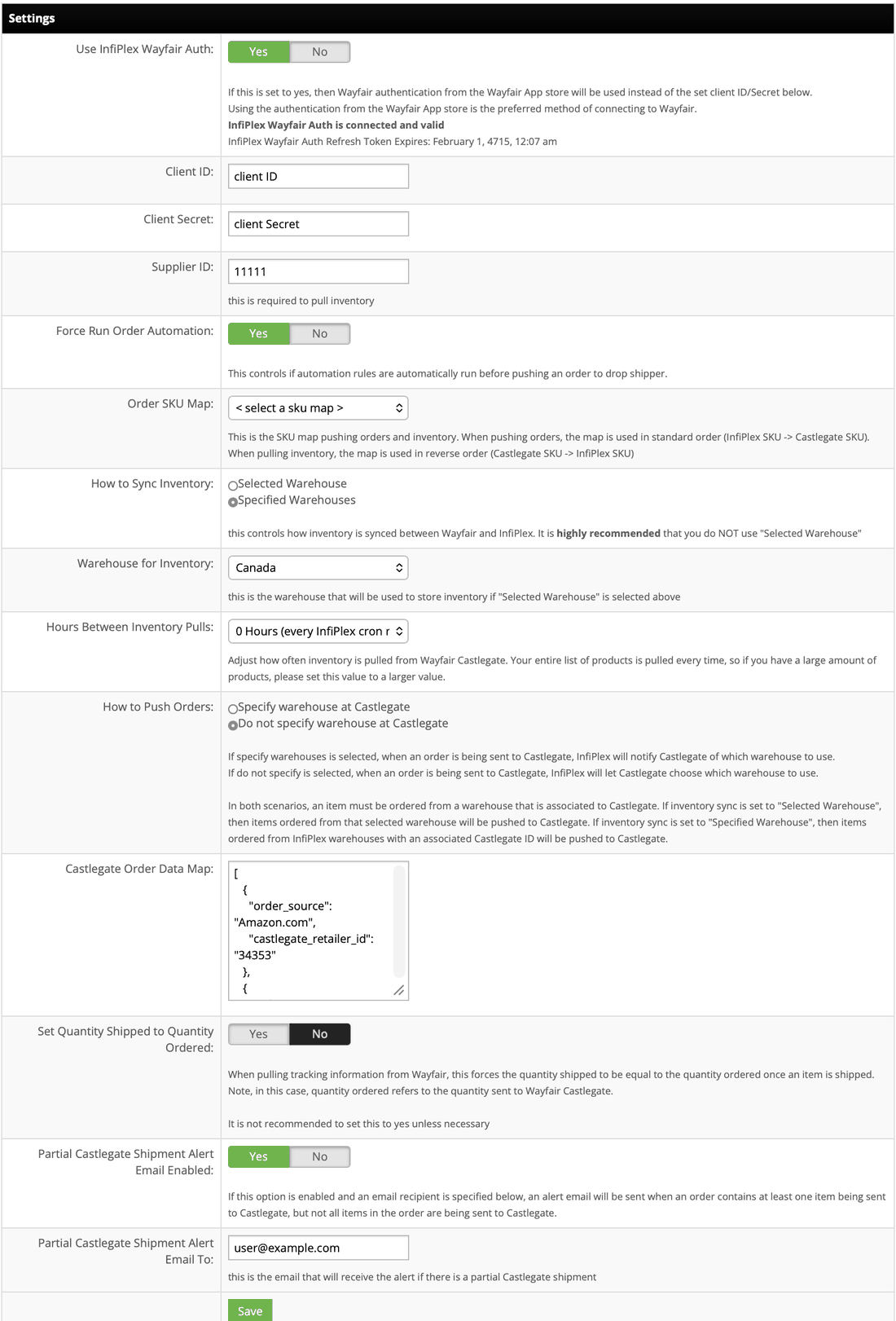
Every connected service has its own version of this page, tuned to what that specific service needs to receive an order correctly. The specifics vary service to service, but the pattern, authentication, SKU mapping, inventory sync behavior, and order-level rules, repeats across all of them.
Which Fulfillment Services Does InfiPlex Connect To?
21 named fulfillment services and 3PLs today, each enabled the same way as any other order-routing connection:
Six more connections work at the platform level rather than as a single named company, they're the warehouse management software several 3PLs run on behind the scenes, not a 3PL themselves. Logiwa powers Wayfair Castlegate, for example. Connecting to one of these directly means InfiPlex can reach any 3PL built on it, not just the ones named above:
One connection works differently still: InfiPlex itself. Some InfiPlex customers are fulfillment companies who run their own multi-client operations on InfiPlex, often managing many Site Areas with their own complex routing rules already set up. Connecting to "InfiPlex" as a fulfillment service routes an order into that operation directly, and the receiving side applies its own full routing logic, the same rules covered in this entire article, to decide what happens from there. It's the same system, nested one level deeper, not a simplified hand-off.
Concretely: a seller sells on Amazon and Shopify, running their own InfiPlex account. They route certain orders to a fulfillment partner who happens to run their own warehouse operation on InfiPlex too. From the seller's side, that partner just shows up as a fulfillment option, the same as KeHE or NTP would. From the partner's side, the order lands in their own InfiPlex account as a normal incoming order, and everything in this article, zip rules, priority sort, splitting across their own further warehouses or 3PLs, applies to it independently. Two accounts, two rule sets, one order.
How Are Partial Shipments Handled?
It depends on the marketplace, and InfiPlex handles both cases automatically. Some marketplaces want tracking sent only once an order has shipped in full; InfiPlex waits until every piece has shipped before sending anything. Others are fine receiving tracking as it comes in; InfiPlex sends each piece's tracking the moment it's available, rather than waiting.
Either way, a seller doesn't have to configure this per order. It's handled by how each connected fulfillment service is set up, and where relevant, by an alert like Wayfair Castlegate's partial shipment email, sent whenever an order contains at least one item going to that service without the whole order going there.
What Are the Rare Edge Cases in Order Routing?
Everything above is what order routing looks like the vast majority of the time. A few things can happen at the edges, worth knowing even though none of them are common.
Running out of stock mid-order. InfiPlex works down the warehouse list, taking whatever's available at each one, in order, until the order is fully covered. If it runs out of eligible warehouses before the order is fully covered, the shortfall is forced onto the first warehouse in that list, and that warehouse's inventory can go negative for the SKU. This is rare, but it happens, since customers control their own inventory setup and stock levels don't always match what a routing rule expects.
When a split occurs, whether from this shortfall scenario or a normal multi-warehouse split, packages are created per warehouse by default, though a seller can override that and build packages however they want instead.
No warehouse is zip-eligible. If Zip Code Rules leave zero warehouses eligible for an order's ship-to zip, InfiPlex falls back to the first warehouse in the system rather than failing the order outright. With warehouses set up sensibly, this shouldn't come up, and to date it never has.
Two fulfillment services attached to the same warehouse process the same SKU. Each service attached to a warehouse needs its own, non-overlapping SKU list. If two services attached to the same warehouse were ever set up to process the same SKU, an order for it would be sent to both. It's a real possible failure mode, though it has never actually happened.
Why Do Sellers Actually Set This Up?
A few reasons come up consistently:
- Cost. Splitting inventory or routing to a cheaper fulfillment option for certain SKUs or regions can meaningfully cut fulfillment cost, without giving up control over the rest of the catalog.
- Scale. Fulfillment services and 3PLs let a seller grow order volume without adding their own warehouse space, staff, or shipping infrastructure to match.
- Drop shipping. The same virtual-warehouse mechanism that connects a 3PL also supports drop-ship suppliers, so a seller doesn't have to hold, or pay for, that inventory at all.
- Speed and marketplace ratings. Routing an order to whichever location can ship it fastest tends to mean faster delivery, and faster delivery tends to mean better marketplace performance metrics, which in turn affects visibility and buy box eligibility on some channels.
Every Way You Can Route an Order, in One Place
Everything above, in one table. This is the actual range of what you can combine, not a simplified version of it:
| Mechanism | What It Controls | Example |
|---|---|---|
| Zip Code Rules | Which warehouses are even eligible, by region | Zips starting with 9 only ship from the West warehouse |
| Manual Sort or Zip Distance | The default priority order among eligible warehouses | Try the East warehouse before the Midwest one |
| SKU-Specific Fulfillment Order | A different priority for one product only | This one SKU always tries the drop-shipper first |
| Integration-Level Force | Locks an entire channel to one warehouse, skipping the rest of this list | Every Amazon order goes to the Distribution Center warehouse |
| Virtual Warehouses | Whether a warehouse is a building or a connected service | "East Coast" is really NTP and KeHE behind one ID |
| Multi-Destination Splitting | One order fulfilled from more than one place at once | Half from an owned warehouse, half from a 3PL, tracking merged back into one order |
| The Fulfillment Waterfall | What happens when stock runs short mid-order | Takes what's available, backorders the rest onto the first warehouse in line |
| Partial Shipment Handling | How and when tracking syncs back as pieces ship separately | Waits for full shipment, or sends tracking as it arrives, depending on what the marketplace wants |
Every row in that table can be combined with every other row, on the same account, at the same time, down to the individual SKU. That combination is the actual point: routing in InfiPlex isn't a single setting to pick, it's a set of independent controls that stack.
Order Routing Questions
What decides which warehouse fulfills an order?
Four layers in order: an integration-level force, Zip Code Rules narrowing which warehouses are eligible, a SKU-specific fulfillment order override, then the system default sort, either a manual list or nearest by zip.
What happens if a warehouse doesn't have enough stock to fill an order?
InfiPlex takes what's available from each eligible warehouse in priority order. If the order still isn't fully covered after the last one, the remainder is forced onto the first warehouse in the list, which can push that warehouse's inventory negative for that SKU. This is rare in practice.
Can InfiPlex split one order across a warehouse I run and a 3PL?
Yes. Part of the order can ship from a warehouse you operate while the rest ships from a 3PL, with InfiPlex pulling tracking from both and syncing it back to the marketplace as one order.
Does a warehouse in InfiPlex have to be a physical location?
No. A warehouse can be virtual, an ID that routes orders to a connected fulfillment or drop-ship service instead of a building you operate. Up to InfiPlex's routing logic, a virtual warehouse behaves exactly like a real one.
Does forcing a warehouse for a channel skip the fulfillment service handoff?
No. Forcing a warehouse only decides which warehouse gets the order. If that warehouse is virtual, tied to a fulfillment service, the handoff to that service still happens normally.
How many fulfillment services can InfiPlex connect to?
21 named services today, including KeHE, NTP, Wayfair Castlegate, Amazon FBA, and Ryder, each with its own dedicated settings page. Six more connections work at the platform level, Logiwa, VeraCore, 3PL Central, ShipHero, ShipStream, and Snapfulfil are WMS software that several 3PLs run on rather than single companies. A seventh, InfiPlex itself, routes an order into a second, independent InfiPlex operation, such as a customer who runs their own multi-client fulfillment business, and lets that operation apply its own routing rules from there.
Can two different fulfillment services ever conflict on the same warehouse?
Only if they're set up to process the same SKU, which InfiPlex doesn't prevent on its own. Keeping each attached service's SKU list unique to that warehouse avoids it. In practice this has never actually happened.
Do I have to set routing rules for every SKU individually?
No. The system default sort and zip rules apply automatically to everything. SKU-specific overrides are only needed for the exceptions, not the whole catalog.
Ask an AI Agent Instead
"Why did this order ship from that warehouse?" is now a question, not an investigation: the routing explanation tool returns the event log described on this page. Every InfiPlex instance runs a native MCP server, so Claude, ChatGPT through Codex, or any MCP client connected to your instance can do it from a chat window, with a preview before anything channel-visible changes. See the five-minute set-up and the prompts by role.
Need Something This Doesn't Cover?
Contact Us and we'll take a look. Support is included with every InfiPlex plan.
Route to any warehouse, 3PL, or drop-ship partner
InfiPlex's routing engine already speaks to WMS platforms and 3PL systems directly, no middleware required.
Related Amazon guides
Related warehouse guides
- Automating fulfillment with your 3PL warehouse
- Warehouse management set-up
- Add Order Lines by Rule
- Warehouse Orders
- Warehouse User Roles
