Walmart DSV Integration FAQs: the first approved DSV channel partner solution
Walmart DSV (Drop Ship Vendor, via the Walmart Supplier Center) was InfiPlex's first approved Walmart DSV channel partner solution, and it connects as an official Walmart Selling Partner App — API-based, not EDI. The InfiPlex™ Inventory & Order Management System (OMS) pulls your Supplier Center orders automatically, supports both standard shipping labels and Site-to-Store (S2S) labels, and keeps tracking and inventory in sync with Walmart. Below are the questions Walmart DSV suppliers ask us most.
The InfiPlex Walmart DSV integration connects your approved Walmart Drop Ship Vendor account (via the Walmart Supplier Center) to the InfiPlex Inventory & Order Management System. Open orders pull in automatically, standard and Site-to-Store labels are both supported, and tracking and inventory sync back to Walmart as soon as you purchase a label.
Yes — Walmart DSV works through an approved Drop Ship Vendor relationship with Walmart's Supplier Center, established directly with Walmart. Once approved, InfiPlex connects that account during onboarding.
Our USA-based team adds your setup to our project queue and helps you get the required keys for your Walmart DSV integration. You'll receive login credentials and instructions to add those keys to your OMS and begin managing orders.
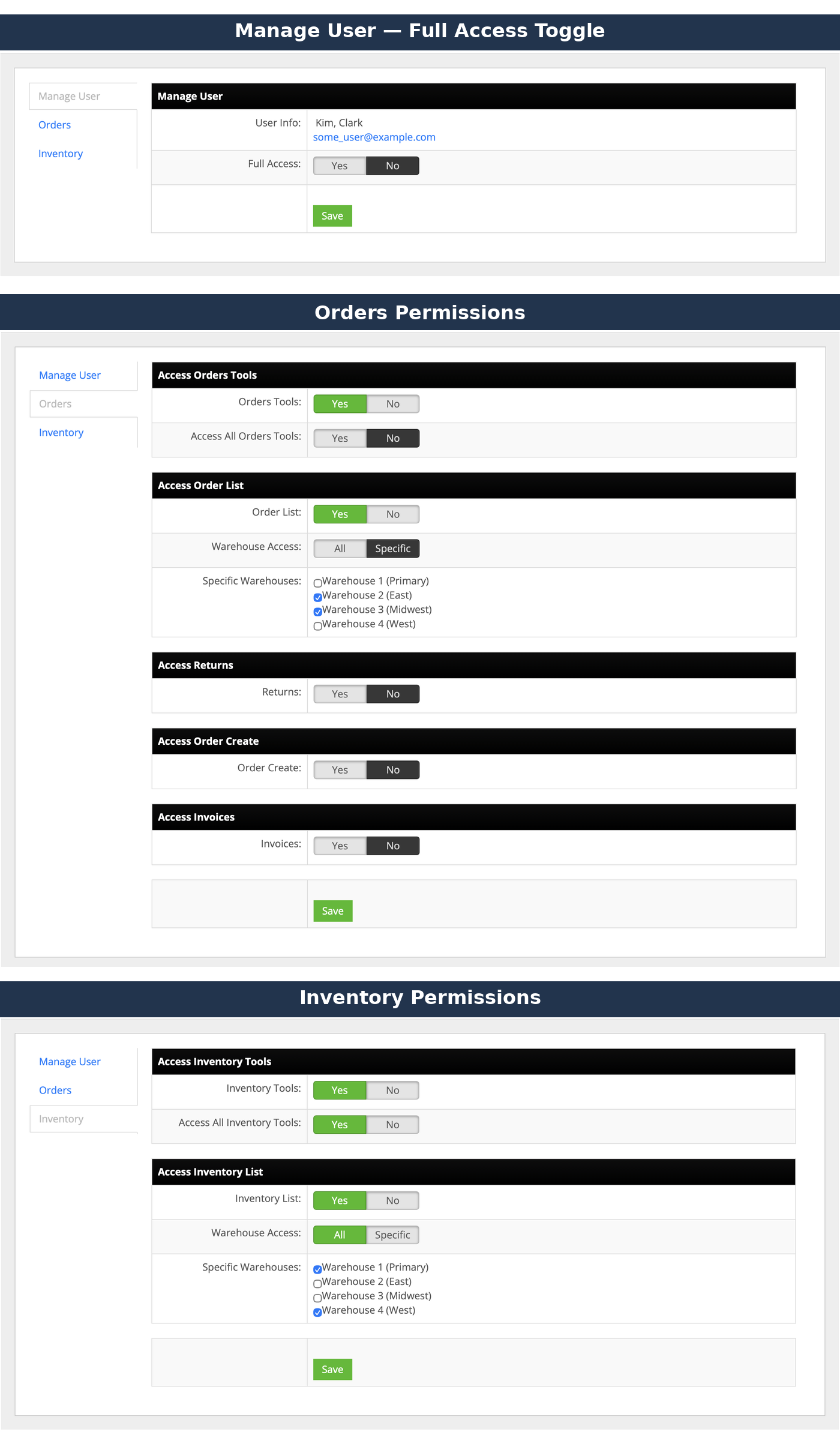
InfiPlex configuration includes granular permissions per team member, not just a single fixed role. Each user can be given Full Access, or scoped access configured separately for Orders and Inventory. Order-side permissions cover access to order tools (all or limited), the order list (scoped to all warehouses or specific ones you choose), returns, order creation, and invoices. Inventory-side permissions cover access to inventory tools (all or limited) and the inventory list, similarly scoped by warehouse. A user can be granted access to multiple specific warehouses at once, not just one.
Yes — InfiPlex automatically acknowledges Walmart DSV orders as they're pulled in from the Supplier Center, so there's no manual acknowledgment step to keep up with.
S2S stands for Site-to-Store — a label option for customers who choose in-store pickup rather than home delivery. InfiPlex supports generating and managing S2S labels alongside standard shipping labels for the same Walmart DSV account.
Yes — Walmart DSV pairs well with ShipStation for teams managing shipping there, or with a connected 3PL via the 3PL Connector. ChannelAdvisor and Shopify are also common pairings for managing DSV shipping.
InfiPlex updates individual SKU inventory levels as orders are placed through Walmart DSV or any other connected marketplace, so Walmart always has the most current available quantity for each SKU.
Yes — alongside automatic sync, manual updates are available via the built-in Inventory Tool, Inventory Upload (CSV), or a scheduled FTP feed, with custom programming available to pull inventory from anywhere you need it.
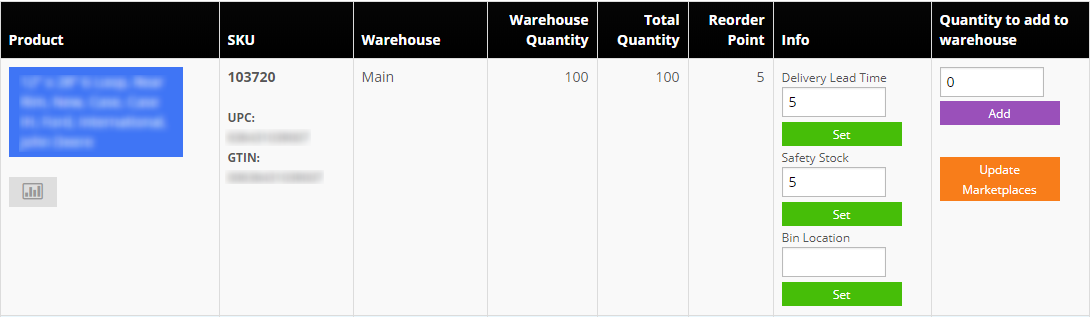
Yes — the InfiPlex Inventory Tool lets you set Safety Stock per SKU, holding back a set amount from what shows as available so you have a cushion against timing gaps or other channels' orders.
You can also set a Reorder Point to flag when it's time to replenish a SKU, along with Delivery Lead Time and Bin Location for your own warehouse operations.
Set to Zero is a threshold you configure per SKU: if you set it to 5, for example, any item with inventory at or below 5 will have its Walmart-facing availability set to 0 automatically, rather than continuing to show a low but nonzero quantity. It's a stronger stop-sell trigger than Safety Stock, useful for SKUs where selling the last few units on Walmart DSV specifically isn't worth the risk of an oversell.
Yes — InfiPlex supports an inventory sync type setting: total your inventory across all InfiPlex warehouses and send Walmart one combined value per SKU, or sync 1:1 so each of your warehouses maps to its own corresponding location on Walmart's side. Our team configures whichever matches how you actually run fulfillment.
Yes — alerts for order returns and order cancellations are especially popular among Walmart DSV suppliers specifically, letting your team react the moment either happens rather than discovering it during a routine check.
Any event that happens in InfiPlex can be configured to send an alert — order returns, order cancellations, a failed inventory API call, a successful tracking send, and more. You're not limited to a fixed list of triggers.
Alerts are a platform-wide InfiPlex feature, not specific to any one channel — they're just especially popular among Walmart DSV suppliers for returns and cancellations specifically.
Our team configures which events trigger an alert, and whether it goes by email or text, during onboarding or any time afterward — just let us know which events you want to track and where you want the notification sent.
Section 5 of 6 · Two Walmart relationships
Walmart DSV vs. Walmart Marketplace
Make sure this hub is the Walmart relationship you actually need.
Walmart DSV is a Drop Ship Vendor relationship through the Walmart Supplier Center — Walmart routes the order to you and you ship directly, using either a standard or Site-to-Store label. The Walmart Marketplace is the self-serve seller program where you list and fulfill your own orders directly. Some suppliers run both.
If your orders come through the Supplier Center as a Drop Ship Vendor and you ship directly to the customer or a store for pickup, you're a DSV supplier. If you list and fulfill your own orders under your own Marketplace seller account, you're a Marketplace seller.
Walmart DSV, Walmart Canada, and the Marketplace TwoDay program are each handled as their own connection within the broader Walmart relationship InfiPlex manages, so you can run any combination that fits your business.
Yes — InfiPlex connects both relationships independently while sharing the same inventory pool. See the Walmart Marketplace integration for details on that side.
Yes — InfiPlex integrates with NetSuite (Growth Pro) and QuickBooks Online, so DSV orders and revenue flow into your system of record without re-keying.
Section 6 of 6 · Plans & costs
Walmart DSV Integration Pricing & Plans
What connecting Walmart DSV to InfiPlex costs, and which plan fits.
Walmart DSV connects on every InfiPlex plan as a standard connection. Basic Starter is $49.99/month with up to 2,000 SKUs at $0.50 per order; Growth Starter is $499.99/month with 10,000 SKUs and 1,000 orders included ($0.10 per additional order); Growth Pro is $999.99/month with 100,000 SKUs and 10,000 orders included ($0.05 per additional order). Full details are on the Pricing page.
Set-up assistance for popular pairings like ChannelAdvisor, ShipStation, or Shopify is available for a low one-time fee per integration set-up; the core Walmart DSV connection itself is included in your plan.
Suppliers testing DSV alongside one or two other channels often start on Basic Starter or Growth Starter, then move up as order volume and SKU count grow.
Growth packages carry a 3-month minimum commitment and Partner packages a 12-month term; Basic Starter is month-to-month. Schedule a demo and we'll scope the right plan against your channel mix.
No — connecting Walmart DSV alongside Walmart Marketplace or Walmart Canada is included on every plan. You're billed based on SKU count and order volume, not the number of Walmart relationships you connect.
Connect the rest of your stack
Pair Walmart DSV with the systems you already run
InfiPlex connects Walmart DSV with 130+ marketplaces, carts, shipping platforms, 3PLs, WMS, and ERP systems — and our Growth Packages include building new API integrations you need at no additional cost.
NetSuiteERP connectivity for growing DSV suppliers
Walmart DSV orders come through the Walmart Supplier Center as a drop-ship relationship: Walmart routes the customer's order to you, and you ship directly — either to the customer's address with a standard carrier label, or to a Walmart store for pickup using a Site-to-Store (S2S) label. InfiPlex pulls those orders automatically, acknowledges them, supports both label types, and sends tracking and inventory updates back to Walmart as soon as a label is purchased — with email or text alerts available for returns, cancellations, and other events you want to track.
The InfiPlex Walmart DSV sync rail: open Supplier Center orders flow into the OMS and are acknowledged automatically, ship from your warehouse or 3PL using a standard or Site-to-Store label, and tracking posts back to Walmart automatically once purchased, while inventory stays reconciled across every channel you supply.
Walmart DSV guides
Running Walmart DSV well
The four-hour acknowledgment window, the chargebacks it prevents, and how DSV compares to Marketplace and the 1P supplier program.
Our team answers real questions from Walmart DSV suppliers every day. Contact us, email info@infiplex.com, or call 888‑770‑0857 and we’ll walk you through your exact setup — we can also add this page’s answer for the next supplier who asks.
Our website uses cookies to help provide the best user experience. By continuing to use this site, you consent to the use of cookies as described in our Privacy Policy. OK