ShipStation Integration FAQs: multichannel orders, your existing shipping workflow
ShipStation handles rates, labels, and carrier accounts well — but it doesn't aggregate orders across 130+ channels or sync inventory between them. The InfiPlex™ Inventory & Order Management System (OMS) does that upstream work: consolidating orders from every channel, sending shipment-ready orders to ShipStation for label generation using your existing carrier setup, and distributing tracking back out automatically. Below are the questions ShipStation users ask us most.
The InfiPlex ShipStation integration connects your existing ShipStation account to the InfiPlex Inventory & Order Management System. InfiPlex aggregates orders from every sales channel you run, sends shipment-ready orders to ShipStation for label and rate generation, and pushes the resulting tracking back out to the originating marketplace or storefront — all while managing real-time inventory sync across channels that ShipStation itself doesn't handle.
Yes — this integration connects an existing ShipStation account to InfiPlex. If you don't use ShipStation, InfiPlex's built-in shipping already covers 100+ carriers directly, so ShipStation isn't a requirement to ship through InfiPlex.
Setup is quick and simple: after you sign up, our USA-based team provisions your OMS site within 1–2 business days and links your ShipStation account using its API credentials. There's nothing to install and no developer needed.
Most sellers are live in 1–3 business days. The connection itself completes quickly; the rest of the window goes to confirming which order types route to ShipStation versus InfiPlex's own carrier connections.
No — your team keeps using ShipStation's packing and printing workflow exactly as they know it. InfiPlex changes what happens before an order reaches ShipStation (multichannel aggregation and inventory sync) and after (tracking distributed back to the right channel), not the label-printing step itself.
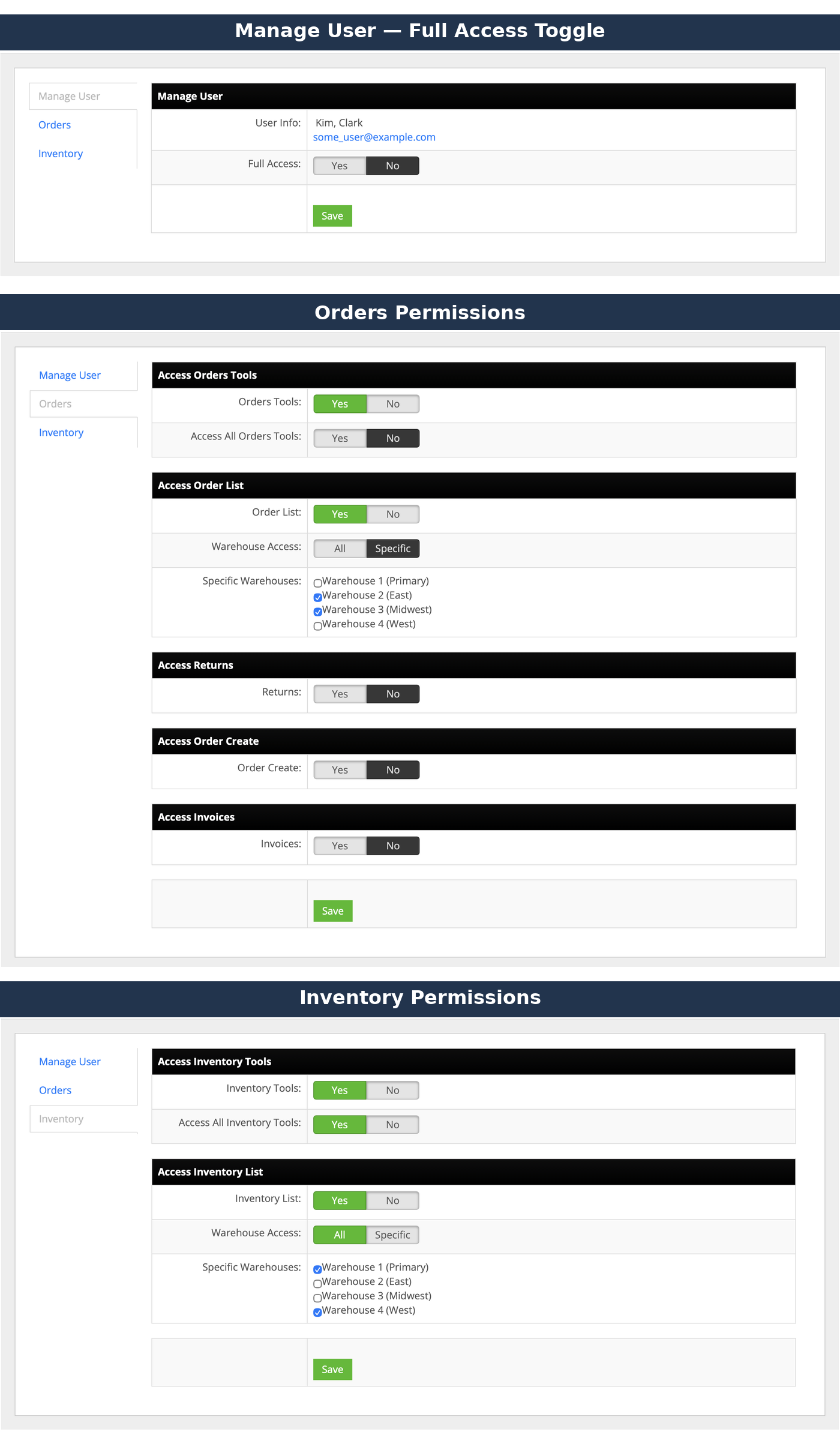
InfiPlex configuration includes granular permissions per team member, not just a single fixed role. Each user can be given Full Access, or scoped access configured separately for Orders and Inventory. Order-side permissions cover access to order tools (all or limited), the order list (scoped to all warehouses or specific ones you choose), returns, order creation, and invoices. Inventory-side permissions cover access to inventory tools (all or limited) and the inventory list, similarly scoped by warehouse. A user can be granted access to multiple specific warehouses at once, not just one.
InfiPlex does. Orders from every connected channel — Amazon, Walmart, Shopify, and 130+ more — pull into the InfiPlex OMS about every 15 minutes, giving you one aggregated queue instead of relying on ShipStation's own per-channel connections.
Once an order is ready to ship, InfiPlex sends it to ShipStation, which then handles rate comparison and label generation using your existing ShipStation carrier accounts and settings.
Automatically — once ShipStation generates a label, the tracking number flows back through InfiPlex to whichever channel the order originally came from, whether that's Amazon, Shopify, or anywhere else.
Yes — routing rules can send some orders to ShipStation while others go to a connected 3PL or InfiPlex's own built-in carrier connections, based on rules you set. The 3PL Connector handles the 3PL side.
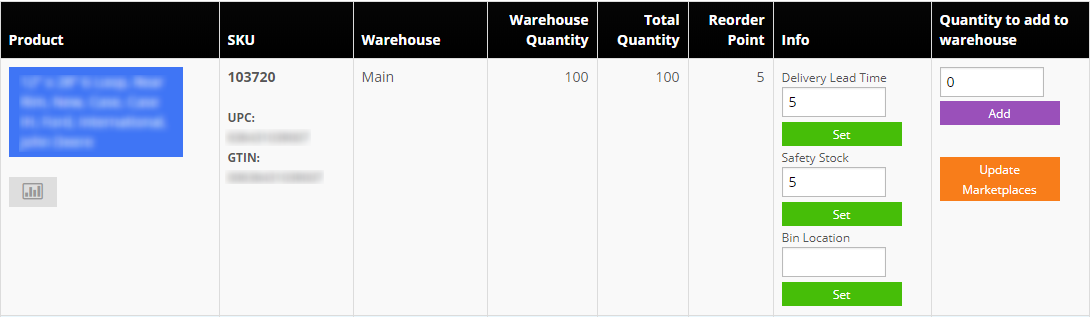
Yes — once a label is generated, the sale reflects in InfiPlex's master inventory pool and propagates to every other connected channel in real time. Per-SKU Safety Stock, Reorder Point, and Bin Location are all managed from the same InfiPlex Inventory Tool.
Section 3 of 7 · The other direction
Pulling Orders Directly From ShipStation
For warehouses where orders originate or already live in ShipStation itself, InfiPlex can pull from it directly instead of the aggregation model.
Yes — large warehouses commonly use this model. Instead of InfiPlex aggregating channel orders and pushing them into ShipStation, InfiPlex pulls orders directly from ShipStation via API, then sets tracking information on those orders back in ShipStation, also via API.
This fits operations where ShipStation is already the point where orders land — whether through ShipStation's own channel connections or an existing workflow built around it. Rather than re-routing that setup, InfiPlex pulls from ShipStation directly and layers on inventory sync and tracking automation.
Yes — orders can be pulled from ShipStation based on a specific order status, so InfiPlex only picks up orders that are actually ready for it to manage rather than every order in the account.
Yes — once an order pulled from ShipStation ships, InfiPlex sets the tracking information on that order back in ShipStation via API, keeping the ShipStation record complete without manual entry.
This depends on your specific setup — our team scopes which model (or combination) fits during onboarding based on where your orders actually originate and how your warehouse already uses ShipStation.
Section 4 of 7 · Your carrier setup, unchanged
Rate Shopping & Multi-Carrier Accounts
How ShipStation's core rate-shopping and carrier-account functionality carries over untouched.
Yes — InfiPlex doesn't insert its own carrier logic into the ShipStation step. Orders sent to ShipStation use your existing negotiated rates and carrier account settings exactly as configured, with InfiPlex only responsible for getting the order there and the tracking back.
Yes — however many carrier accounts you have configured in ShipStation remain available for rate shopping on orders InfiPlex sends there, unchanged from how you use ShipStation today.
No — your negotiated rates and carrier discount agreements in ShipStation apply exactly as they did before connecting InfiPlex, since InfiPlex doesn't alter ShipStation's rate shopping or carrier selection logic.
Yes — orders InfiPlex sends to ShipStation are available for batch processing the same way any ShipStation order would be, so your team's existing batch label workflow isn't disrupted.
Shipment and tracking data from ShipStation syncs back into the InfiPlex order record; cost-specific reporting depends on what ShipStation returns through its API, which our team confirms during setup based on your ShipStation plan.
Section 5 of 7 · Labels & tracking
Rates, Labels & Tracking
How labels and tracking specifically move between the two systems.
No — InfiPlex includes its own shipping across 100+ carriers, including UPS, FedEx, DHL, and USPS with Commercial Plus pricing, so ShipStation isn't required. This integration exists for sellers who already have ShipStation workflows, carrier accounts, or automation rules they want to keep using.
Common reasons include existing ShipStation carrier discount agreements, a warehouse team already trained on ShipStation's packing workflow, or automation rules built up over years that aren't worth rebuilding. InfiPlex's value in that case is the multichannel order aggregation and inventory sync layered on top, which ShipStation alone doesn't provide.
Yes — sellers sometimes start with ShipStation connected and gradually shift carrier volume to InfiPlex's built-in options as they get comfortable, without disrupting order flow during the transition.
It works alongside it. InfiPlex isn't trying to replace ShipStation's label and rate functionality — it's solving the multichannel order aggregation and real-time inventory sync problem that sits upstream of shipping, which ShipStation on its own doesn't address across channels.
Yes — the 3PL Connector program lets a 3PL keep its existing ShipStation workflow while connecting each client's sales channels and inventory through InfiPlex.
Section 6 of 7 · Which to use
When to Use ShipStation vs. InfiPlex's Built-In Shipping
Both are available — here's how sellers typically decide.
Existing carrier agreements, team familiarity with ShipStation's workflow, and how much automation is already built in ShipStation are the main factors. Sellers starting fresh often just use InfiPlex's built-in 100+ carrier shipping instead.
Yes — some sellers route certain channels or order types through ShipStation while others use InfiPlex's built-in carriers directly, based on which setup fits a given channel's volume or carrier requirements.
Neither by default — the right choice depends on your existing carrier relationships and team workflow. Our team can walk through your specific setup during onboarding to help you decide.
Historical data stays in your ShipStation account regardless of whether you continue routing new orders there; switching to InfiPlex's built-in shipping for new orders doesn't affect what's already recorded in ShipStation.
Section 7 of 7 · Plans & costs
ShipStation Integration Pricing & Plans
What connecting ShipStation to InfiPlex costs, and which plan fits.
ShipStation connects on every InfiPlex plan as a standard connection. Basic Starter is $49.99/month with up to 2,000 SKUs at $0.50 per order; Growth Starter is $499.99/month with 10,000 SKUs and 1,000 orders included ($0.10 per additional order); Growth Pro is $999.99/month with 100,000 SKUs and 10,000 orders included ($0.05 per additional order). Full details are on the Pricing page.
It depends on your order volume and SKU count across all connected channels, not on your existing ShipStation plan — schedule a demo and we'll scope the right plan against your full channel mix.
Growth packages carry a 3-month minimum commitment and Partner packages a 12-month term; Basic Starter is month-to-month. Schedule a demo and we'll scope the right plan against your channel mix.
No — connecting ShipStation alongside a 3PL Connector or additional marketplaces is included on every plan. You're billed based on SKU count and order volume, not the number of fulfillment paths or channels you connect.
Connect the rest of your stack
Pair ShipStation with the systems you already run
InfiPlex connects ShipStation with 130+ marketplaces, carts, shipping platforms, 3PLs, WMS, and ERP systems — and our Growth Packages include building new API integrations you need at no additional cost.
There are two ways InfiPlex connects with ShipStation, and which one fits depends on where your orders actually originate. Most sellers use the aggregation model: InfiPlex consolidates orders from every sales channel and sends shipment-ready orders to ShipStation for rate comparison and label generation using your existing carrier accounts. Large warehouses more often use the direct-pull model instead: InfiPlex pulls orders straight from ShipStation via API — filtered by a specific order status if needed — and sets tracking on those orders back in ShipStation via API once they ship. Either way, your team's packing and printing workflow in ShipStation doesn't change.
The InfiPlex ShipStation sync rail: orders from every channel land in one OMS, ship-ready orders go to ShipStation for label generation using your existing carrier accounts, and tracking posts back automatically — while inventory stays reconciled across every channel you supply. Some warehouses run this in reverse, pulling orders directly from ShipStation instead.
Ready to put ShipStation on autopilot?
Your OMS is typically live in 1–3 business days, and our USA‑based team handles onboarding with you — no coding required.
Our team answers real questions from ShipStation users every day. Contact us, email info@infiplex.com, or call 888‑770‑0857 and we’ll walk you through your exact setup — we can also add this page’s answer for the next user who asks.
Our website uses cookies to help provide the best user experience. By continuing to use this site, you consent to the use of cookies as described in our Privacy Policy. OK