
A retailer that requires EDI doesn't ask if you can handle it, it's simply a condition of doing business with them. Miss a testing deadline and vendor onboarding stalls, or gets limited to a lesser program, or gets rejected outright. Miss a seasonal reset window because of it and the next shot at that shelf placement can be six months away. InfiPlex Bridge EDI to API removes the file format entirely: retailers keep sending purchase orders as EDI, and you receive normal orders, through the REST API in JSON, in the InfiPlex OMS, or straight into your ERP, with the required response documents generated and sent back automatically.
Jump to What You Need
| If You Want To… | Jump To |
|---|---|
| Know what actually happens when a new trading partner is added, direct or VAN | How a Trading Partner Gets Connected |
| See how "EDI to API" actually works, in the same API as everything else | How "EDI to API" Actually Works |
| Understand inventory sync for EDI retailers specifically | Inventory Sync for EDI Retailers |
| Know how split or partial shipments are handled | Partial Shipments and Multiple ASNs |
| See which trading partners are already connected | Trading Partners |
How Much Does InfiPlex Bridge EDI to API Actually Handle?
- EDI retailers show up in the exact same API as everything else. The same GET /shop/order/search and POST .../shipment calls you'd already use for a marketplace channel, just filterable by order_source to pull one retailer's orders.
- You never touch an EDI file. Every document a trading partner requires, the purchase order in, the acknowledgment, shipment, and invoice out, is handled and mapped for you.
- Three ways to actually work the orders. The InfiPlex REST API in JSON, the standard InfiPlex OMS with no code at all, or straight into your ERP.
- One inventory pool covers EDI and everything else. The same buffers, Sold On flags, and set-to-zero thresholds already covered for marketplaces apply here too.
- Not limited to the named partners. Any EDI trading partner can be connected, direct or through a VAN, and if a channel turns out to be API-based instead, that gets built at no additional cost.
Where Do I Manage EDI Trading Partners in InfiPlex?
Settings > Integrations > EDI / Retail. Every connected trading partner has its own section there, alongside your Marketplaces, Stores, ERPs, and Fulfillment tabs.
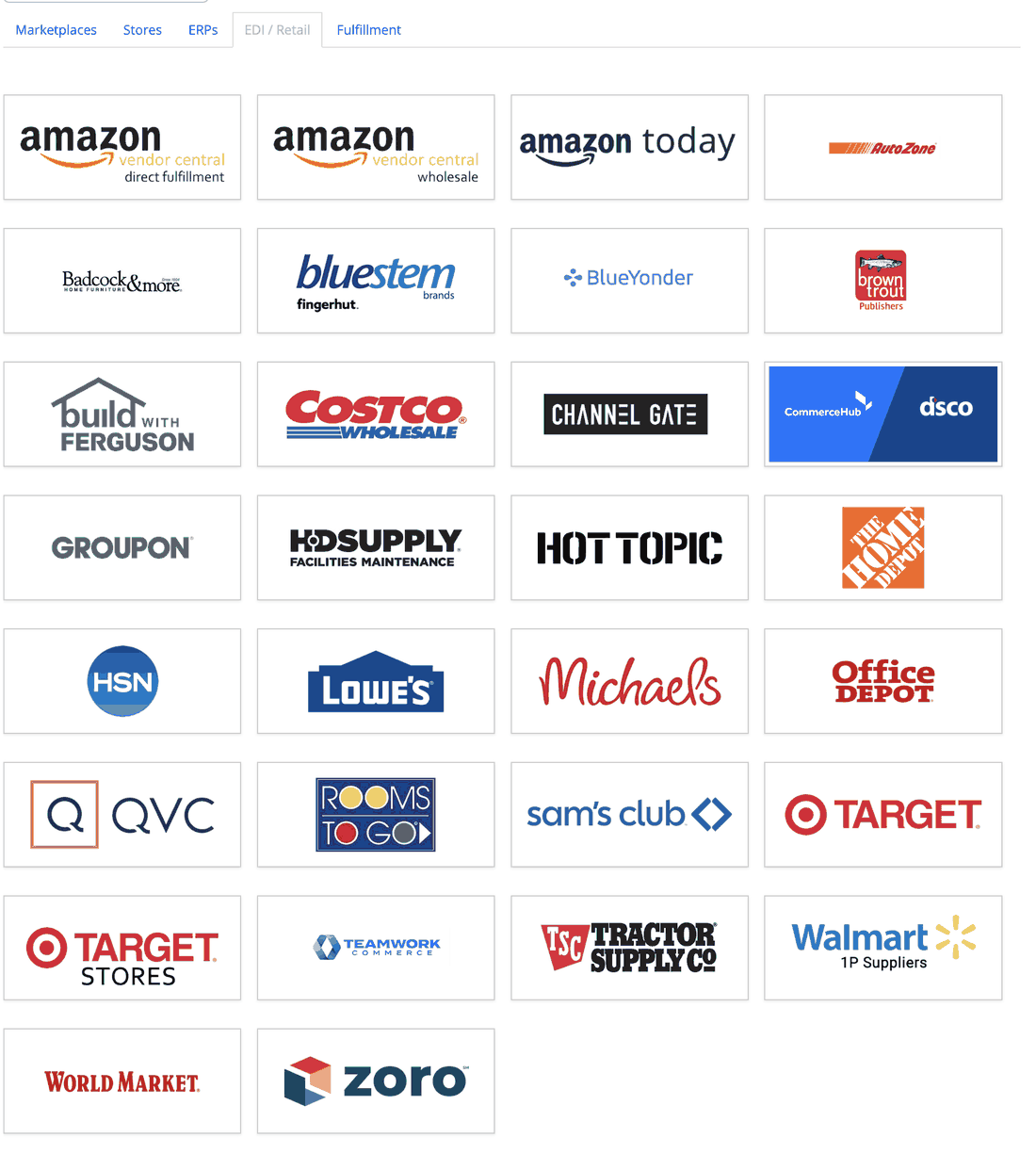
Not everything in that tab is actually EDI. It's organized by trading partner type as much as by protocol, so a few connections there, the Amazon Vendor Central programs among them, run over API rather than EDI documents. This guide covers the EDI-specific mechanics; the trading partner list further down reflects that distinction.
How Does a New Trading Partner Actually Get Connected?
It depends entirely on what that specific partner requires, and it's rarely identical twice. Some trading partners are close to self-serve. Others need InfiPlex's team to help configure a VAN. Others require a full round of connectivity and document testing before anything goes live. The retailer sets the terms; InfiPlex does the work of meeting them.
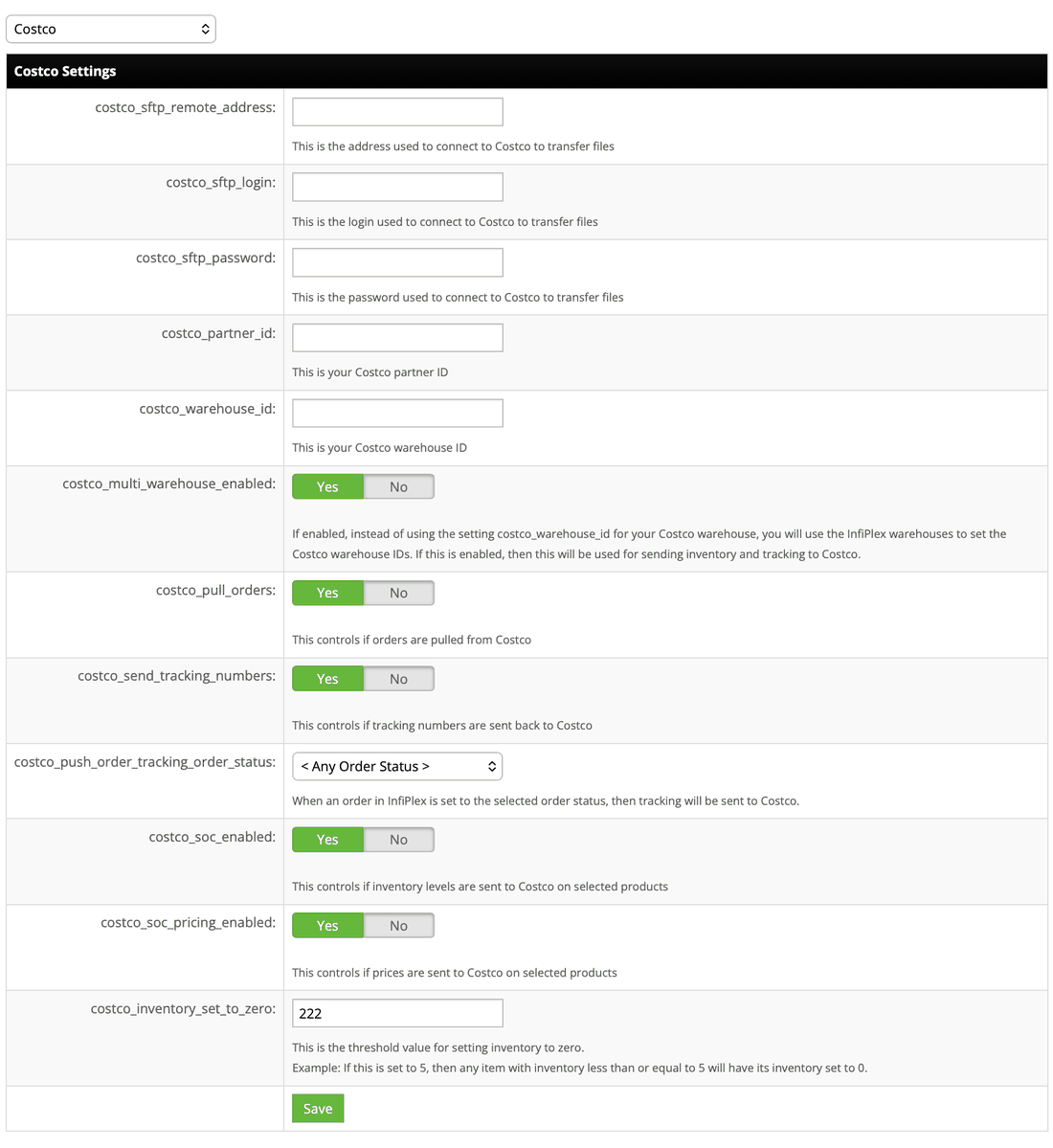
Underneath, that setup takes one of two shapes. Costco is a clean example of a direct connection, SFTP with a handful of straightforward fields:
Target requires a VAN instead, which brings a different set of fields, a network ID, a mailbox ID, and separate qualifier and trading-partner IDs for both sides of the connection (the qualifier and ID pair follow a format like ZZ:YOURBIZ, and Target's own default qualifier is ZZ:TGTDVS), plus the vendor and warehouse IDs the retailer assigns:
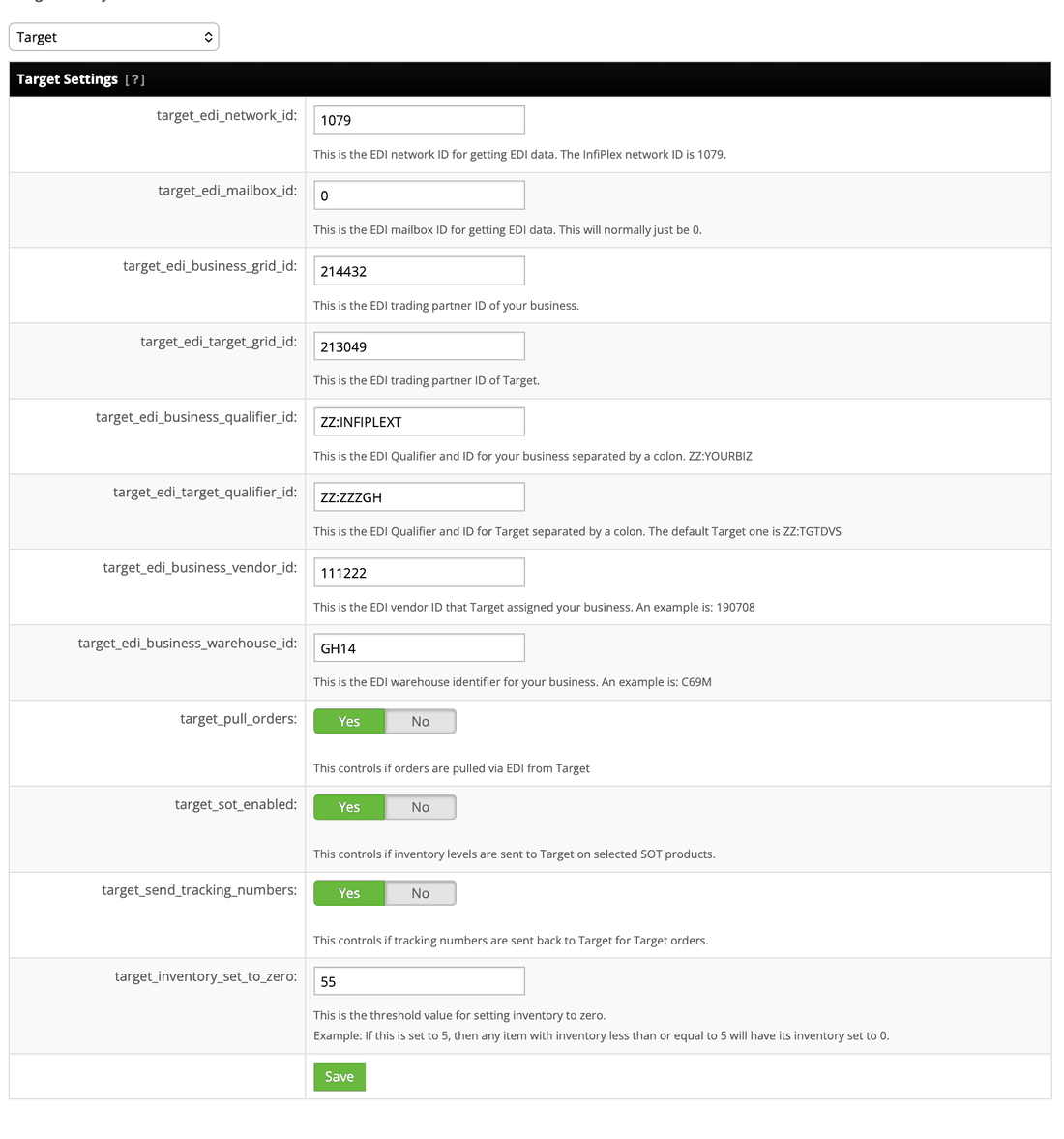
InfiPlex uses a direct connection wherever a partner allows it. Where a retailer requires a VAN instead, that fee is simply passed through to you at cost, not a line of business InfiPlex tries to profit from.
How Does "EDI to API" Actually Work?
The core of it is simple: this isn't a separate API built just for EDI. It's the same InfiPlex REST API used for every other connected channel, built from a concrete, well-documented set of calls. Authentication is a Bearer token on every request. Orders are reachable at GET /shop/order/search, filterable by order_source among other things, so pulling only your Target purchase orders is the exact same query shape as pulling only your Shopify orders. Once a trading partner's documents are mapped, that partner's purchase orders simply start appearing in that same search, as normal orders.
A single order, wherever it came from, looks identical: shipping and billing address, order totals, line items, and an order_source field that just names the channel:
{
  "shop_orderid": "101769",
  "order_source": "Target",
  "order_date": "2026-05-12 17:56:06",
  "ship_first_name": "Scott",
  "ship_last_name": "Smith",
  "ship_street1": "1234 Another Road",
  "ship_city": "Carol Stream",
  "ship_state": "IL",
  "ship_zip": "60188",
  "item_total": "14.99",
  "ship_price": "2.95"
  …
}
That's a real InfiPlex order response with the source swapped to show the point: nothing about it is EDI-shaped. If your team already parses this JSON for a marketplace channel, an EDI retailer's orders parse the exact same way.
Shipping works the same way in reverse, and this is where the EDI documents actually get generated. One call, POST /shop/order/{orderid}/shipment, with a tracking number, carrier, and the items in the package, ships any order regardless of source:
Make that call on a Shopify order and it's just a shipment record. Make the identical call on a Target order and InfiPlex generates and sends the 856 ASN behind it, automatically, no separate step.
Inventory works the same way, for one SKU or for a whole batch at once. Setting one SKU's count is PUT /shop/inventory/{sku}:
{
  "quantity_to_set": 779,
  "warehouse_id": 7
}
Updating many SKUs at once is a single call to POST /shop/inventory/bulk_update with an array:
[
  { "sku": "DTR5511", "warehouse_id": 13, "quantity_to_set": 27 },
  { "sku": "1705145", "warehouse_id": 13, "quantity_to_set": 3 },
  { "sku": "1702325", "warehouse_id": 13, "quantity_to_set": 1 }
]
For an EDI retailer that takes an 846 Inventory Advice, either call becomes that document automatically on the way out, one SKU or a whole batch. You're never constructing a document; you're making the same call you'd make anyway.
How Does Inventory Sync Work for EDI Retailers?
Exactly like every other inventory sync mechanism covered in the multichannel inventory sync guide, buffers, Sold On flags, and set-to-zero thresholds all apply the same way. The only difference is the transport: instead of an API call, InfiPlex sends an EDI file, an 846 Inventory Advice document for retailers that take one. Everything else about how the number is calculated is identical.
Worth knowing if you're cross-referencing the marketplace side of this: the Sold On flag naming convention is per-retailer, so Target's own flag is SOT (Sold On Target), the same three letters used for Sold On TikTok on the marketplace side. They're unrelated settings that happen to share a naming pattern, not the same flag.
How Are Partial Shipments Handled on an EDI Order?
It depends on what the trading partner allows. Where a retailer accepts multiple shipment notices against one purchase order, InfiPlex sends a separate ASN as each piece ships. Where a retailer doesn't, InfiPlex waits until the order is fully shipped and sends one ASN covering the whole thing. Either way, it's handled per the partner's own rules, not something to configure per order.
How Often Do EDI Orders Actually End Up on Backorder?
Rarely, and it keeps getting rarer. Since inventory stays tightly synced across every connected channel, including EDI retailers, backorders on a well-configured connection are uncommon to begin with, and clients who switch to InfiPlex typically see them drop close to zero. The mechanics are the same low-stock and buffer controls already covered for inventory sync generally, just applied to EDI channels too.
Which EDI Trading Partners Does InfiPlex Connect To?
These are today's connected trading partners, and the list isn't limited to them, any EDI trading partner can be connected, so if yours isn't here, ask:
Why Do Sellers Actually Move to This Instead of Running EDI Themselves?
Because parsing EDI is genuinely miserable, and generating it correctly is worse. Plenty of sellers arrive at InfiPlex after months of building or reviewing EDI files by hand, a process that's slow, error-prone, and directly tied to the kind of mapping mistakes that generate chargebacks. Handing that entire layer over, the mapping, the testing, the ongoing spec changes, is what actually lets a lean team serve big-box retailers without hiring for EDI specifically.
EDI to API Questions
Do I need to learn a separate API for EDI retailers?
No. EDI trading partners come through the exact same InfiPlex REST API: GET /shop/order/search to pull orders, POST .../shipment to ship them, filterable by order_source, the same calls you'd already use for a marketplace or storefront channel.
Do I need to know EDI to sell to a retailer that requires it?
No. InfiPlex handles the EDI side entirely, mapping, testing, and the ongoing document traffic, and delivers you normal orders through the REST API, the InfiPlex OMS, or your ERP.
What's the difference between a direct connection and a VAN?
A direct connection, often SFTP, costs nothing beyond the setup itself and is used wherever a trading partner allows it. A VAN is only used when the retailer requires one, and its fee is passed through to you at cost.
How long does it take to connect a new trading partner?
It depends entirely on what that partner requires. Some connections are close to self-serve; others need InfiPlex to configure a VAN or complete a full round of connectivity and document testing before going live.
Will I ever see a raw EDI file?
No. EDI documents are normalized into standard InfiPlex orders before they reach you, and handled the same way whether you work through the API, the OMS, or your ERP.
Does inventory sync work differently for EDI retailers?
No, the same buffers, Sold On flags, and set-to-zero thresholds apply, covered in full in the inventory sync guide. The only difference is that inventory is sent as an EDI document instead of an API call.
How are partial shipments handled on an EDI purchase order?
Per the trading partner's own rules. Some accept a separate shipment notice for each piece as it ships; others require InfiPlex to wait until the order is fully shipped and send one shipment notice for the whole order.
Can I connect an EDI trading partner that isn't listed?
Yes. Any EDI trading partner can be connected, direct or through a VAN, and if a channel turns out to be API-based rather than EDI, that integration gets built at no additional cost.
Comparing EDI providers? See how running EDI inside the OMS stacks up against a per-trading-partner EDI platform in InfiPlex vs. Orderful.
EDI three ways on one connection: work retailer orders in the OMS, pull them as JSON through Bridge EDI to API, or put them in front of your AI agent with MCP to EDI.
Need Something This Doesn't Cover?
Contact Us and we'll take a look. Support is included with every InfiPlex plan.
See EDI the way your trading partners see it
InfiPlex manages EDI documents, VANs, and API retailers in the same place as your marketplaces and carts.
