MCP to EDI: ask your AI agent about your retailer EDI orders
Your EDI retailers already arrive in InfiPlex as orders: AutoZone, Target, Costco, Walmart DSV purchase orders pulled in, routed, shipped, and invoiced inside the OMS. The same connection is available as JSON through the REST API, which is InfiPlex Bridge EDI to API. And it is available to Claude, Cursor, ChatGPT through Codex, or any MCP client through the native InfiPlex MCP server. That is MCP to EDI: a retailer's purchase orders, ship notices, invoices, inventory feeds, and shop log, answerable in plain English, with a preview before anything channel-visible changes. Every screenshot below is a real session against a live InfiPlex instance, with the client's identifying values replaced.
OMSWork EDI orders in the InfiPlex screens, no code
REST APIEvery retailer as JSON, Bearer-token auth
MCPEvery retailer in front of your AI agent, included with API access
Prompt 1
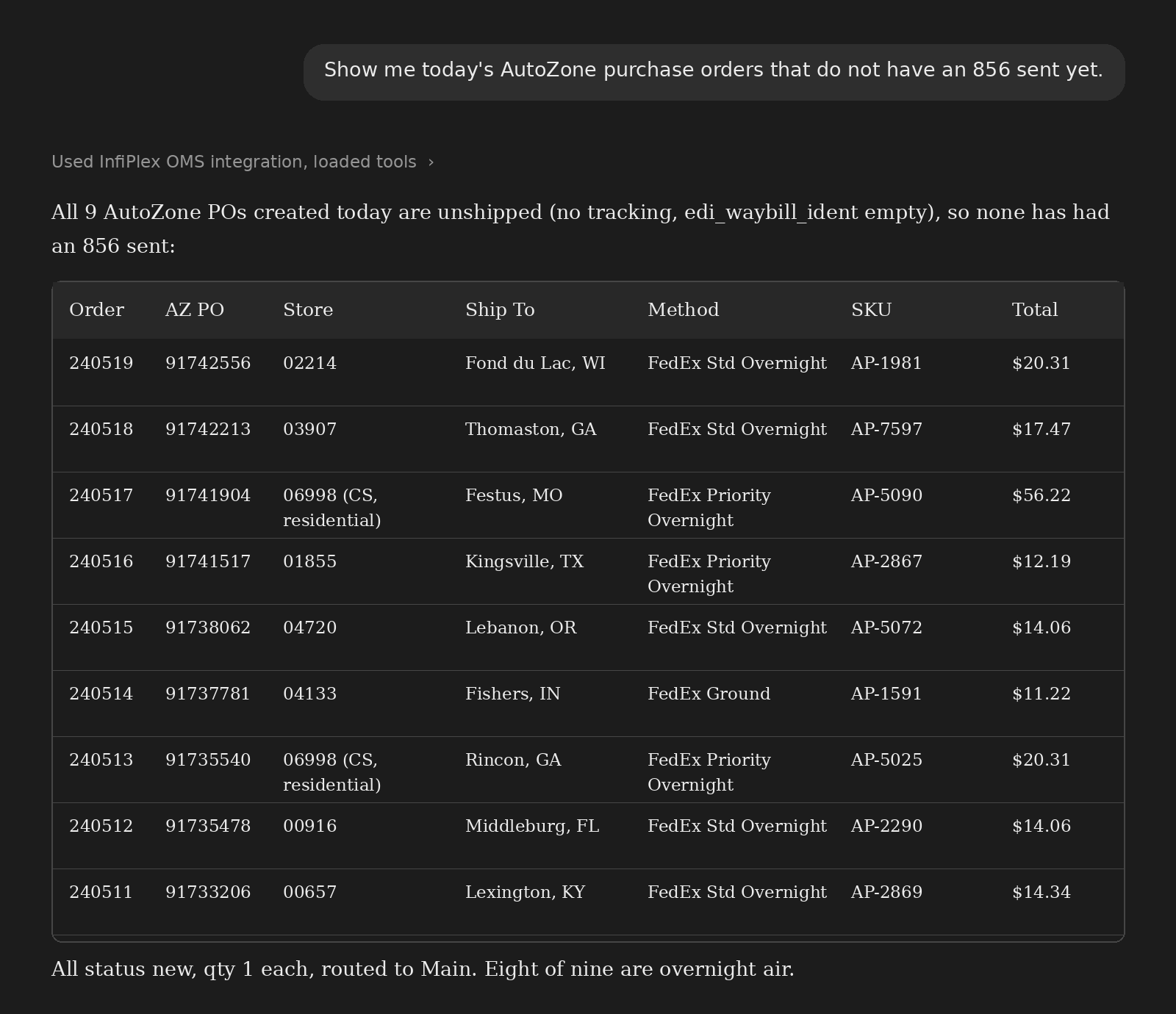
Which purchase orders have no 856 yet?
The question every EDI vendor asks before the ASN window closes. The agent searches orders by source and ship state and reads the EDI waybill field InfiPlex fills when an 856 goes out.
Read the transcript as text
Show me today's AutoZone purchase orders that do not have an 856 sent yet.
Used InfiPlex OMS integration, loaded tools
All 9 AutoZone POs created today are unshipped (no tracking, edi_waybill_ident empty), so none has had an 856 sent:
Order
AZ PO
Store
Ship To
Method
SKU
Total
240519
91742556
02214
Fond du Lac, WI
FedEx Std Overnight
AP-1981
$20.31
240518
91742213
03907
Thomaston, GA
FedEx Std Overnight
AP-7597
$17.47
240517
91741904
06998 (CS, residential)
Festus, MO
FedEx Priority Overnight
AP-5090
$56.22
240516
91741517
01855
Kingsville, TX
FedEx Priority Overnight
AP-2867
$12.19
240515
91738062
04720
Lebanon, OR
FedEx Std Overnight
AP-5072
$14.06
240514
91737781
04133
Fishers, IN
FedEx Ground
AP-1591
$11.22
240513
91735540
06998 (CS, residential)
Rincon, GA
FedEx Priority Overnight
AP-5025
$20.31
240512
91735478
00916
Middleburg, FL
FedEx Std Overnight
AP-2290
$14.06
240511
91733206
00657
Lexington, KY
FedEx Std Overnight
AP-2869
$14.34
All status new, qty 1 each, routed to Main. Eight of nine are overnight air.
Nine POs, the store or consumer destination for each (two are STH consumer-direct, flagged CS residential), the carrier service AutoZone specified, and the fact that all nine route to one warehouse. That is the AutoZone order lifecycle read straight from the order records, no report to build.
Prompt 2
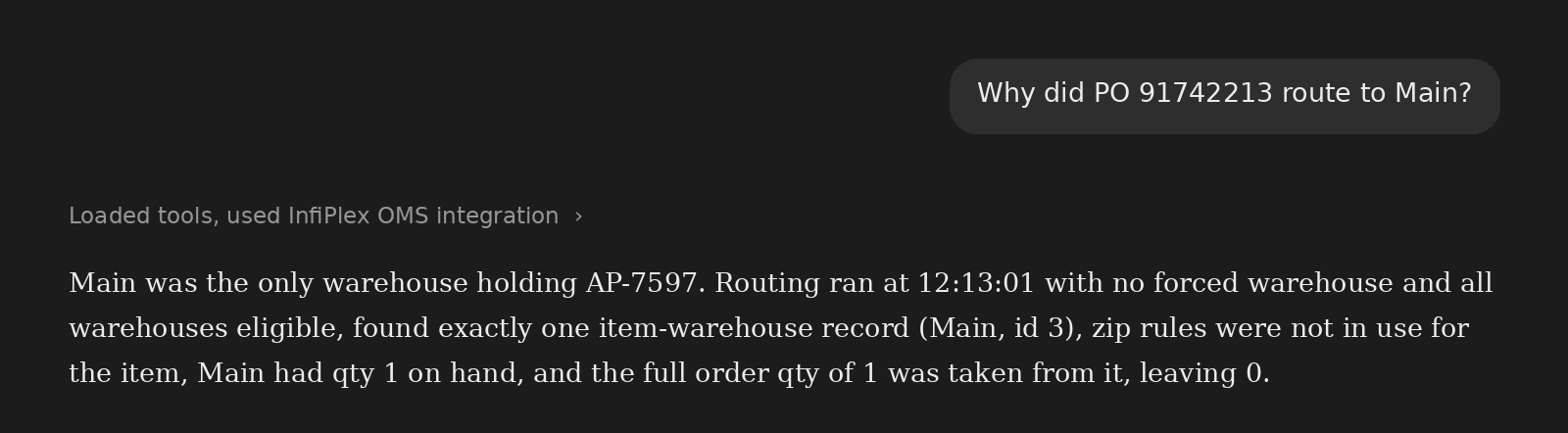
Why did this PO route where it did?
InfiPlex writes a routing event log every time an order is allocated. The agent reads that log, not a guess.
Read the transcript as text
Why did PO 91742213 route to Main?
Loaded tools, used InfiPlex OMS integration
Main was the only warehouse holding AP-7597. Routing ran at 12:13:01 with no forced warehouse and all warehouses eligible, found exactly one item-warehouse record (Main, id 3), zip rules were not in use for the item, Main had qty 1 on hand, and the full order qty of 1 was taken from it, leaving 0.
One sentence, and it covers every input the router considered: forced warehouse, eligibility, item-warehouse records, zip rules, on-hand, and the resulting allocation. The mechanics behind each of those are on the multi-warehouse order routing page.
Prompt 3
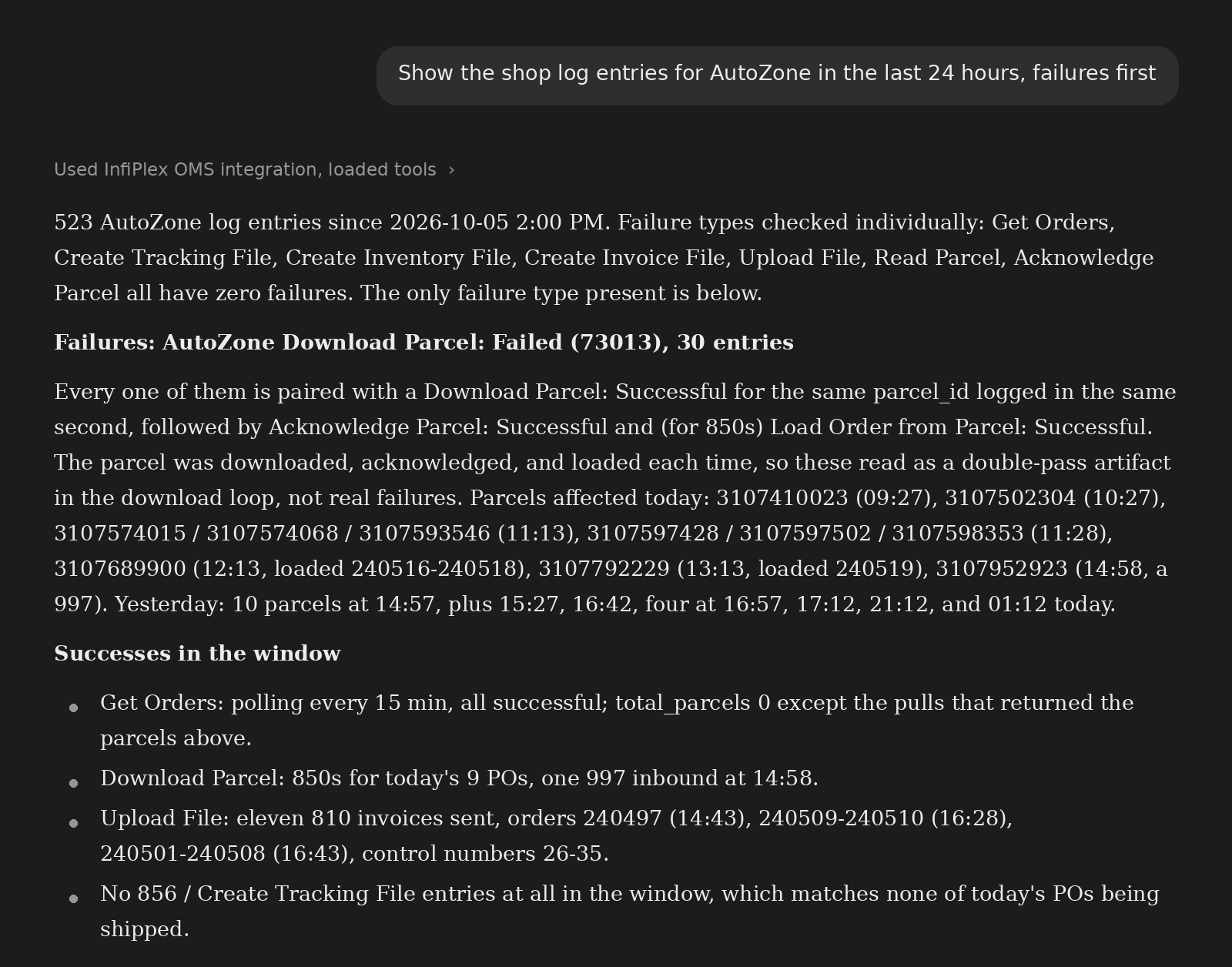
What happened on the EDI connection in the last 24 hours?
The shop log is the record InfiPlex writes for every channel call: order pulls, parcel downloads, acknowledgments, file uploads. The agent reads the same log your support contact reads, and sorts the failures to the top.
Read the transcript as text
Show the shop log entries for AutoZone in the last 24 hours, failures first
Used InfiPlex OMS integration, loaded tools
523 AutoZone log entries since 2026-10-05 2:00 PM. Failure types checked individually: Get Orders, Create Tracking File, Create Inventory File, Create Invoice File, Upload File, Read Parcel, Acknowledge Parcel all have zero failures. The only failure type present is below.
Every one of them is paired with a Download Parcel: Successful for the same parcel_id logged in the same second, followed by Acknowledge Parcel: Successful and (for 850s) Load Order from Parcel: Successful. The parcel was downloaded, acknowledged, and loaded each time, so these read as a double-pass artifact in the download loop, not real failures. Parcels affected today: 3107410023 (09:27), 3107502304 (10:27), 3107574015 / 3107574068 / 3107593546 (11:13), 3107597428 / 3107597502 / 3107598353 (11:28), 3107689900 (12:13, loaded 240516-240518), 3107792229 (13:13, loaded 240519), 3107952923 (14:58, a 997). Yesterday: 10 parcels at 14:57, plus 15:27, 16:42, four at 16:57, 17:12, 21:12, and 01:12 today.
Successes in the window
Get Orders: polling every 15 min, all successful; total_parcels 0 except the pulls that returned the parcels above.
Download Parcel: 850s for today's 9 POs, one 997 inbound at 14:58.
No 856 / Create Tracking File entries at all in the window, which matches none of today's POs being shipped.
Notice what the agent did with the only failure type: it checked whether each failed download was followed by a successful one for the same parcel, found that it was every time, and said so. That is the failed sync watch pattern applied to a retailer EDI connection on demand, and it is why a Web EDI portal with a mailbox and an email address cannot answer this question.
Prompt 4
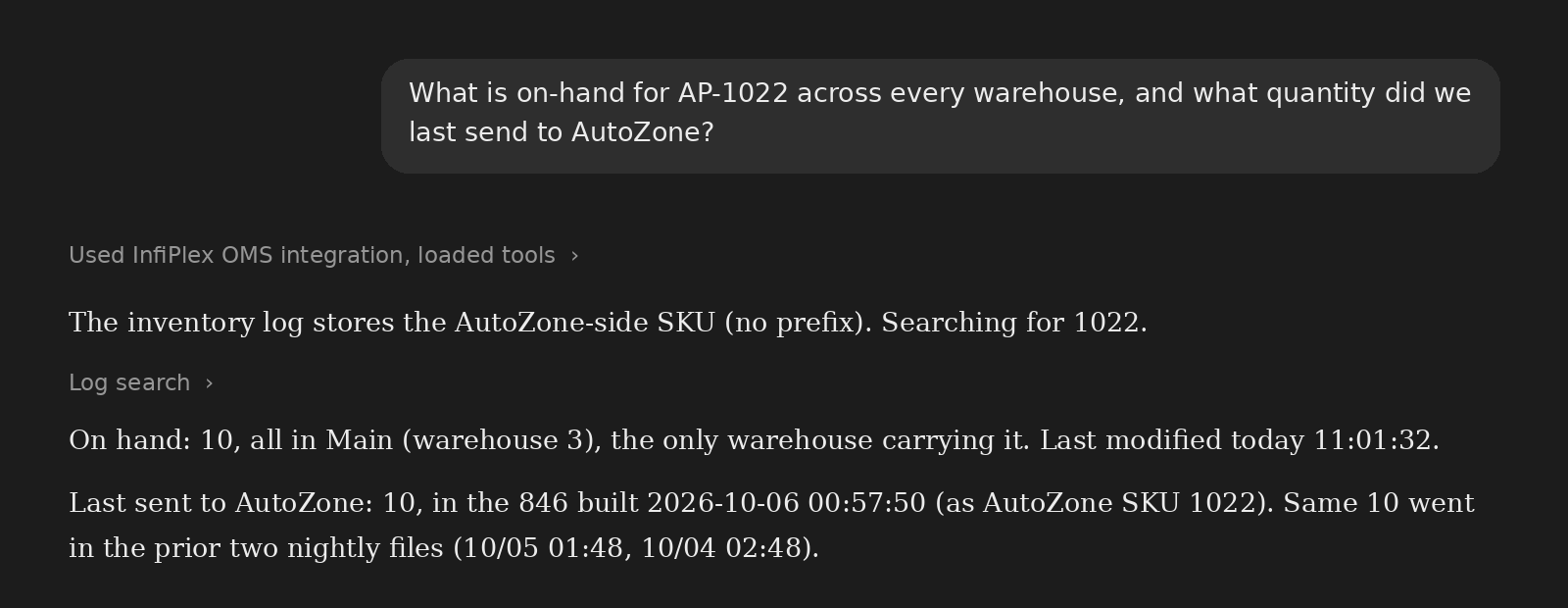
What is on hand, and what did we last tell the retailer?
Two numbers that are supposed to agree: the warehouse count and the quantity in the last 846 inventory file sent to the retailer. The agent reads both, and knows the retailer file carries the retailer's SKU, not yours.
Read the transcript as text
What is on-hand for AP-1022 across every warehouse, and what quantity did we last send to AutoZone?
Used InfiPlex OMS integration, loaded tools
The inventory log stores the AutoZone-side SKU (no prefix). Searching for 1022.
Log search
On hand: 10, all in Main (warehouse 3), the only warehouse carrying it. Last modified today 11:01:32.
Last sent to AutoZone: 10, in the 846 built 2026-10-06 00:57:50 (as AutoZone SKU 1022). Same 10 went in the prior two nightly files (10/05 01:48, 10/04 02:48).
On hand, per warehouse, with the last-modified time; then the exact quantity in the last three nightly 846 files, mapped through the retailer's own item number. When a retailer disputes an availability figure, this is the whole investigation.
Prompt 5
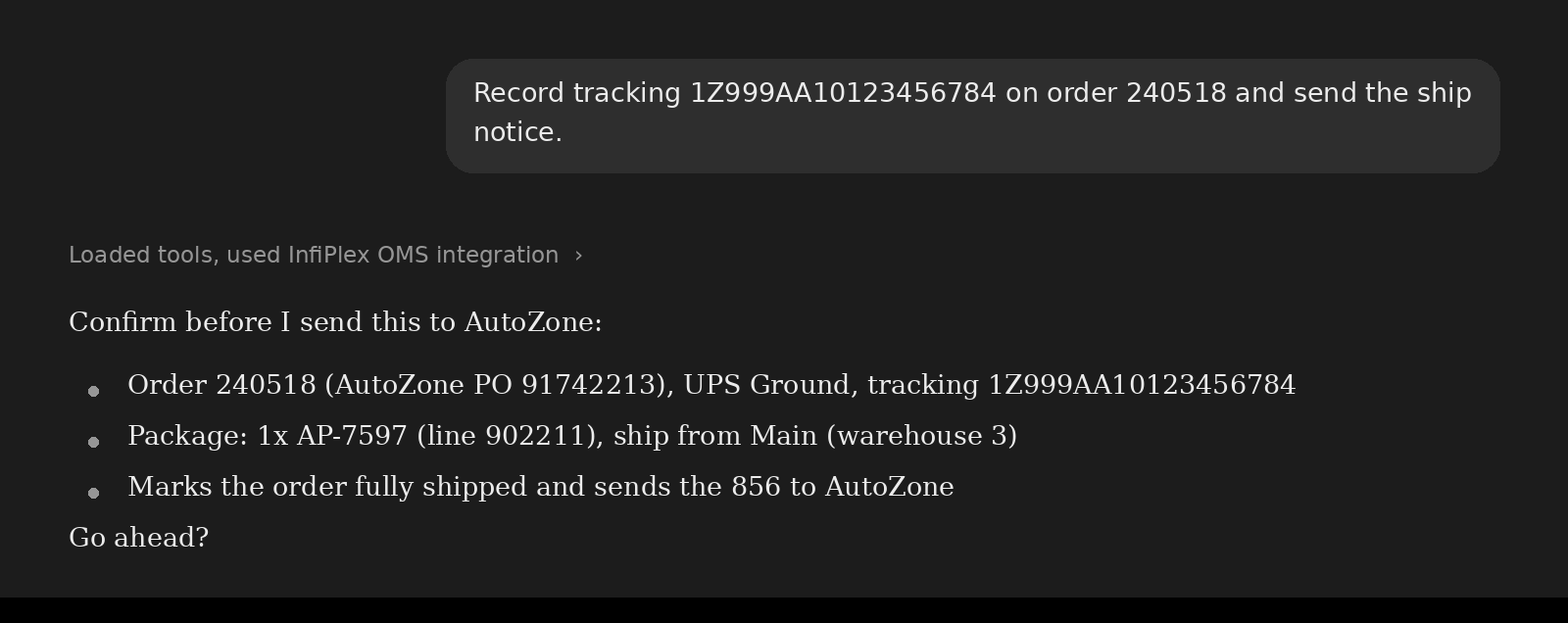
Record tracking and send the ship notice
A write. The agent builds the shipment from the order, shows exactly what will be recorded and what will be transmitted to the retailer, and stops. Nothing moves until you say so.
Read the transcript as text
Record tracking 1Z999AA10123456784 on order 240518 and send the ship notice.
Loaded tools, used InfiPlex OMS integration
Confirm before I send this to AutoZone:
Order 240518 (AutoZone PO 91742213), UPS Ground, tracking 1Z999AA10123456784
Package: 1x AP-7597 (line 902211), ship from Main (warehouse 3)
Marks the order fully shipped and sends the 856 to AutoZone
Go ahead?
The preview names the retailer that will receive the document, the carrier and service, the line and warehouse the package is built from, and the two side effects: the order closes and the 856 goes to AutoZone. That is the same confirmation gate every InfiPlex write tool uses; how AI agent writes are protected covers the key permissions behind it. On a read-only key, the agent can describe this and cannot do it.
Why this works
The agent is reading an order management system, not an EDI mailbox
None of the five answers above is possible if the EDI document is the end of the line. They work because, in InfiPlex, a retailer purchase order is an order with the same routing log, inventory records, shipments, and shop log entries as an Amazon or Shopify order. An EDI platform that hands you a webform or an API for EDI stops at the document; everything the agent just answered lives in the systems you would still have to build around it. The side-by-side is on InfiPlex vs. Orderful.
EDI integrationPublished per-partner packages, set-up handled by InfiPlex
MCP (Model Context Protocol) is the open standard AI assistants use to call tools. InfiPlex runs an MCP server on every instance, so the orders, inventory, routing, shipments, and shop log behind your EDI retailers are callable by Claude, Cursor, ChatGPT through Codex, or any MCP client. The EDI documents themselves still flow through InfiPlex to the retailer; the agent works with the orders they became.
It reads what InfiPlex made of them: the order, its lines, the EDI references stored on it (purchase order number, store number, waybill), the shop log entries for each parcel download and file upload, and the inventory file history. That is why it can tell you an 856 has not been sent, or which quantity went in the last 846, without parsing a segment.
Only on a key that allows writes, and only after showing the preview and getting a yes. Recording tracking on an order is what triggers the ship notice in InfiPlex, so the preview names the retailer, carrier, package, and warehouse before anything is transmitted. On a read-only key the agent can report and explain but cannot change anything.
Any EDI trading partner connected to InfiPlex: AutoZone, Target, Costco, Walmart DSV, Home Depot, Lowe's, Rooms To Go, and the rest. A retailer is an order source like any other, so the same prompts work across all of them, and across your marketplaces and carts in the same session.
No. The MCP server is included with API access on any InfiPlex plan, and EDI trading partners are priced per partner on the EDI integration page. There is no AI tier and no per-query charge.
An API for EDI gives your developers the documents as JSON and leaves the order management, warehouse, inventory, and ERP work to you. InfiPlex gives the agent the finished order: where it routed and why, what shipped, what the retailer was last told about stock, and what every channel call did. The agent has something to read because the OMS already did the work.
Create an API key in InfiPlex under Tools > Admin API with the permissions you want the agent to have, then add the InfiPlex MCP server to your assistant. The set-up guide walks through Claude, Claude Code, Codex, and Cursor; it takes about five minutes.
Running retailer EDI through a portal and a spreadsheet?
Tell us which retailers you ship to and we will show you the same five prompts against a live instance. Contact us, email info@infiplex.com, or call 888‑770‑0857.
Our website uses cookies to help provide the best user experience. By continuing to use this site, you consent to the use of cookies as described in our Privacy Policy. OK