
Temu Order Tour: Watch InfiPlex Route by Zip Code to the Right Warehouse
A Temu order for one product, start to finish, on real screens from a live InfiPlex account: the order pulls in automatically, InfiPlex checks each warehouse against its zip code rules and picks the one that should ship it, and the shop log shows exactly why. Thirty-eight minutes, order landing to tracking confirmed, in the timestamps. No signup, full written version below.
Ten screens, one Temu order routed by zip code
Click anywhere on the screen to advance. Every image is an unedited capture, and the shop log is the system's own receipt for why this order went where it went.
Four warehouses. One order. The system picked the right one and can show its work.
Routed, shipped, tracked, synced. Nobody looked up a zip code by hand.
Click anywhere to continue →
Every step, in writing
The same ten screens as the walkthrough above, with what's actually happening on each one.
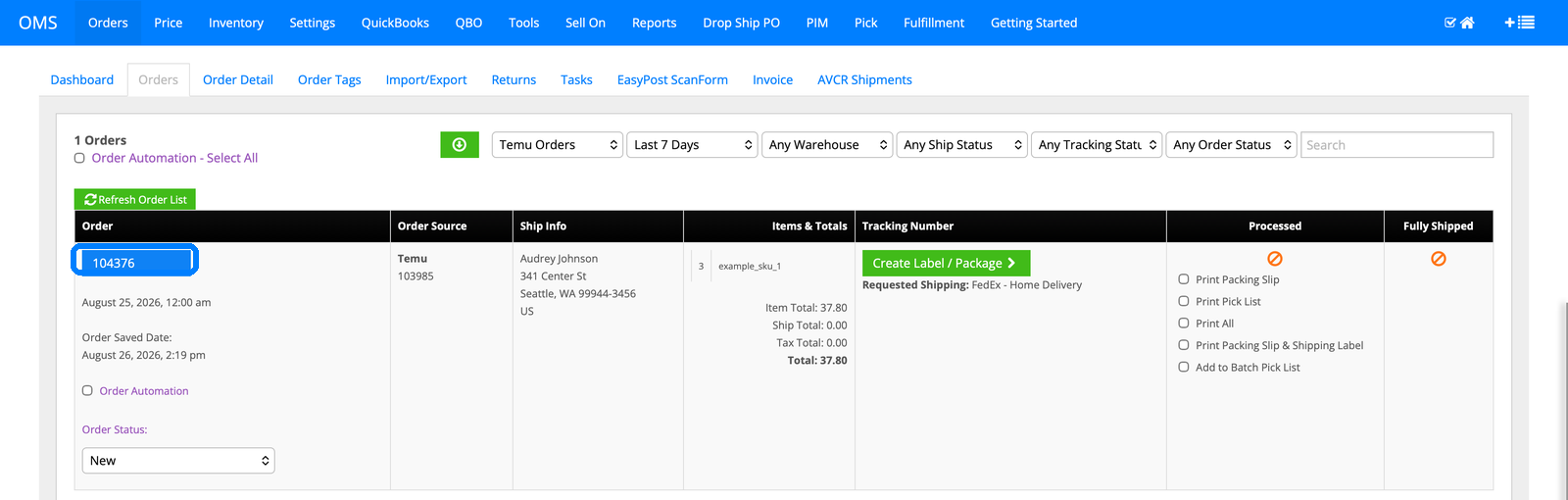
1. The Temu order lands in the queue
Order 104376 arrives from Temu for 3 units of Example Product 1 at $37.80, pulled automatically with the ship-to (Seattle, WA 99944-3456), the requested FedEx Home Delivery shipping, and totals filled in. No tracking exists yet and it hasn't shipped; it lands in the same queue as every other channel.
2. Zip code distance is the routing method, site-wide
One setting decides how every multi-warehouse order gets filled: Manual Sort, or Zip Code Distance. This account runs Zip Code Distance, which means the system checks each order's ship-to zip against every warehouse's rules and picks the warehouse that should handle it, automatically, on every order.

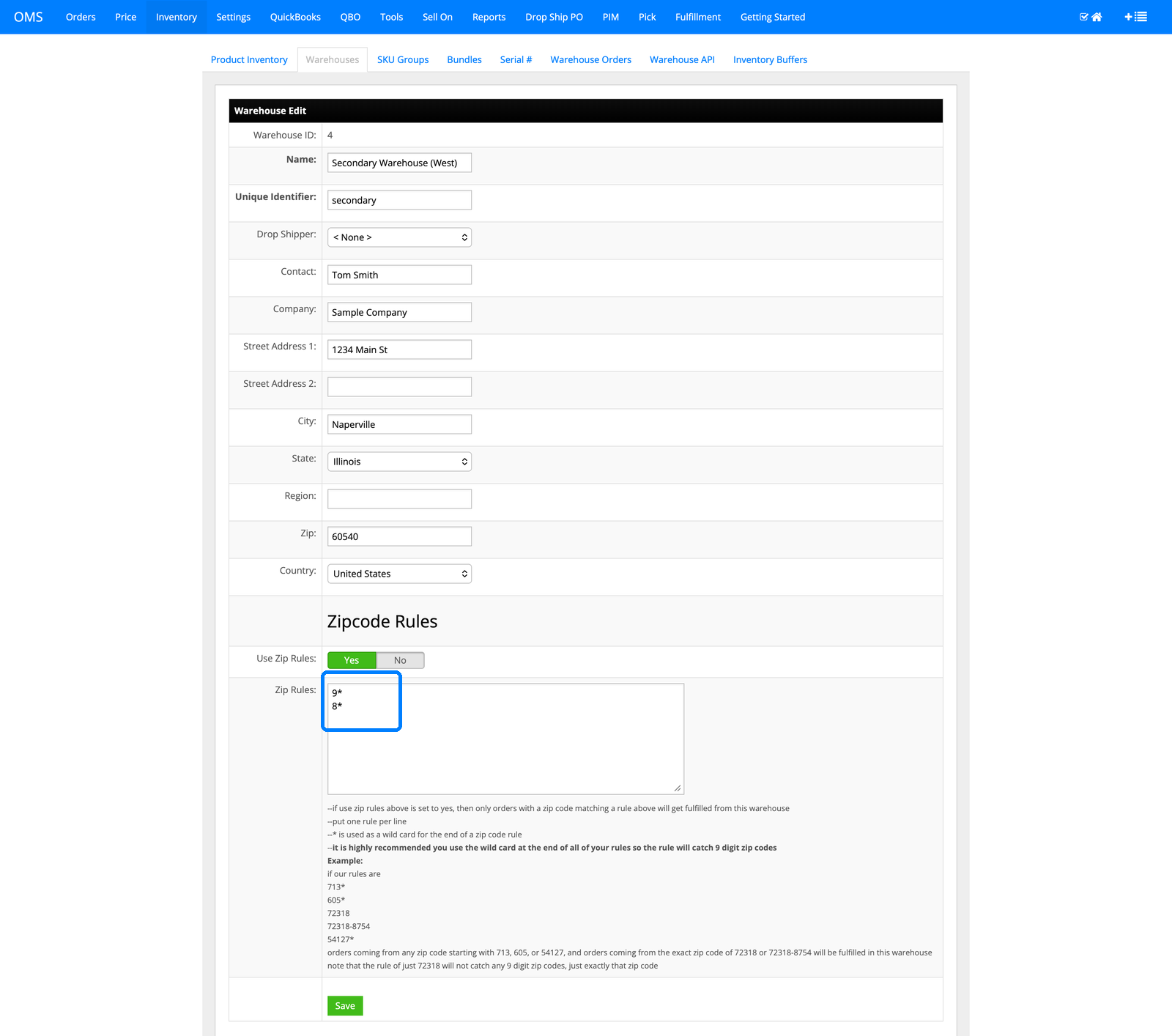
3. Each warehouse gets its own zip rules
Secondary Warehouse (West) is configured with zip rules 9* and 8*, meaning any order shipping to a zip code starting with 9 or 8 is eligible to fill from this warehouse. Every warehouse in the account carries its own rule set; the wildcard at the end catches both 5-digit and 9-digit zip codes.
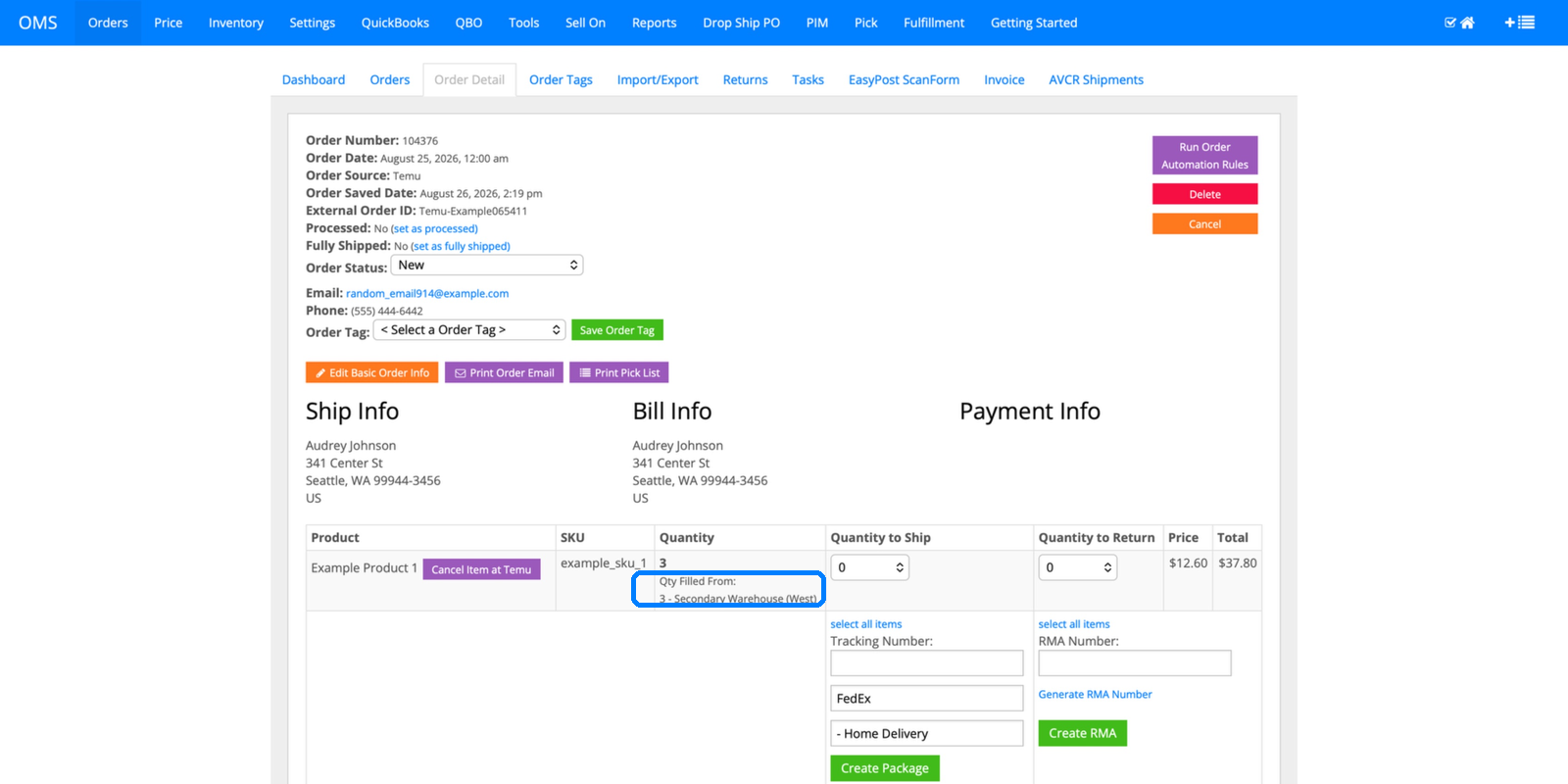
4. The order detail already shows the answer
Order 104376 shipping to zip 99944 in Seattle: the item list reads "Qty Filled From: 3 - Secondary Warehouse (West)" before you even open the log. The order detail page and the routing decision agree, because they're the same data.
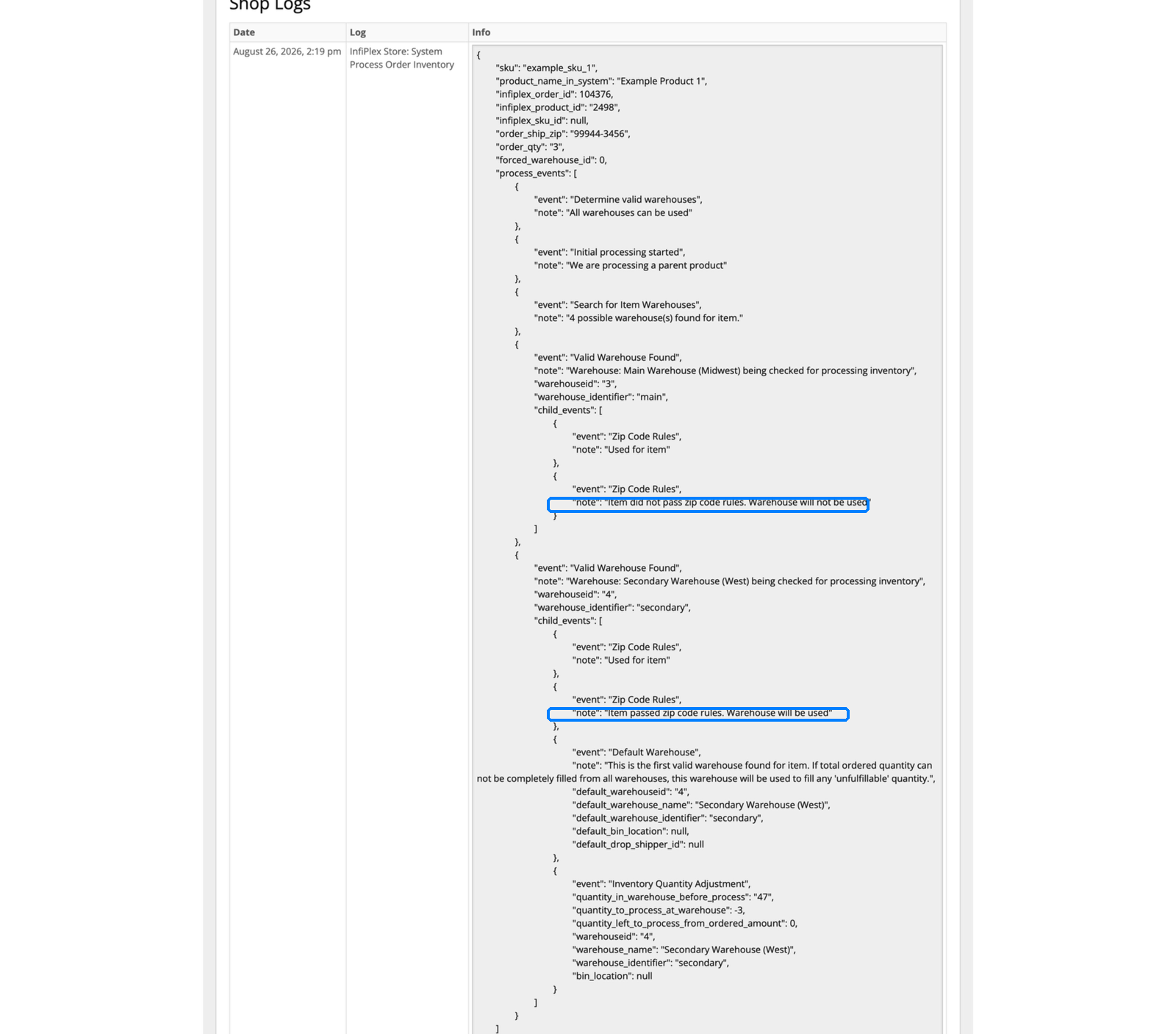
5. The shop log shows its work, warehouse by warehouse
This is the receipt. InfiPlex checked Main Warehouse (Midwest) first: "Item did not pass zip code rules. Warehouse will not be used." Then it checked Secondary Warehouse (West): "Item passed zip code rules. Warehouse will be used." Stock there ticked from 47 to 44. Every warehouse the system considered, and why each one was accepted or rejected, is in the log.
6. Shipped, with a real tracking number
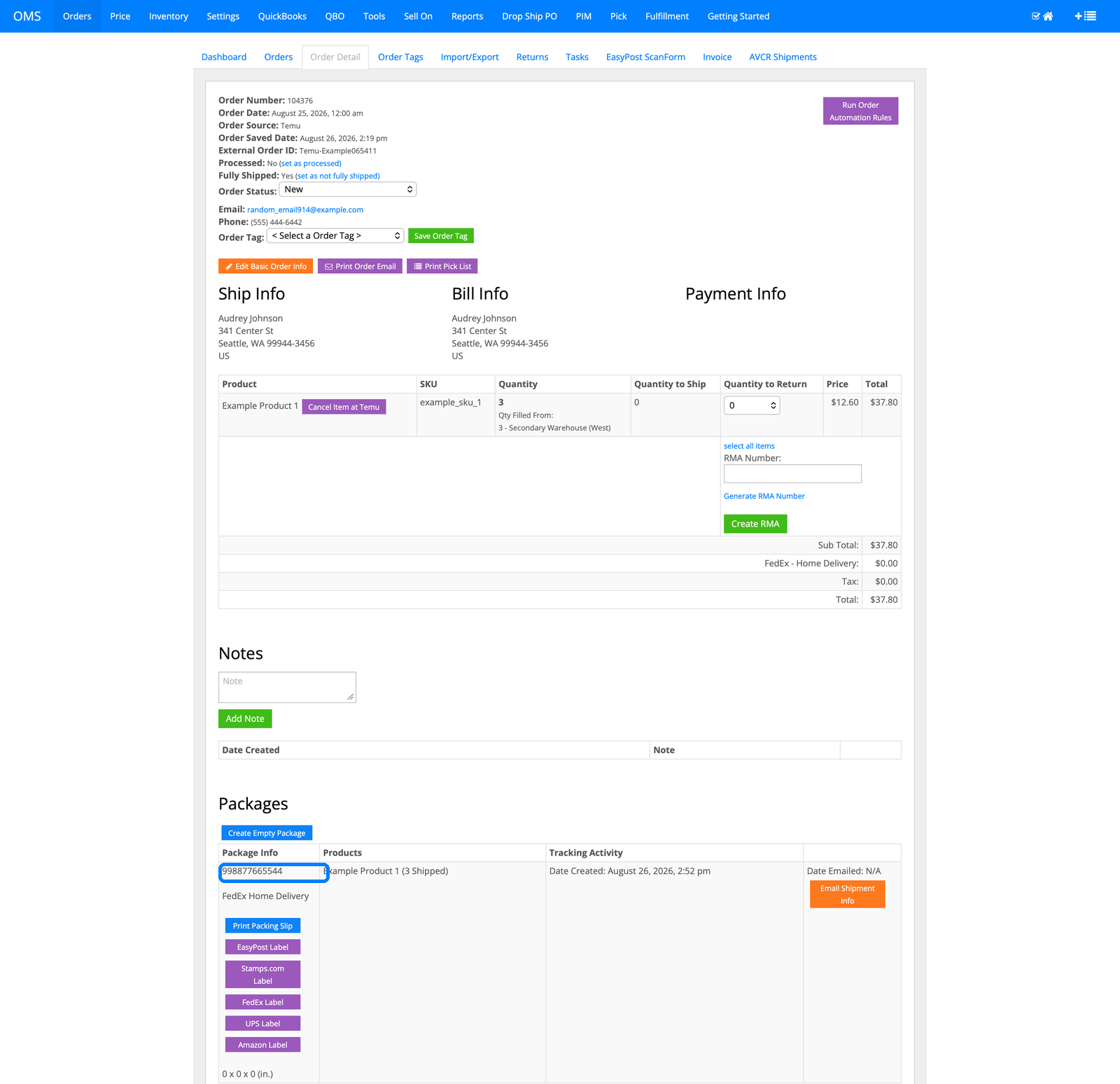
Fully Shipped flips to Yes, and InfiPlex builds the package on its own: tracking 998877665544, FedEx Home Delivery, Example Product 1 (3 Shipped), package created automatically once the warehouse confirmed the ship.
7. Tracking goes back to Temu automatically
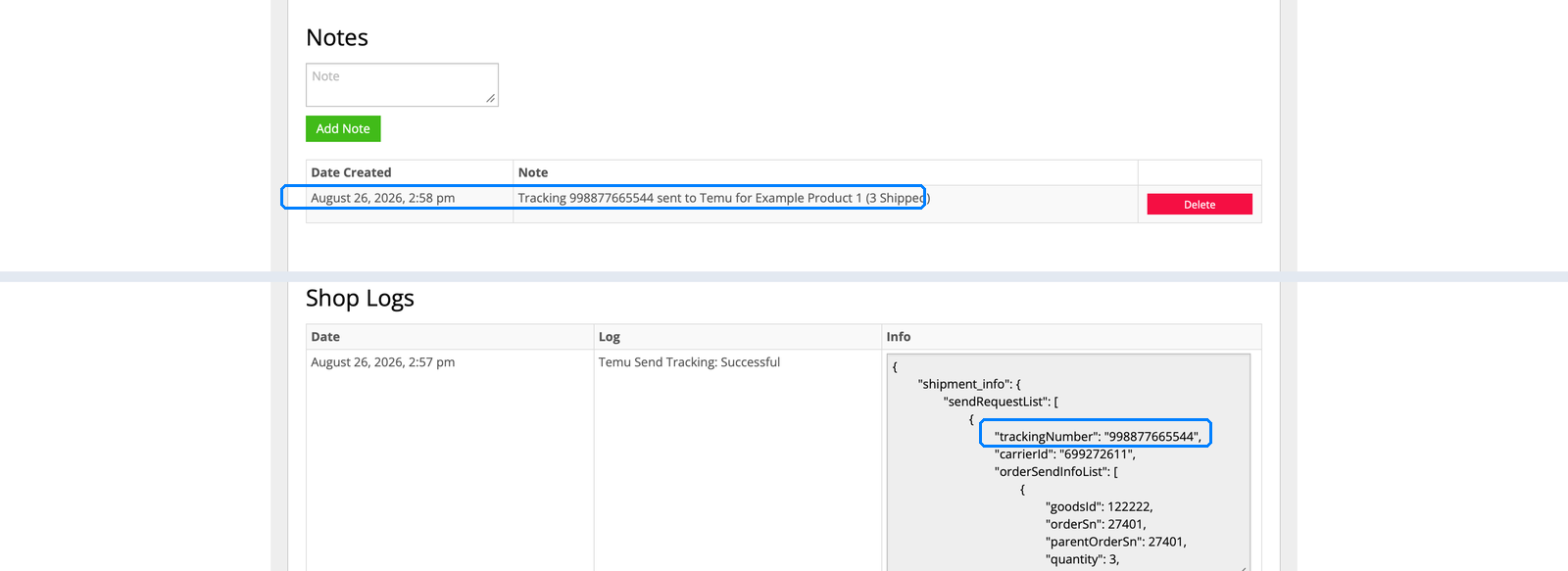
Two receipts, same event: a note logging that tracking 998877665544 was sent to Temu for Example Product 1, and the shop log's own "Temu Send Tracking: Successful" entry with the carrier ID and order numbers InfiPlex actually sent. Order landed in InfiPlex at 2:19 pm, tracking confirmed sent to Temu at 2:57 pm. Thirty-eight minutes, and nobody touched a spreadsheet.
8. Every warehouse, one running total
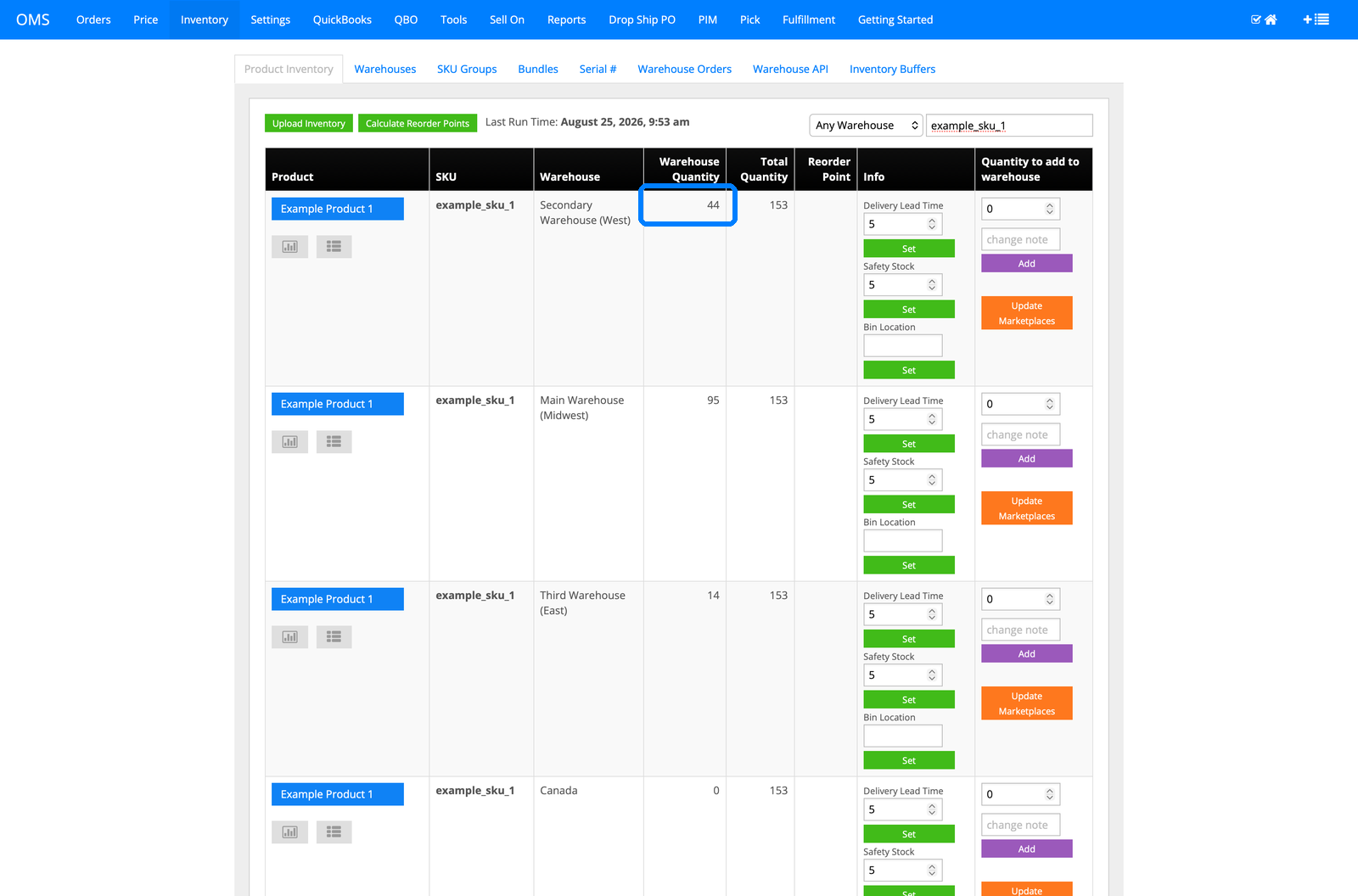
The same SKU sits in four warehouses: 44 in Secondary Warehouse (West) after this order, 95 in Main Warehouse (Midwest), 14 in Third Warehouse (East), 0 in Canada, one total of 153 wherever it's asked. Zip routing works because the system already knows exactly how much is sitting in each location.
9. Every deduction has a paper trail
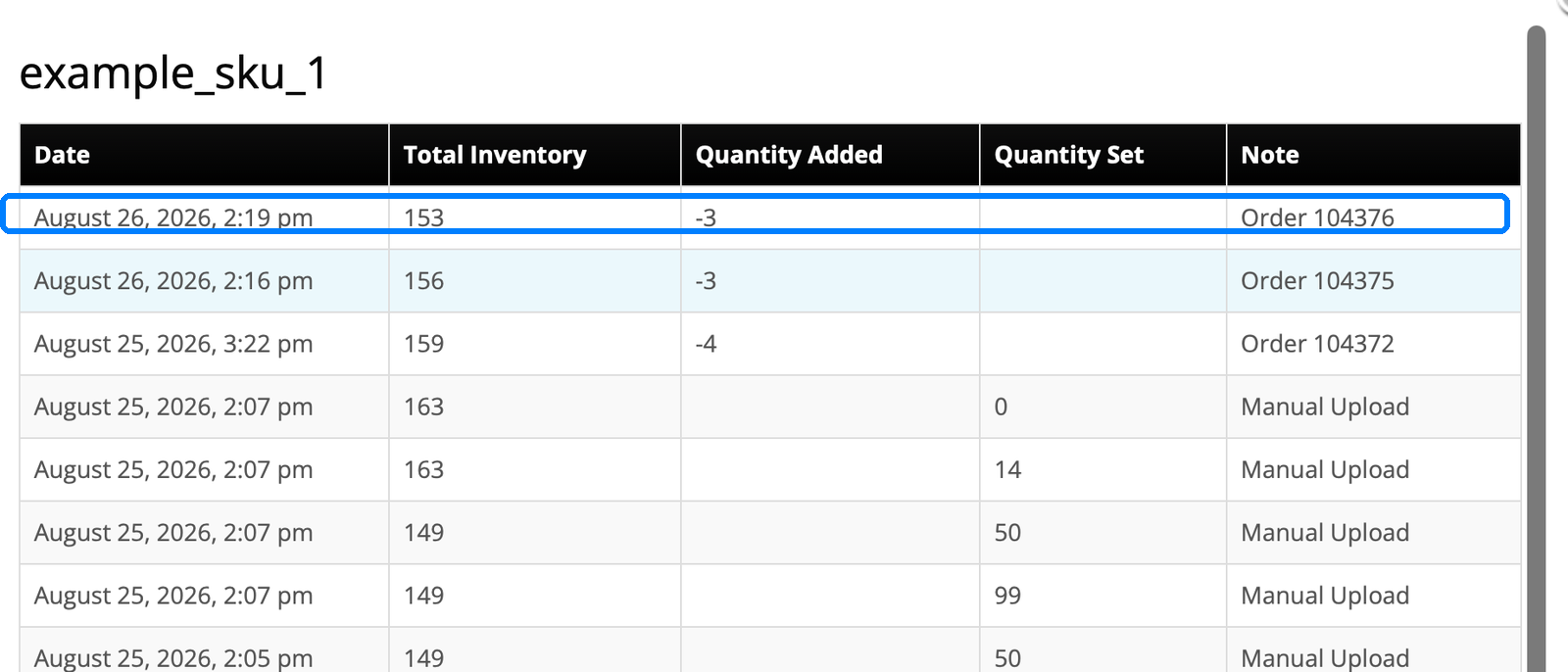
The per-SKU log shows this order taking 3 units, right alongside every other order and manual adjustment, each with a date, quantity, and reason. When a warehouse count looks off, you read the trail instead of guessing which order did it.
10. The entire connection is one settings page
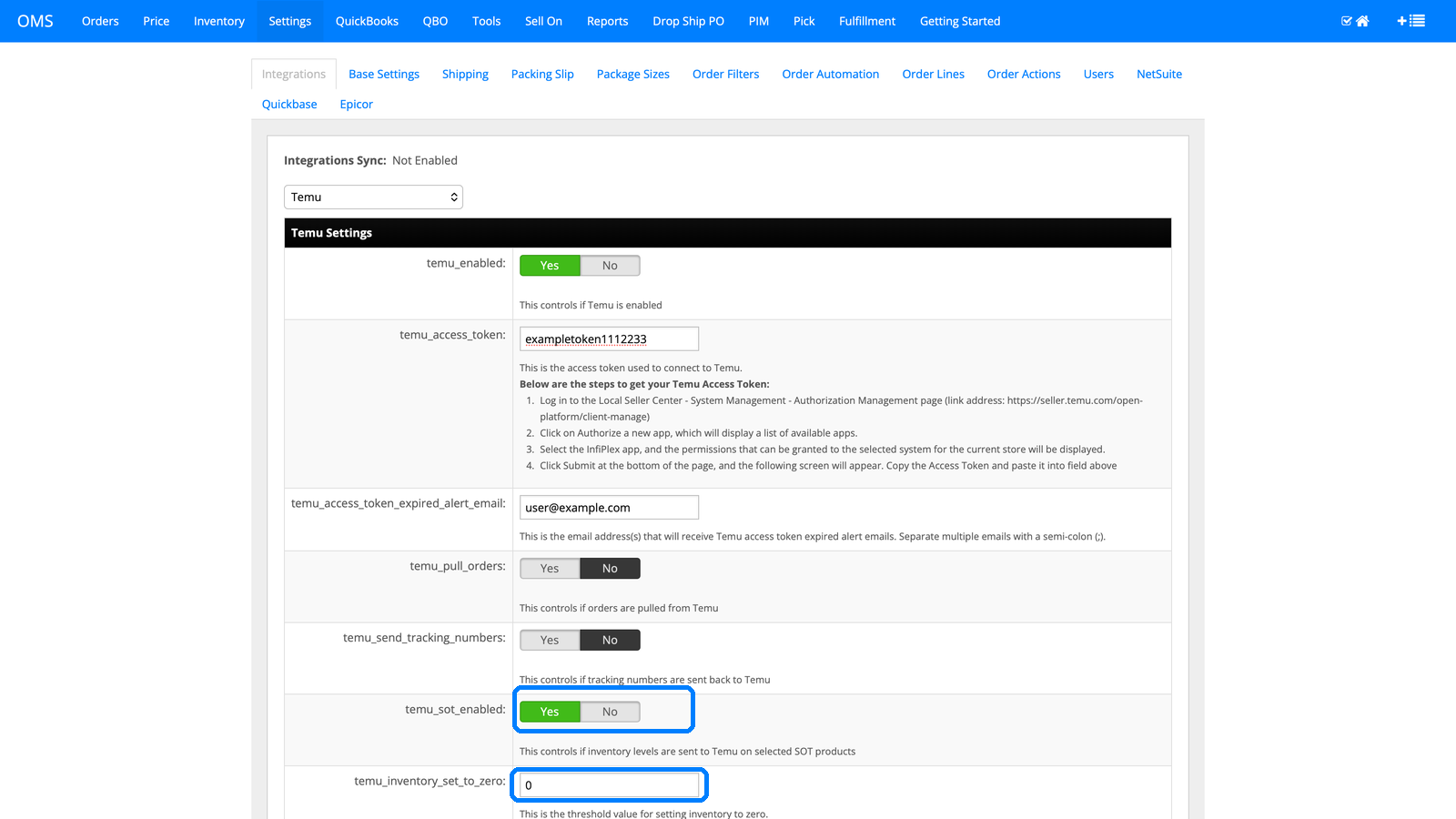
Everything you just watched runs off a single Temu settings page: the access token, pulling orders, sending tracking numbers back, syncing inventory levels on selected products, plus an inventory-to-zero threshold that keeps low-stock items from overselling. Connect it once and it just runs.
Multi-warehouse zip code routing FAQ
How does InfiPlex decide which warehouse ships an order?
You choose the method at the site level: Manual Sort, where warehouses fill in a fixed priority order, or Zip Code Distance, shown in this tour. With zip code distance, each warehouse carries its own list of zip code rules, and InfiPlex checks an order's ship-to zip against every warehouse in turn until it finds one whose rules match, exactly as shown in steps 2 through 5. The decision and the reasoning for every warehouse considered, accepted or rejected, are written to the shop log on the order itself.
Can I sell on Temu and have multiple warehouses fulfill orders?
Yes, and that's exactly this tour. Temu orders pull in automatically, InfiPlex routes each one to the correct warehouse by zip code, and tracking syncs back to Temu once it ships, all without anyone manually assigning a warehouse. The same routing logic applies regardless of which channel the order came from, so a Temu order and an Amazon order shipping to the same zip code route to the same warehouse.
What happens if no warehouse's zip rules match an order?
InfiPlex still needs somewhere to ship it, so the system falls back to the first valid warehouse it finds for the item, logged plainly as the default warehouse decision, the same event visible in step 5's log. Zip rules narrow the field first; nothing is left unfulfillable because a zip code fell outside every configured range. The full rule syntax, the decision steps, and a US coverage map by first digit are in Geo Routing by Zip Code.
What does this cost and how long does setup take?
InfiPlex plans start at $49.99/month, and pricing is public on the pricing page, no sales call required to see it. Temu connects in days, not months, because the integration already exists and setup is the settings page in step 10. Temu is one of 130+ channels and platforms in the integrations directory, and the product tour hub has live walkthroughs for Amazon, AliExpress, and TikTok Shop if you want to watch other flows, plus a guided tour of 3PL order management. The free demo runs InfiPlex against your actual channels and warehouses.
Temu guides
The rules this routing is built to meet, and the API it runs on.
Want your warehouses routing orders like this?
Plans start at $49.99/month. Watch it on your own channels and warehouses with a free demo.
