
Geo routing in InfiPlex means every order fills from the warehouse or 3PL facility closest to the person who bought it, automatically, on every channel, with a log entry that shows why. It runs on two settings: a site-wide fulfillment method called Zip Code Distance, and a list of zip code rules on each warehouse. Set those once and a Temu order shipping to Seattle, an Amazon order shipping to Atlanta, and a Shopify order shipping to Dallas each land in the right building without anyone assigning them. This guide covers the exact rule syntax, how a decision is made, how to lay out regions across the US, and how the same routing works when your “warehouses” are 3PL facilities in Extensiv, Logiwa, or any other WMS connected through the InfiPlex 3PL Connector.
Jump to What You Need
| If You Want To… | Go To |
|---|---|
| Find the two settings that turn geo routing on | Where Geo Routing Lives |
| Write zip rules that match the right orders | Zip Rule Syntax |
| Understand how one order gets its warehouse | How a Geo-Routed Order Is Decided |
| Split the US into regions for two, three, or four warehouses | Building a Coverage Map |
| Route orders to 3PL or WMS facilities instead of your own buildings | Geo Routing to 3PL and WMS Facilities |
| See what geo routing does not override | What Geo Routing Does Not Override |
| Set it up in order | Set-Up Checklist |
Where Geo Routing Lives in InfiPlex
Geo routing is two settings, and both are in the OMS. There is nothing to script and nothing to configure per channel.
- The fulfillment method, site-wide. Settings > Base Settings > Warehouse, warehouse_fulfill_order_method. The two values are Manual Sort, where warehouses fill in a fixed priority order you drag into place, and Zip Code Distance, where the order's ship-to zip decides. Geo routing is Zip Code Distance.
- Zip code rules, per warehouse. Inventory > Warehouses > Add/Edit Warehouse. Each warehouse has a Use Zip Rules toggle and a Zip Rules box, one rule per line. A warehouse with rules turned on only fills orders whose ship-to zip matches one of its rules.

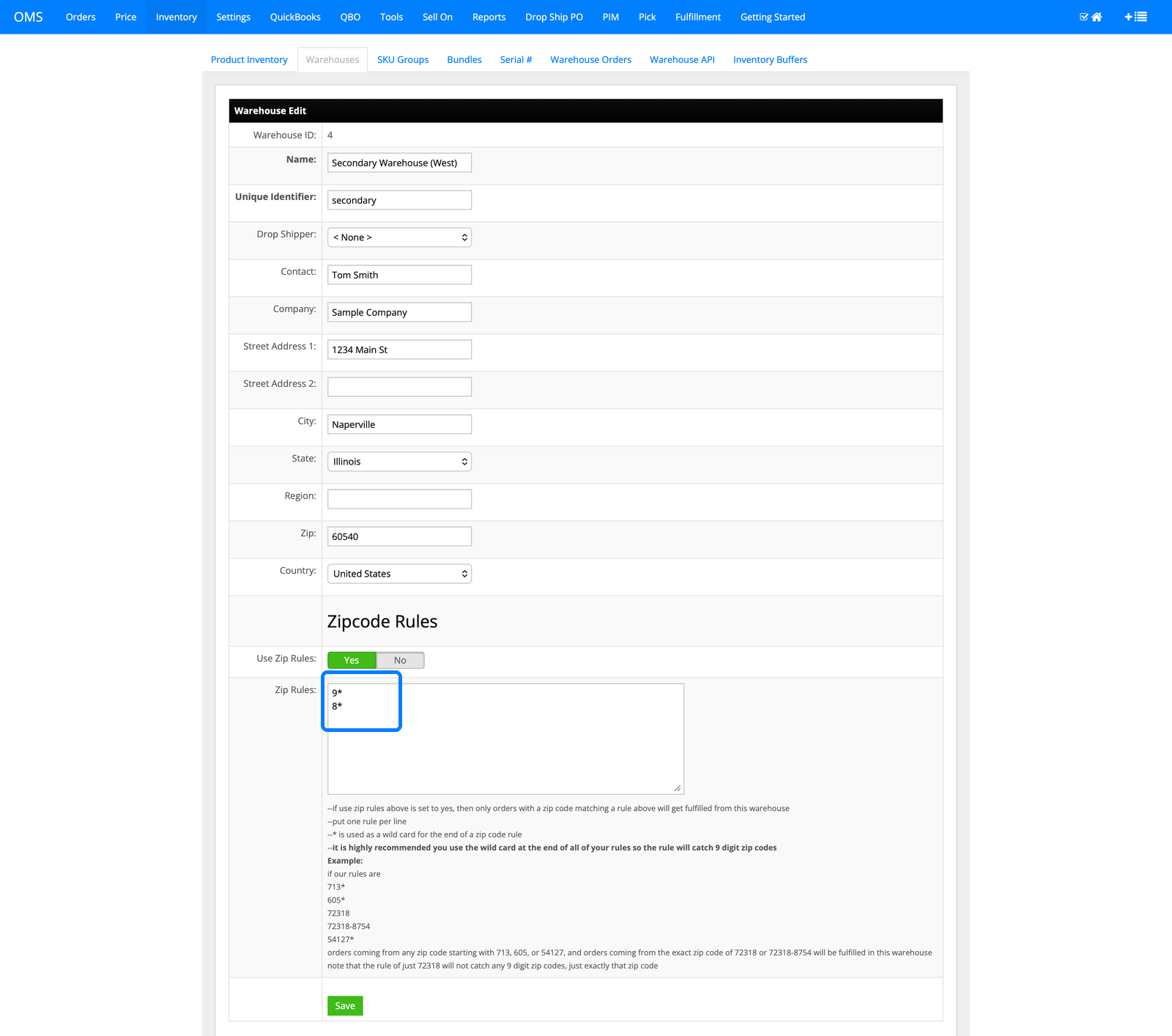
The warehouse address you enter on the same screen matters too. It is what the Zip Code Distance method measures against, so a warehouse with an accurate street address and zip code is a warehouse that gets ranked correctly.
InfiPlex Zip Rule Syntax
Rules are plain text, one per line, and the only operator is a trailing wildcard. This is the whole grammar:
| Rule | What It Matches | Use It For |
|---|---|---|
| 9* | Any zip starting with 9, five-digit or nine-digit | A whole USPS region (see the map below) |
| 713* | Any zip starting with 713, five-digit or nine-digit | A metro area or a slice of a state |
| 54127* | Exactly 54127, plus any 54127-XXXX | One zip code, including its ZIP+4 variants |
| 72318 | Exactly 72318, and nothing else. A 72318-8754 does not match | Rarely the right choice; add the wildcard |
| 72318-8754 | Exactly that ZIP+4 | A single facility or campus |
Three things follow from that table:
- End every rule with the wildcard unless you have a specific reason not to. Marketplaces send ZIP+4 on a large share of US orders. A rule of 60540 silently misses 60540-1234; a rule of 60540* catches both.
- Fewer, shorter rules beat long lists. 9* is one line that covers eleven states and territories. You only need three-digit rules when a region needs to be carved up more finely than a first digit allows.
- Rules define eligibility, not preference. A warehouse whose rules match is allowed to fill the order. Which eligible warehouse fills it first is decided by the method in the next section.
How InfiPlex Decides a Geo-Routed Order
For every SKU on an order, InfiPlex does the following, and writes each step to the order's shop log:
- Check every warehouse's zip rules against the ship-to zip. A warehouse with Use Zip Rules on and no matching rule is dropped and logged as “Item did not pass zip code rules. Warehouse will not be used.” A warehouse with rules off is always eligible.
- Rank the eligible warehouses. Under Zip Code Distance, the eligible warehouse nearest to the ship-to zip is first. If a SKU has its own fulfillment order set, that order is used instead, still among the eligible warehouses only.
- Take stock down the ranked list. The first warehouse fills as much as it has, the next fills the remainder, and so on. Most geo-routed orders stop at step one of that list because the closest warehouse has the stock.
- Record the decision on the order. The order detail shows “Qty Filled From” per line, and the shop log shows every warehouse considered, accepted or rejected, along with the inventory deduction.
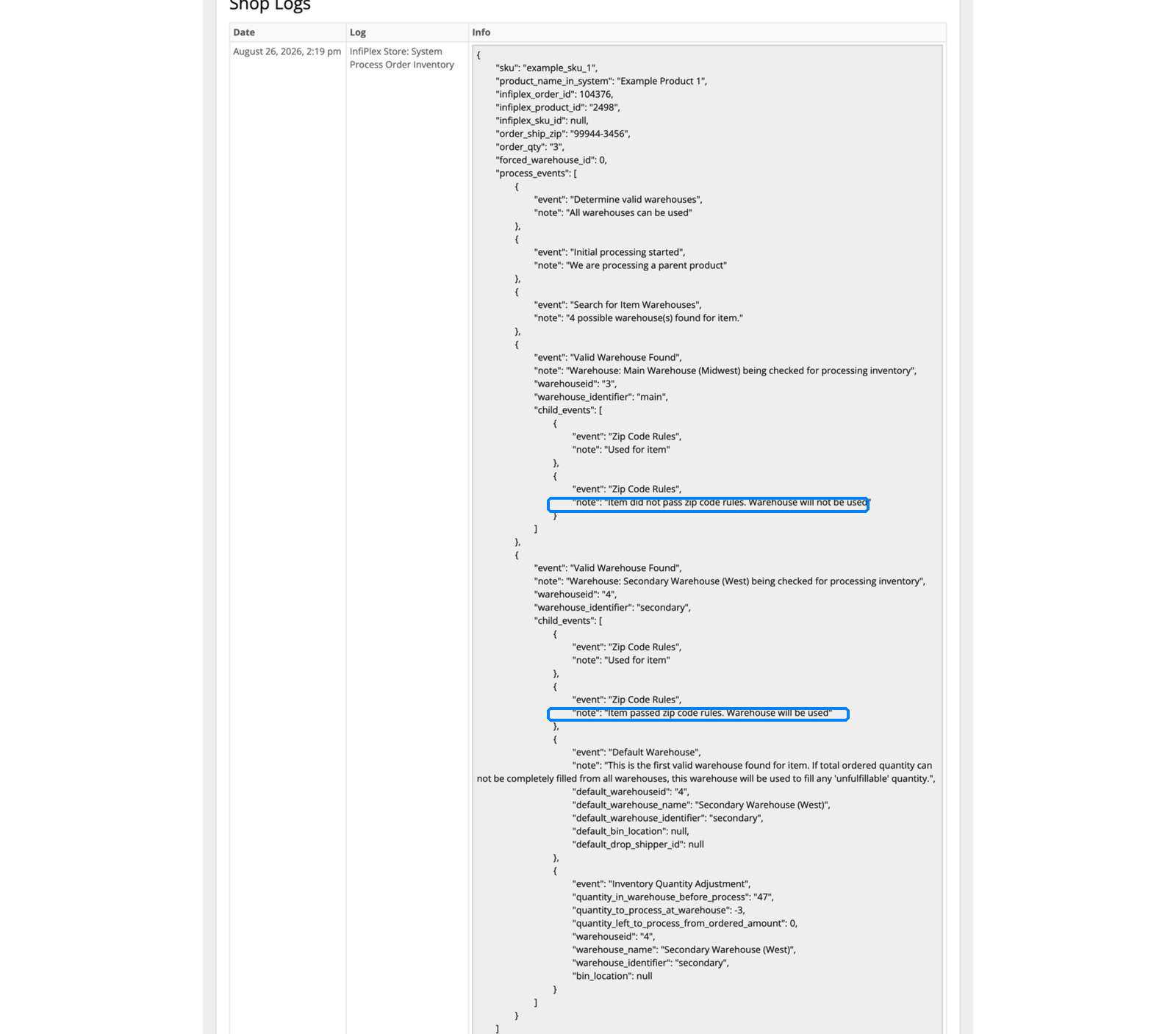
The log is the part people do not expect. When a customer asks why an order shipped from the East coast, or a 3PL asks why they received a certain order, the answer is on the order itself, not in a support ticket. The full ten-screen version of one Temu order going through this is in the Temu zip code routing tour.
When zip rules leave zero warehouses eligible, InfiPlex falls back to the first valid warehouse for the item rather than leaving the order unfulfillable, and logs it as the default warehouse decision. With a coverage map that spans every first digit, this never fires. When a multi-item order needs more than one warehouse, the split, per-warehouse packages, and tracking merge are covered in Multi-Warehouse Order Routing & Splitting.
Building a Coverage Map for InfiPlex Geo Routing
US zip codes are already geographic. The first digit is a region, so a national coverage map is usually a handful of one-character rules. This is the first-digit map:
| Rule | Covers |
|---|---|
| 0* | CT, MA, ME, NH, NJ, RI, VT, Puerto Rico, US Virgin Islands |
| 1* | DE, NY, PA |
| 2* | DC, MD, NC, SC, VA, WV |
| 3* | AL, FL, GA, MS, TN |
| 4* | IN, KY, MI, OH |
| 5* | IA, MN, MT, ND, SD, WI |
| 6* | IL, KS, MO, NE |
| 7* | AR, LA, OK, TX |
| 8* | AZ, CO, ID, NM, NV, UT, WY |
| 9* | AK, CA, HI, OR, WA, and the Pacific territories |
Three layouts that work, each covering every first digit exactly once so no order is left without an eligible warehouse and no two warehouses compete for the same zip:
| Layout | Warehouse | Zip Rules |
|---|---|---|
| Two warehouses | East | 0*, 1*, 2*, 3*, 4* |
| West | 5*, 6*, 7*, 8*, 9* | |
| Three warehouses | East | 0*, 1*, 2*, 3* |
| Central | 4*, 5*, 6*, 7* | |
| West | 8*, 9* | |
| Four warehouses | Northeast | 0*, 1*, 2* |
| South | 3*, 7* | |
| Midwest | 4*, 5*, 6* | |
| West | 8*, 9* |
Two refinements come up often. First, a warehouse that should catch everything nobody else claims can simply leave Use Zip Rules off; it is then eligible for every order and Zip Code Distance ranks it below any closer warehouse that matched. Second, you can deliberately overlap. Giving both the Central and West warehouses 8* means Mountain-state orders are eligible at both, and the closer one wins; if it is out of stock, the other fills without a manual reassignment. Overlap is a stock-out safety net you choose, not a conflict.
A warehouse in another country works the same way. Give a Canadian facility rules for the postal codes it should serve, or leave rules off and force Canadian channels to it at the integration level as described under what geo routing does not override.
InfiPlex Geo Routing to 3PL and WMS Facilities
A warehouse in InfiPlex does not have to be a building you operate. It can be a facility inside a 3PL's WMS, connected through the 3PL Connector. Each facility becomes its own InfiPlex warehouse with its own address, its own zip rules, and its own inventory count, and the routing logic above treats it exactly like an owned warehouse. The order lands in the right facility's queue in the WMS, the 3PL picks and ships, and InfiPlex pulls the tracking back to the marketplace.
That is how geo routing works with Extensiv 3PL Warehouse Manager (formerly 3PL Central), Logiwa, and the other WMS platforms InfiPlex connects to: one InfiPlex warehouse per physical facility the 3PL runs, each with the zip rules for the region it serves. Two things make this hold up in production:
- Per-facility inventory. InfiPlex pulls stock from each connected facility separately, so the routing decision is made against what that specific building actually has, not a merged total. That is the same warehouse-level model behind CastleGate order routing, where each distribution center is its own InfiPlex warehouse.
- Per-connection SKU maps. If a 3PL knows an item by a different SKU, or needs a marketplace bundle delivered as its component SKUs with quantities, an Item Bundle Group associated to that fulfillment connection translates the order on the way out and reverses it when tracking comes back. That is the “dynamic bundling” a 3PL can offer its clients without pre-kitting anything, covered in SKU Groups vs Bundles vs SKU Maps.
For a 3PL, this is a service to sell. A brand with one Shopify store and one Amazon account can be offered two-region or three-region fulfillment on day one, with InfiPlex deciding which of the 3PL's facilities receives each order and the 3PL's WMS never having to know a zip rule exists. The commercial side of that arrangement is on Order Management for 3PL Fulfillment, and a mixed setup, where some orders go to an owned warehouse and some to a 3PL, is one of the standard patterns in the multi-warehouse routing guide.
Why InfiPlex Geo Routing Lowers Shipping Cost and Delivery Time
Domestic carriers price ground shipments by zone, and zones are distance bands from the origin zip to the destination zip. A parcel that leaves a West coast warehouse for a West coast customer travels one or two zones; the same parcel leaving an East coast warehouse travels seven or eight, at a higher rate, over more days, through more sort facilities. Geo routing collapses that distance on every order that has a closer eligible warehouse, which for a well-drawn coverage map is most of them.
The delivery-time side shows up on the marketplaces too. Channels that let a seller register multiple ship-from locations, such as Amazon Supply Sources or Shopify locations, can quote faster promised delivery when the order will actually ship from nearby. Because InfiPlex holds inventory per warehouse rather than as a single merged number, each InfiPlex warehouse can be mapped to the matching marketplace location, so the promise the customer sees and the warehouse that ships are the same place. The Shopify version of that is the Shopify Location Router.
What InfiPlex Geo Routing Does Not Override
Geo routing is one layer in a stack, and knowing the layers above it explains every “why did this order go there” question:
- An integration-level forced warehouse wins outright. A channel setting such as amazon_warehouse_id sends every order on that channel to one warehouse and skips zip rules entirely. Use it when a whole channel must ship from one place, for example a marketplace that only accepts one origin.
- A SKU-specific fulfillment order replaces the distance ranking for that SKU. Zip rules still decide which warehouses are eligible; the SKU's own order then ranks them. Set it at Inventory > the SKU > Warehouses, as described in Set a SKU's Default Warehouse.
- Stock still has to exist. Geo routing chooses among warehouses that have the item. If the nearest eligible warehouse is at zero, the next one fills, and the log says so. Keeping regional stock balanced is what Restock Alerts are for.
- Buffers and set-to-zero thresholds apply per warehouse. The quantity a marketplace sees is the sum of what every warehouse can sell after buffers, so geo routing never causes a channel to show stock the buildings do not have. See Multichannel Inventory Sync.
InfiPlex Geo Routing Set-Up Checklist
- Create one InfiPlex warehouse per physical location, owned or 3PL, with its full street address and zip. For 3PL facilities, connect each through the 3PL Connector so inventory and tracking flow per facility.
- Set warehouse_fulfill_order_method to Zip Code Distance at Settings > Base Settings > Warehouse.
- On each warehouse, turn Use Zip Rules on and enter its rules, one per line, every rule ending in the wildcard. Check that the ten first digits are each covered by at least one warehouse.
- Upload an Item Bundle Group for any fulfillment connection that knows SKUs by other names or quantities.
- Place a test order to a zip in each region, open the order, and read the shop log. Every warehouse considered should appear with a pass or fail line, and “Qty Filled From” should name the warehouse you expected.
- Leave any channel that must ship from a single origin on its integration-level forced warehouse, and let every other channel route by zip.
InfiPlex Geo Routing Questions
What is geo routing in InfiPlex?
Geo routing sends each order to the warehouse or 3PL facility closest to the ship-to address. It is the Zip Code Distance fulfillment method at Settings > Base Settings > Warehouse, combined with a list of zip code rules on each warehouse. It applies to every sales channel with no per-channel configuration, and every decision is written to the order's shop log.
How do InfiPlex zip code rules work?
Each warehouse has a Use Zip Rules toggle and a rules box, one rule per line. A rule is a zip prefix with a trailing asterisk wildcard, such as 9* for every zip starting with 9 or 713* for every zip starting with 713. A rule without a wildcard matches only that exact zip and does not match its ZIP+4 forms, so rules should normally end in the wildcard. A warehouse whose rules match the ship-to zip is eligible to fill the order.
Does geo routing work for 3PL warehouses as well as my own?
Yes. A facility inside Extensiv, Logiwa, or another WMS connected through the InfiPlex 3PL Connector is set up as its own InfiPlex warehouse with its own address, zip rules, and inventory. The routing logic is identical for owned and 3PL warehouses, and orders land in the correct facility's queue in the 3PL's WMS.
What happens if no warehouse's zip rules match an order?
InfiPlex falls back to the first valid warehouse for the item rather than leaving the order unfulfillable, and logs it as the default warehouse decision. A coverage map that assigns every first digit from 0 to 9 to at least one warehouse means this never fires.
What happens if the closest warehouse is out of stock?
The next eligible warehouse in distance order fills the item, and the shop log records both the warehouse that was passed over and the one used. If the order has several items, each item is routed independently, so an order can ship from two warehouses when that is the only way to cover it.
Can two warehouses have overlapping zip rules?
Yes, and it is a useful safety net. If two warehouses both list 8*, orders to Mountain-state zips are eligible at both and the closer one is ranked first. When it is out of stock the other fills the order without anyone reassigning it.
Does geo routing override a warehouse forced at the channel level?
No. An integration-level forced warehouse, such as amazon_warehouse_id, sends every order on that channel to one warehouse and skips zip rules entirely. Geo routing applies to channels that do not have a forced warehouse set.
Can one SKU route differently from the rest of the catalog?
Yes. A SKU-specific fulfillment order at Inventory > that SKU > Warehouses replaces the distance ranking for that SKU only. Zip rules still decide which warehouses are eligible; the SKU's own order ranks them.
How does geo routing reduce shipping costs?
Ground rates are priced by carrier zone, and zones are distance bands between origin and destination zip. Filling an order from the nearest warehouse cuts the zones traveled, which lowers the rate and shortens transit on every order that has a closer eligible warehouse.
How can I see why a specific order went to a specific warehouse?
Open the order. The item list shows “Qty Filled From” with the warehouse name, and the shop log lists every warehouse InfiPlex considered with a line stating whether it passed or failed the zip rules and how much inventory was deducted.
Ask an AI Agent Instead
You can ask an AI agent why a specific order went to a specific warehouse and get the zip rule check and inventory at that moment from the routing log. Every InfiPlex instance runs a native MCP server, so Claude, ChatGPT through Codex, or any MCP client connected to your instance can do it from a chat window, with a preview before anything channel-visible changes. See the five-minute set-up and the prompts by role.
Every order from the closest warehouse, on every channel
Zip code routing, per-warehouse inventory, and 3PL facility routing are included on every InfiPlex plan, for your own buildings, your 3PL's facilities, or both at once.
Related guides
- Multi-Warehouse Order Routing & Splitting
- Temu Order Tour: Zip Code Routing on Real Screens
- Set a SKU's Default Warehouse
- InfiPlex 3PL Connector
- Order Management for 3PL Fulfillment
- Extensiv 3PL Warehouse Manager Integration
- Logiwa WMS Integration
- Shopify Location Router
- Shopify Fulfillment Orders and Multi-Location Routing
- CastleGate Order Routing and Split Shipments
- SKU Groups vs Bundles vs SKU Maps
- Multichannel Inventory Sync: Stop Overselling
- InfiPlex Restock Alerts
- InfiPlex MCP Server: connect your AI agents to InfiPlex
- AI agent prompts for order management
- Morning unshipped orders agent
- AI agent for Walmart DSV
