
Last Updated: Sep 21, 2026
 InfiPlex Inventory & Order Management System (OMS) connects directly to your Etsy shop. Once connected, InfiPlex pulls every Etsy order into the OMS, sends tracking back to Etsy when you ship, and keeps Etsy inventory in step with your other channels. This guide covers the quick set-up with the InfiPlex Etsy app, the optional set-up with your own Etsy app, and the two listing rules Etsy variations need.
Etsy Quick Set-up with the InfiPlex Etsy App
The quick set-up uses the InfiPlex OMS Etsy app credentials, so there is nothing to create on the Etsy developer side. This is the recommended path for almost every shop.
- Find your Etsy shop ID. Open your profile page from the Etsy dashboard. The URL looks like
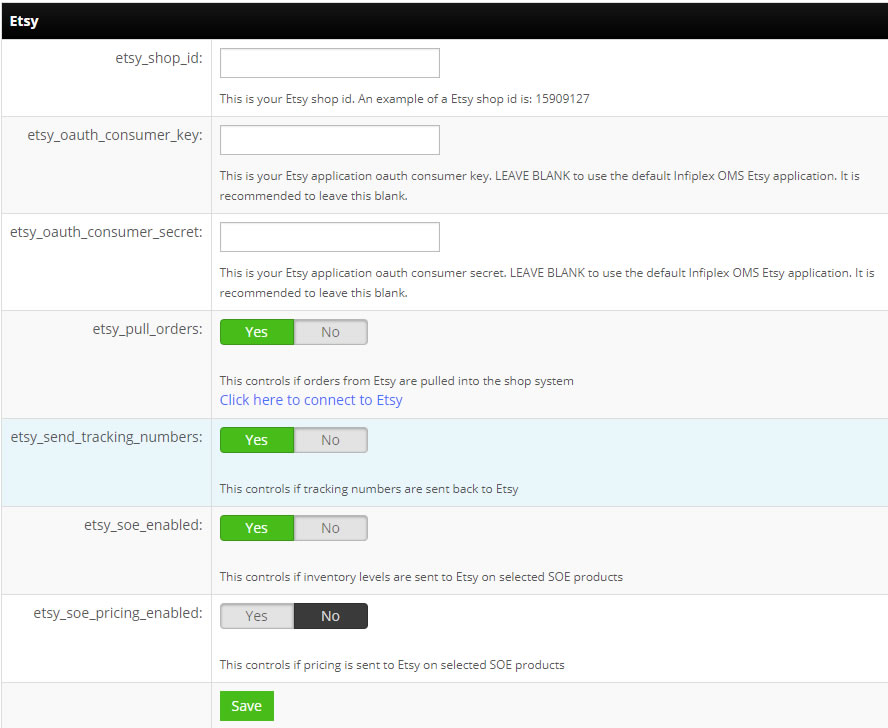
etsy.com/profile.php?user_id=XXXXXXX; the number afteruser_id=is your shop ID. If you cannot find it, Etsy support at developer@etsy.com can provide it. - Open the Etsy settings in your OMS. Log into your InfiPlex OMS site and go to Settings > Base Settings > Etsy.
- etsy_shop_id: your Etsy shop ID, for example 15909127
- etsy_oauth_consumer_key: leave blank for the quick set-up
- etsy_oauth_consumer_secret: leave blank for the quick set-up
- etsy_pull_orders: set to Yes to pull Etsy orders into the OMS
- etsy_send_tracking_numbers: set to Yes to send tracking back to Etsy when an order ships
- etsy_soe_enabled: set to Yes to send inventory levels to Etsy for SKUs flagged as Sell On Etsy
- etsy_soe_pricing_enabled: set to Yes only if you want InfiPlex to send pricing to Etsy for those SKUs
- Authorize the connection. Click the connect link on the settings page. Etsy opens a window asking you to log in and approve InfiPlex OMS access to your shop.
- Save. InfiPlex starts checking Etsy for new orders on the next cycle.
Set-up with Your Own Etsy App
You can also connect with an Etsy app you own. It takes longer, because Etsy issues the keys and reviews the app, but it keeps the API credentials under your account.
- Go to etsy.com/developers and log in with your shop's administrative account.
- Choose Create a New App and follow Etsy's prompts. InfiPlex is compatible with the Etsy Inventory Management API.
- Etsy returns a consumer key and a consumer secret. Enter them in etsy_oauth_consumer_key and etsy_oauth_consumer_secret, then complete the other settings above.
- You do not need to request full access for the app, since only your shop uses it.
Required Listing Set-up for Etsy Variations
Unique SKU per variation. Etsy lets you add variations without SKUs, but InfiPlex can only update inventory on a variation that has its own unique SKU. Review every listing with variations and confirm each one carries a distinct SKU.
Quantities vary. Every listing with variations must have Quantities vary enabled. Without it, inventory updates fail with the Etsy error "One offering must have quantity greater than 0". Etsy's variations help video shows the setting at about the one-minute mark. See Common Etsy Errors for the other messages you may see and what each one means.
Download Etsy Product IDs for New Listings
Each time you create new Etsy listings, give InfiPlex the listing IDs so it can push inventory to them:
- Confirm the new SKU is in InfiPlex and flagged as sold on Etsy.
- Go to Sell On > Etsy and click Download Etsy Products.
- InfiPlex pulls the listing and variation IDs from Etsy and begins sending inventory for those SKUs. The Etsy Product Upload Tool covers creating listings from InfiPlex in bulk.
Set-up Support
Contact InfiPlex with any Etsy set-up questions. Support is included with every InfiPlex package, and our team can review your first Etsy orders with you.
Related Etsy guides
- Etsy Integration: orders, inventory, and tracking on one OMS
- Etsy Integration FAQs
- Etsy Product Upload Tool
- Common Etsy Errors
- Multichannel Inventory Sync: Stop Oversells
The term 'Etsy' is a trademark of Etsy, Inc. The InfiPlex OMS Etsy application uses the Etsy API but is not endorsed or certified by Etsy, Inc.
