
The InfiPlex Settlement Report reconciles a marketplace's own settlement data against the orders you have saved in InfiPlex, breaking every payout down to the order, SKU, and warehouse level. Where your other reports total what you sold, this one shows what you actually got paid, and why the number on your bank statement doesn't match your gross sales.
What Can You Use the Settlement Report For?
- See exactly what a marketplace paid you, and why. Every settlement line shows the item price, tax, and fees that made up the payout, down to the order and SKU.
- Understand fee impact by SKU. Product Summary totals commission and other fees per SKU, so you can see real net proceeds, not just gross sales.
- Break payouts down by warehouse. Warehouse Summary totals the same amounts by fulfilling warehouse, useful once you're splitting fulfillment across more than one location.
- Reconcile a payout against your bank deposit. Amounts Summary gives one period total you can check against what actually hit your account.
- Catch orders the marketplace paid for that aren't in InfiPlex yet. Include Matched Orders Only, turned off, surfaces settlement lines that didn't match a saved order, a fast way to spot a sync gap before it becomes a bookkeeping problem.
- Explain a commission or tax line to a client or accountant. Amount Type and Amount Description spell out precisely what each dollar was for, instead of a single lump deduction.
How Is the Settlement Report Different from Your Other Reports?
Order Reports, the Shipping Item Report, and the SKU Cost of Goods Report all query orders you already have in InfiPlex. The Settlement Report is different: it starts from the marketplace's own settlement data, the same figures the marketplace uses to calculate your payout, and matches those figures against your saved orders. That's why it has a Marketplace filter and an Include Matched Orders Only toggle that nothing else in your reporting has. It's less "what did I sell" and more "what did the marketplace actually pay me, and does that match what I expected."
Where Do I Find the Settlement Report?
Reports > Settlements.
How Do I Filter the Settlement Report?
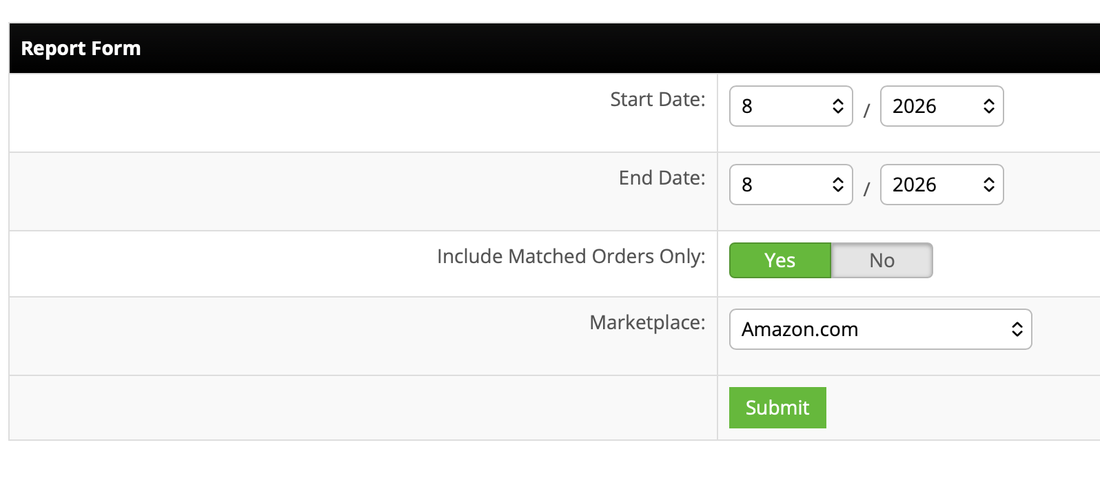
- Start Date and End Date: month and year only, not specific days. Settlement periods are reported by the marketplace in bulk, so the report follows that same monthly granularity rather than a day-level range.
- Marketplace: the settlement source to report on, for example Amazon.com.
- Include Matched Orders Only: Yes or No, defaulting to Yes.
- Yes: only includes settlement lines that matched to an order already saved in InfiPlex. This is what most people want for day-to-day reconciliation.
- No: also includes settlement lines from the marketplace's own settlement report that didn't match any saved InfiPlex order. Use this when a payout total looks off and you want to see everything the marketplace is claiming, matched or not.
What Does the Settlement Report Results Tab Show?
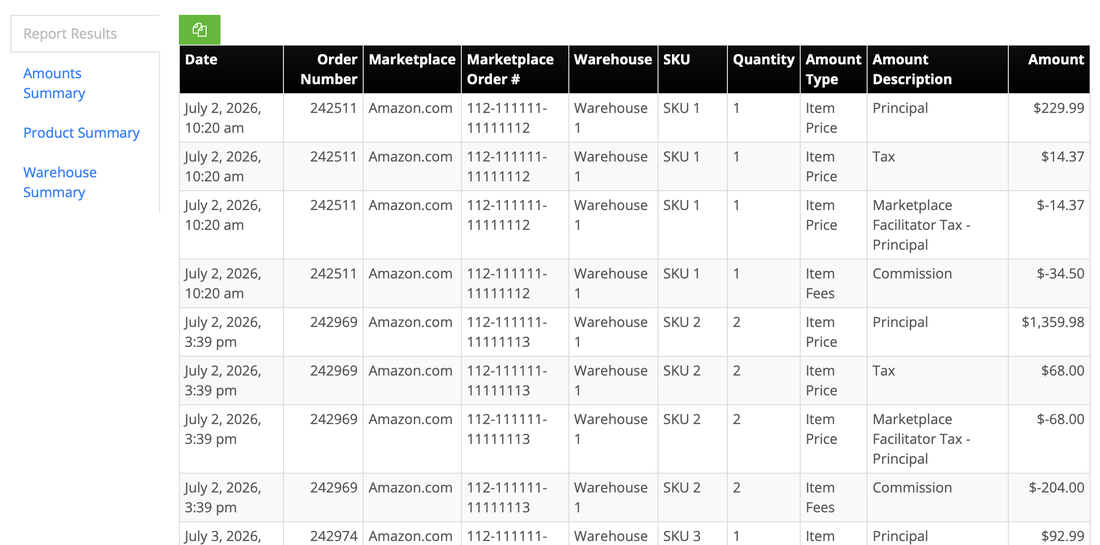
Report Results lists every settlement line at the most granular level: one row per amount, per SKU, per order. A single order and SKU usually produces several rows here, not one, since the settlement bundles the item price together with every tax and fee line that applied to it.
Date, Order Number, Marketplace, Marketplace Order #, Warehouse, SKU, Quantity, Amount Type, Amount Description, Amount
Order Number is the order's InfiPlex number. Marketplace Order # is the same order's ID from the marketplace itself, useful for cross-checking a specific line against the marketplace's own seller reporting when something needs a second look.
What Do Amount Type and Amount Description Mean in the Settlement Report?
Every settlement line pairs one Amount Type with one Amount Description. Amount Type and Amount Description reflect whatever categories the marketplace's own settlement data uses, so the exact set you see can vary by marketplace and by what happened on that order. Two Amount Types cover most of what you'll see:
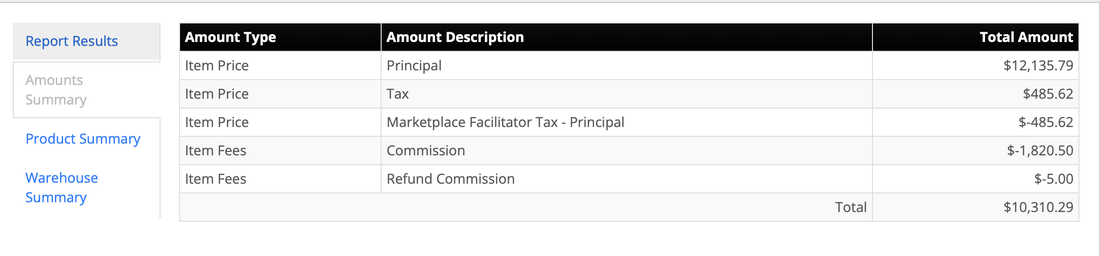
The item's sale price. This is the starting revenue figure before tax or fees.
Tax collected on the item at checkout.
A negative line offsetting the tax above. Marketplace facilitator tax laws require the marketplace to collect and remit that tax itself, so this line cancels the Tax line out rather than paying it to you and then taking it back separately.
The marketplace's referral fee on the sale, shown as a negative.
A partial reversal of commission already charged, typically tied to a customer return or refund on that item, also shown as a negative.
Because Tax and Marketplace Facilitator Tax cancel out, the net amount you're paid on an item comes down to Principal minus fees. Two examples from an actual settlement period:
- A single order line with $229.99 in Principal, $14.37 in Tax, -$14.37 in Marketplace Facilitator Tax, and -$34.50 in Commission nets to $195.49. The tax lines wash out, so only the $34.50 commission actually reduces the payout.
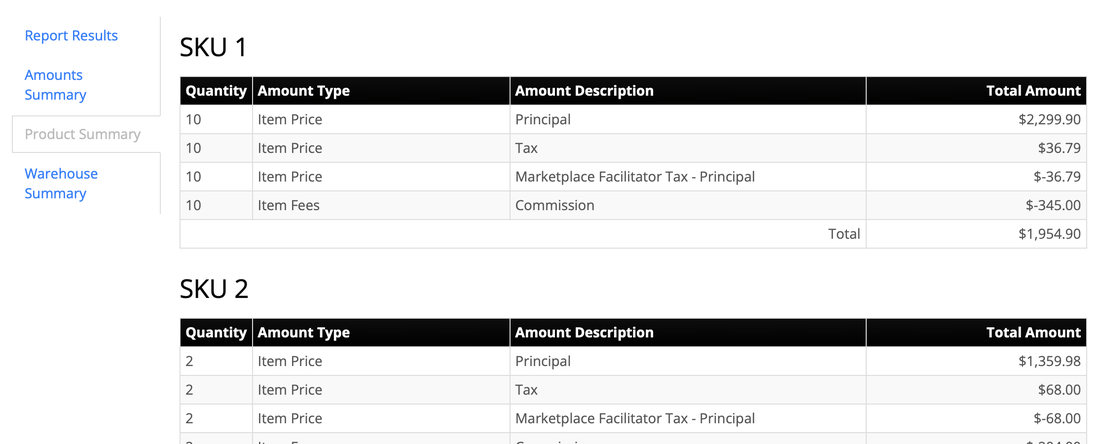
- The same pattern holds at the SKU level across an entire period: one SKU totaling $1,359.98 in Principal, $68.00 in Tax, -$68.00 in Marketplace Facilitator Tax, and -$204.00 in Commission nets to $1,155.98, the identical relationship at a larger scale.
When a Refund Commission line is present, it lowers the fee deduction for that period rather than adding a new charge, since it's the marketplace giving back part of what it previously charged.
What Does the Settlement Report's Product Summary Tab Show?
Product Summary totals every Amount Type and Amount Description by SKU, so you can see total quantity, revenue, tax, and fees for one product across every matching order in the period, without scrolling through individual order lines.
Quantity, Amount Type, Amount Description, Total Amount
What Does the Settlement Report's Warehouse Summary Tab Show?
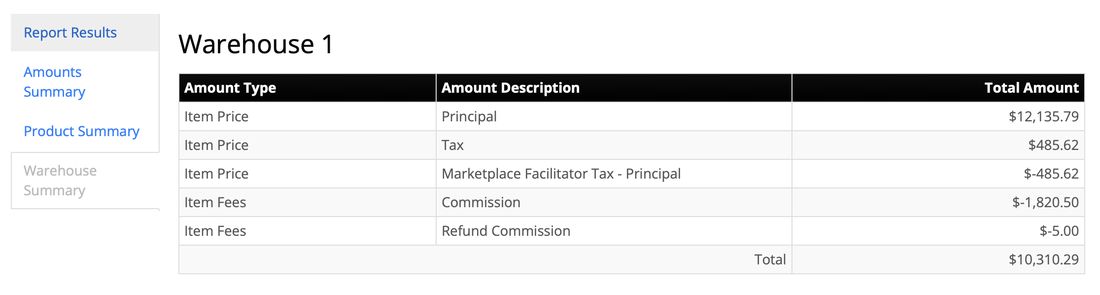
Warehouse Summary totals the same Amount Type and Amount Description breakdown, grouped by the warehouse that fulfilled the order instead of by SKU. It's the fastest way to see net payout by fulfillment location once orders are splitting across more than one warehouse or 3PL.
Amount Type, Amount Description, Total Amount
What Does the Settlement Report's Amounts Summary Tab Show?
Amounts Summary rolls every settlement line in the period up into one total per Amount Type and Amount Description, across every SKU and warehouse. It's the quickest way to see a full period's net settlement in one table, and the one most people check first.
Amount Type, Amount Description, Total Amount
How Do I Use the Settlement Report to Reconcile a Payout?
A simple monthly routine: run Amounts Summary for the period a marketplace paid out, and compare the Total to the deposit that actually hit your bank account. If they match, you're done. If they don't, Report Results is where you find out why, since it's the only tab that shows every line individually rather than as a total. Turn off Include Matched Orders Only to also rule out a sync gap between the marketplace and InfiPlex as the cause of a mismatch.
Can I Copy Settlement Report Results?
Yes. Each tab has a green copy button above its table, so you can copy any table straight to your clipboard and paste it into a spreadsheet, without leaving the page.
Settlement Report Questions
What does Include Matched Orders Only do?
When set to Yes, the Settlement Report only includes settlement lines that matched to an order already saved in InfiPlex. Set to No, it also includes settlement lines from the marketplace's own settlement report that didn't match a saved order, which is useful for spotting orders missing from InfiPlex.
Why do I see both a Tax and a Marketplace Facilitator Tax line?
The marketplace collects tax on the sale, then remits it directly under marketplace facilitator tax laws. The Marketplace Facilitator Tax line is a negative that offsets the Tax line, so the two net to zero rather than paying out twice.
What's the difference between Order Number and Marketplace Order #?
Order Number is the order's number inside InfiPlex. Marketplace Order # is the same order's ID from the marketplace itself, useful for cross-checking against the marketplace's own reports.
What does a Refund Commission line mean?
It's the marketplace giving back part of a commission it previously charged, typically because the item was returned or refunded. It reduces the fee total for that period rather than adding a new charge.
Why does Start Date only let me pick a month and year?
The Settlement Report follows the marketplace's own settlement periods, which are reported in bulk rather than day by day, so the date filter matches that same monthly granularity.
Can I run a Settlement Report for a marketplace other than Amazon.com?
Contact Us. Additional marketplaces can be added to the Settlement Report wherever the underlying settlement data is available.
Can I copy the results without downloading a file?
Yes. Every tab in the Settlement Report has a copy button above its table that copies that table straight to your clipboard.
Need Something This Report Doesn't Cover?
Contact Us and we'll take a look. Support is included with every InfiPlex plan.
See every report InfiPlex includes
Settlement Report is one of four built-in reports, all included on every plan.
