
Shopify order metafields give you typed, named fields on the order for data Shopify has no standard field for: a link to a marketplace shipping label, a packing slip, a ship by date, a package count. InfiPlex handles both halves for you. One setting holds the metafield definitions InfiPlex creates in your Shopify store, and one setting holds the rules that map InfiPlex order data into those metafields every time an order is pushed to Shopify. This guide documents both settings and walks through a complete example: sending the Wayfair shipping label and packing slip to Shopify as links on the order. For the connection itself, start with Manage Orders From Your Shopify Store and the InfiPlex Shopify integration page.
Jump to What You Need
| If You Need To… | Use |
|---|---|
| Create order metafields in your Shopify store without building them by hand | shopify_push_orders_metafield_definitions |
| Fill a metafield from order data or a fixed value when the order is pushed | shopify_push_orders_custom_rules |
| Send the Wayfair shipping label and packing slip to Shopify as links | The Wayfair example |
| Send data that is not on the order yet | Mapping other order data |
How InfiPlex Sets Shopify Order Metafields
Both settings are in the Shopify Push settings in your InfiPlex OMS, alongside the settings covered in the Shopify Push set-up guide.
- Define. List each metafield in
shopify_push_orders_metafield_definitions. InfiPlex creates the definitions in your Shopify store as order metafields and syncs them every 6 hours. Everything on the Shopify side is handled for you. - Map. Add one
set_shopify_order_metafieldrule per metafield toshopify_push_orders_custom_rules, naming the metafield key and where its value comes from. - Push. When InfiPlex pushes an order to Shopify, each rule sets its metafield on that order.
Step 1: Define the Metafields InfiPlex Creates in Shopify
The setting shopify_push_orders_metafield_definitions holds a JSON list. Each entry is one order metafield definition that InfiPlex creates in your Shopify store.
| Property | What It Sets |
|---|---|
name |
The label shown for the metafield in Shopify admin |
key |
The metafield key. Rules refer to the metafield by this value |
type |
The Shopify metafield type, for example url, single_line_text_field, date, or number_integer |
description |
The description shown with the definition in Shopify admin |
InfiPlex syncs the metafield definitions to your Shopify store every 6 hours, so a definition you add or change in the setting is in Shopify by the next sync.
An example with four definitions:
[
    {
        "name": "InfiPlex Shipping Label",
        "key": "shipping_label",
        "type": "url",
        "description": "Link to the shipping label PDF"
    },
    {
        "name": "InfiPlex Ship Method",
        "key": "ship_method",
        "type": "single_line_text_field",
        "description": "Carrier service level used for the shipment"
    },
    {
        "name": "InfiPlex Ship By Date",
        "key": "ship_by_date",
        "type": "date",
        "description": "Date the order must ship by"
    },
    {
        "name": "InfiPlex Package Count",
        "key": "package_count",
        "type": "number_integer",
        "description": "Number of packages in the shipment"
    }
]
The value a rule sends has to match the type of the metafield it fills.
| Type | Value Shopify Expects |
|---|---|
url |
A full link, for example https://yourcompany.infiplex.com/... |
single_line_text_field |
One line of text |
date |
A date in YYYY-MM-DD format |
number_integer |
A whole number |
Step 2: Map Order Data Into the Metafields
The setting shopify_push_orders_custom_rules holds the rules InfiPlex applies when it pushes an order to Shopify. A set_shopify_order_metafield rule fills one metafield.
| Property | What It Sets |
|---|---|
order_type |
Which orders the rule applies to. Enter an order source to apply the rule only to orders from that source, or all_orders as the catch-all for every order pushed to Shopify |
rule_type |
set_shopify_order_metafield |
metafield_key |
The key of a definition from Step 1 |
value_data_source |
Where the value comes from: order_additional_info or static_value |
order_additional_info_field |
With order_additional_info: the name of the additional info field on the InfiPlex order to send |
static_value |
With static_value: the fixed value to send on every order |
Example rules for three of the definitions above. Two take their value from an additional info field on the order, and one sends a fixed value:
{
    "rules": [
        {
            "order_type": "all_orders",
            "rule_type": "set_shopify_order_metafield",
            "rule_type_options": {
                "metafield_key": "shipping_label",
                "value_data_source": "order_additional_info",
                "order_additional_info_field": "infiplex_ship_label_2"
            }
        },
        {
            "order_type": "all_orders",
            "rule_type": "set_shopify_order_metafield",
            "rule_type_options": {
                "metafield_key": "package_count",
                "value_data_source": "order_additional_info",
                "order_additional_info_field": "infiplex_ship_label_total_count"
            }
        },
        {
            "order_type": "all_orders",
            "rule_type": "set_shopify_order_metafield",
            "rule_type_options": {
                "metafield_key": "ship_method",
                "value_data_source": "static_value",
                "static_value": "UPS Ground"
            }
        }
    ]
}
The metafields show on the order detail page in Shopify, in the Metafields section, each under the name from its definition:
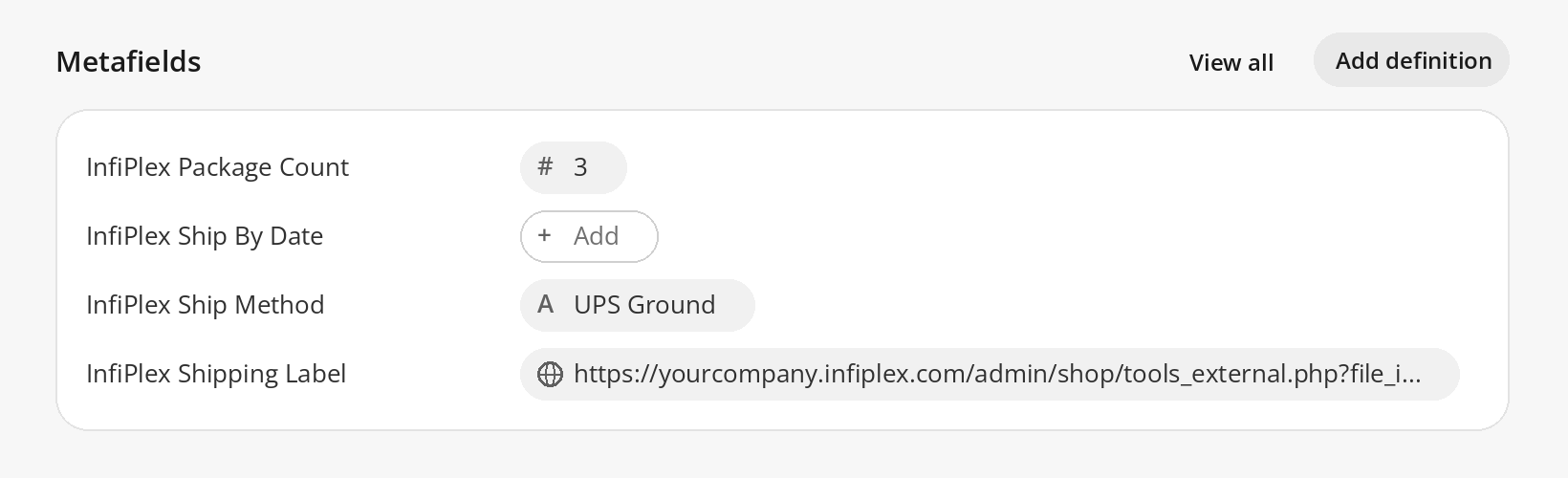
A definition is only filled when a rule maps to it. ship_by_date is defined above with no rule, so InfiPlex Ship By Date is on the order and stays empty until you add one.
Every InfiPlex order carries a set of additional info values, named key/value pairs on the order. The same fields drive ERP mapping in the NetSuite custom field mapping guide and channel mapping in BigCommerce Channel Mapping by Order Source.
Example: Send the Wayfair Shipping Label and Packing Slip to Shopify
Wayfair supplies its own shipping label and packing slip for each order. If you fulfill Wayfair orders out of Shopify, or out of a warehouse or shipping app connected to Shopify, the team packing the order needs both documents on the Shopify order. InfiPlex pulls them from Wayfair, stores them, and sends a link to each one as a metafield.
1. Save the Wayfair documents as order files. In your Wayfair settings, set these to Yes:
| Wayfair Setting | What It Does | Additional Info Field Created |
|---|---|---|
wayfair_orders_save_packing_slip_as_order_file |
Saves the order's Wayfair packing slip as an InfiPlex order file | wayfair_packing_slip_url |
wayfair_orders_save_shipping_label_as_order_file |
Saves the order's Wayfair shipping label as an InfiPlex order file | wayfair_shipping_label_url |
Each Wayfair order then carries the two additional info fields, each holding the link to its document. The Wayfair settings page also has wayfair_orders_save_packing_slip and wayfair_orders_save_shipping_label, which control whether the packing slip and shipping label are saved for all Wayfair orders. Printing those documents inside the OMS is covered in the Wayfair integration set-up guide.
2. Define the metafields. Add these to shopify_push_orders_metafield_definitions:
[
    {
        "name": "Wayfair Packing Slip",
        "key": "wayfair_packing_slip",
        "type": "url",
        "description": "Link to the Wayfair packing slip PDF"
    },
    {
        "name": "Wayfair Shipping Label",
        "key": "wayfair_shipping_label",
        "type": "url",
        "description": "Link to the Wayfair shipping label PDF"
    },
    {
        "name": "InfiPlex Ship Method",
        "key": "ship_method",
        "type": "single_line_text_field",
        "description": "Carrier service level used for the shipment"
    }
]
3. Map the fields. Add these to shopify_push_orders_custom_rules:
{
    "rules": [
        {
            "order_type": "all_orders",
            "rule_type": "set_shopify_order_metafield",
            "rule_type_options": {
                "metafield_key": "wayfair_packing_slip",
                "value_data_source": "order_additional_info",
                "order_additional_info_field": "wayfair_packing_slip_url"
            }
        },
        {
            "order_type": "all_orders",
            "rule_type": "set_shopify_order_metafield",
            "rule_type_options": {
                "metafield_key": "wayfair_shipping_label",
                "value_data_source": "order_additional_info",
                "order_additional_info_field": "wayfair_shipping_label_url"
            }
        },
        {
            "order_type": "all_orders",
            "rule_type": "set_shopify_order_metafield",
            "rule_type_options": {
                "metafield_key": "ship_method",
                "value_data_source": "static_value",
                "static_value": "UPS Ground"
            }
        }
    ]
}
4. Push the order. When the Wayfair order is pushed to Shopify, the order detail in Shopify shows Wayfair Packing Slip and Wayfair Shipping Label as links to the two PDFs, plus the ship method, ready for whoever picks and packs it. Most accounts keep all_orders on these rules; enter your Wayfair order source as the order_type if you want them applied to Wayfair orders only. For the rest of the Wayfair connection, see the InfiPlex Wayfair integration and the Wayfair integration FAQs.
Mapping Other Order Data Into Shopify Metafields
A rule can send any additional info field on the order, so anything you can get into additional info can land in a Shopify metafield:
- Fields the sales channel provides. Marketplace and retailer orders arrive with their own additional info fields, like the two Wayfair links above.
- Fields you build with Order Automation. A Set Order Data rule can copy, combine, or map order data into an additional info field of your choosing before the order is pushed. See the Order Automation overview.
- Fields set through the API. The Order Additional Info Create endpoint, and the matching tool on the InfiPlex MCP server, add additional info to an order from your own systems or an AI agent.
- Fixed values.
static_valuesends the same value on every order, with no field needed.
Metafields work alongside the other Shopify push controls, including moving the Shopify fulfillment order to the right location, covered in Shopify Fulfillment Orders and Multi-Location Routing and the Shopify Location Router.
Set-up Support From InfiPlex
Both settings are yours to edit. If you want help writing definitions or rules, or you need a value that is not on the order yet, open a Support Ticket from your OMS and the InfiPlex team will configure it with you.
Shopify Order Metafields in InfiPlex: Questions
Can InfiPlex set metafields on a Shopify order?
Yes. InfiPlex creates order metafield definitions in your Shopify store from the setting shopify_push_orders_metafield_definitions, then fills them on each order it pushes to Shopify using set_shopify_order_metafield rules in the setting shopify_push_orders_custom_rules.
Do I have to create the metafield definitions in Shopify myself?
No. You list each definition (name, key, type, description) in the InfiPlex setting shopify_push_orders_metafield_definitions and InfiPlex creates it in your Shopify store as an order metafield. The definitions are synced to Shopify every 6 hours, and everything on the Shopify side is handled for you.
Can I send the Wayfair shipping label and packing slip to Shopify?
Yes. Set wayfair_orders_save_shipping_label_as_order_file and wayfair_orders_save_packing_slip_as_order_file to Yes. InfiPlex saves each document as an order file and adds the additional info fields wayfair_shipping_label_url and wayfair_packing_slip_url to the order. Map those two fields to url metafields and the links arrive on the Shopify order.
What order data can be mapped into a Shopify order metafield?
Any additional info field on the InfiPlex order, using value_data_source order_additional_info, or a fixed value you type into the rule, using value_data_source static_value. Additional info fields can come from the sales channel, from an Order Automation Set Order Data rule, or from the InfiPlex API.
Where do the metafields show in Shopify?
On the order detail page in Shopify, in the Metafields section, each under the name from its definition. A metafield that is defined with no rule mapped to it shows on the order and stays empty.
Can a metafield rule apply to one sales channel only?
Yes. The order_type of a rule takes an order source, which applies the rule only to orders from that source, or all_orders, the catch-all that applies it to every order pushed to Shopify.
Which Shopify metafield types can I use?
The type is the Shopify metafield type name. The examples in this guide use url, single_line_text_field, date, and number_integer. The value mapped into a metafield has to match its type, so a url metafield needs a full link and a number_integer metafield needs a whole number.
Every marketplace order in Shopify, with the data your team needs on it
InfiPlex pushes orders from Wayfair, Amazon, Walmart, and 130+ marketplaces, carts, 3PLs, and ERPs into your Shopify store, with labels, packing slips, and any other order data mapped into order metafields.
Related guides
- Manage Orders From Your Shopify Store
- Shopify Integration
- Shopify Integration FAQs
- Shopify Fulfillment Orders and Multi-Location Routing
- Shopify Location Router
- Shopify Warehouse Integration
- Wayfair Integration
- Wayfair Integration FAQs
- Wayfair Integration Set-up
- Order Automation Overview
- NetSuite Custom Field Mapping and Order Rules
- BigCommerce Channel Mapping by Order Source
- AI agent for Shopify